Introduction
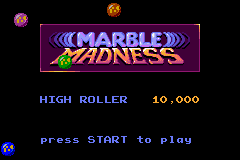
Since 1984, the year in which Marble Madness® was released, it represented the most innovative and immediate coinop ever. Now you can finally play it on your Game Boy® Advance.
Getting Started
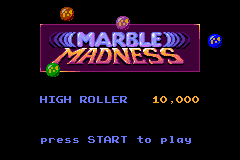
From the Marble Madness® main menu screen, press START to start a new game.
How To Play
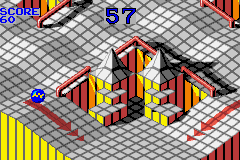
Marble Madness® is a challenge against time which is founded on the control of a rotating sphere and its balance. You can control the sphere and move it on the floor, but be careful: it will speed up or down according to the floor's pitch!
The objective of the game is to reach the GOAL area, at the bottom of each level within a time limit being careful to avoid crags, traps and enemies. In every level, you must reach the GOAL area as quickly as possible.
Save the more seconds you can in order to earn extra points and seconds for the next level. Sometimes more than one way leads to the GOAL area. If you choose the hardest way, you will earn extra points when completing it.
Game Controls
Controlling the blue sphere is simple! With the Control Pad, you can make the sphere roll wherever you want. By pressing A Button or B Button, you can give the sphere a speed burst that will be crucial to climb very steep platforms.
During game, press START to pause the game and START again to unpause it.
But be careful! The sphere is subject to gravity, so that when you're on a slope it will automatically gain speed at the risk of falling in a crag or to ending up in an enemy-infested area.
End Of Game
The game ends if the time is over and the sphere didn't reach the GOAL area. In this case you can only hope your score is high enough to be admitted in the HIGH SCORE CHART, and focus on the next game of MARBLE MADNESS®!
To enter your name in the high scores, press Control Pad Up or Down to change the current character. Confirm by pressing A Button.
Tips
If you never played Marble Madness® and you're about to play for the first time, this is the right place where to learn how to make your sphere's lifespan longer. First of all, try to make your choices as quickest as possible! Time in Marble Madness® is very important. Treasure it.
Try to avoid enemies: some of them can follow you if you're close enough to be located. For your first games, try the simplest ways; when you find a crossroad, take a glance of each path before choosing it!
You don't have to be only aware of crags, but even of jumps whose height will make your sphere impact on the floor violently. The ball might remain stunned for a while or to even break on the spot and make you lose precious time.
Introduction
Launched in 1989, Klax® surely is a classic in the PUZZLE GAMES history, affecting the forthcoming videogames! You will finally be able to play one of the most original video games on your Game Boy® Advance.
Getting Started
From the Klax® main menu screen, use the Control Pad to highlight the "New game" selection. Then press START or the A Button to start a new game.
How to Play
KLAX® requires brains and speed! By controlling a small sideways-sliding platform, you must collect and order several colored blocks which roll down on a conveyor belt along five straight lanes. Place the sliding platform right under the block which is about to fall, collect it and decide where to place it.
You can collect more than one block at a time, but be careful: you can only drop them in the game-scheme one by one!
Unluckily, the sliding platform can't carry more than five blocks altogether. The next ones will directly drop in the game-scheme causing you to lose points.
The goal of the game is to order series of blocks on the game-scheme with a predefined objective explained at the beginning of each level. You can be asked to place three blocks of the same color vertically, horizontally, diagonally or even in odd shapes that will never fail to challenge your skills!
Game Controls
•
Use the Control Pad Left or Right to move the sliding platform at the end of the conveyor belt and wait for a falling block.
•
Press Control Pad Down to temporarily speed up the rolling of the incoming blocks.
•
Press the A Button to make a






.png)



.png)
.png)

.png)
.png)


.png)