Menu Navigation
To move through menus, press the Control Pad Left and Right. To confirm a selection, press the A Button. To cancel a selection or return to the previous menu, press the B Button.
Introduction
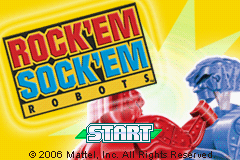
Take control of those block knocking, mean machines from the world Famous ROCK 'EM SOCK 'EM ROBOTS™ game from MATTEL®. Using a combination of quick wits, quick skills and a love for knocking your opponents block off, climb the ranks to become the champion of champions!
Object of Game
The object of the game is to become crowned the champion of the ROCK 'EM SOCK 'EM ROBOTS™ universe by beating all those in your way in true knockout style!
Title Fight
Press the Control Pad Up and Down to navigate using the appropriate direction to highlight the desired choice.
Game Modes
New Game
Start a new TITLE FIGHT game.
Continue Game
Continue the TITLE FIGHT game currently loaded onto the Game Boy® Advance system.
Enter Password
Enter a password to continue a previous WORLD TOUR.
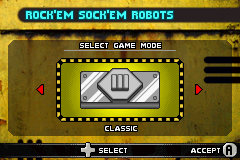
Classic Mode
Press the Control Pad Left and Right to navigate using the appropriate direction to highlight the desired character that the player will be using. Once selected, press the A Button at the PREPARE TO FIGHT screen to be taken to the battle arena.
Versus Mode
Press the Control Pad Left and Right to navigate using the appropriate direction to highlight the desired character that the player will be using. Confirm the choice with the A Button and repeat to select the opponent character.
At the next screen, press the Control Pad Left and Right to select the ARENA to fight in. Once again, confirm the choice with the A Button. Once selected, press the A Button at the PREPARE TO FIGHT screen to be taken to the battle arena.
Options
Battle Duration
Press the Control Pad Left and Right to change the time the battle will last for.
Music Volume
Press the Control Pad Left and Right to change the volume of the music heard in the game.
Sound Effects Volume
Press the Control Pad Left and Right to change the volume of the sound effects heard in the game.
Credits
To view the credits of those that made the game.
Starting a New Game
1. From the TITLE FIGHT screen select NEW GAME.
2. At the next screen, choose the robot with whom you want to go for the glory!
3. After a brief dialogue screen, you will be shown whom you will be fighting along with the arena. 4. At any point during a match the game can be paused. From here you are able to select:
•
CONTINUE: To continue the battle.
•
QUIT BATTLE: To quit the battle and exit back out to the MAIN SCREEN.
Playing the Game
HUD Elements
Fill up the Special Bar to be able to use each robots unique special move!
Movement
Press the Control Pad Left and Right to move the character back and forth in the ring. Pressing the Control Pad Down can also be used to crouch.
Combat
Use the A and B Buttons to unleash a robotic rampage on your opponents. Try experimenting with different combinations of button presses for devastating effects.
Charged Punches
Hold down the attack buttons to perform strong punches. Be warned though. You leave yourself open to attack while charging, so pick your time carefully! Once you have connected with 3 charged punches, the character's special move becomes active allowing you to gain the upperhand in this mechanized brawl!
Special Moves
When the special Bar is filled, press the A and B Buttons together to unleash your robots devastating special move!


 (En,Fr,De,Es,It).png)
.png)
 (En,Fr,De,Es,It).png)

.png)


.png)
.png)
_1.png)
_1.png)

 (En,Fr,De,Es,It).png)
_1.jpg)
 (En,Fr,De).png)
.png)
.png)
 (En,De,Es,It).png)


_1.png)
