In this
action-adventure game,
Shamu the killer whale embarks on a quest to rescue his friends Clyde and Del after a mysterious Kraken attacks SeaWorld. The player guides Shamu through the devastated park and beyond, ultimately venturing into the sunken city of Atlantis to uncover the truth behind the destruction.
Getting Started
To begin playing, insert the Shamu's Deep Sea Adventures Game Pak into your Game Boy® Advance system, and switch the Power on. Tail Flip
Press the head bash button while jumping. Use it to toggle switches above the water. You will learn this move as you progress through the game.
Push
Move toward the object you want to push, and press the push/pull button. You will learn this move as you progress through the game.
Pull
Press the push/pull button next to an object and move backward. You will learn this move as you progress through the game.
Head Bash
Press the head bash button while under the water. Use this to attack enemies and to hit underwater switches.
Main Menu
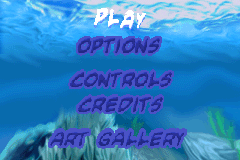
From the main menu you can access the following elements:
•
Play - Choose this to start playing the game. You will be prompted to create, erase or continue one of 3 different saved games.
•
Options - In this menu you can toggle the sound and music on and off.
•
Controls - Choose what control scheme you prefer in this screen.
•
Credits - See the team that created Shamu's Deep Sea Adventures here. •
Art Gallery - You can view all the art you've unlocked by finding treasure chests here. Level Select Screen
From this screen you can select which level to play. By playing through previously completed levels you can find more secret chests and Atlantis Tablets. •
Select a level with the +Control Pad and tap the A Button to enter the level.

.png)
.png)
.png)
