Getting Started
1. Make sure your Game Boy® Advance System power switch is set to OFF then insert the Strawberry Shortcake™: Summerland™ Adventure Special Edition Game Pak into the Game Boy® Advance System.
2. Turn on the Game Boy® Advance. In a few moments, the Menu Screen should appear.
3. Press Left or Right on the Control Pad to select the Strawberry Shortcake™ Summer Adventure Game or “Meet Strawberry Shortcake™” video.
4. Once you have decided if you want to play the game or watch the video, use the A Button to select it.
5. If you want to change your selection while playing the game or watching the video, Power OFF your Game Boy® Advance and then turn it back on and make your selection from the main menu.
Important Note: If nothing appears on the screen, turn the power switch to OFF. Check to make sure the Game Pak is inserted correctly then try again. Always set the power switch to OFF before inserting or removing the Game Pak.
Main Menu
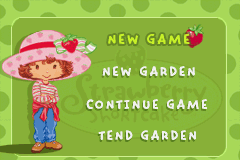
At the Start Screen you can choose from the following options. Press Up or Down on the Control Pad to highlight an option, then press the A Button to select it.
•
New Game: Take Strawberry Shortcake™ through a journey with her friends and pets as she tends to her garden and gathers ingredients before the Strawberryland™ Bakeoff begins! Grow items in your garden and use them to accomplish tasks and cross them off your task list.
•
New Garden: Select a berry seed, plant it and care for it to grow the largest, sweetest berry possible! Make sure to water and weed your garden! •
Continue Game: Resume play from where you last left off in your adventure. Type in the password you previously received to continue.
•
Tend Garden: Care for your garden with this selection. Type in the password you previously received to continue.
Garden Mode
In Garden Mode, you can select a berry seed to plant and tend. The maximum size of the berry is determined by your skill in watering, weeding and tending the berry to ripeness so make sure you take proper care of the seed to grow the largest, sweetest berry possible!
To access Garden Mode, you can begin in Adventure Mode or start a “New Garden” from the Main Menu. Walk up to the garden gate next to Strawberry Shortcake™'s house and press the B Button. This will bring you into the Berry Garden.
Seeding and Tending Berries
Initially, Strawberry Shortcake™ can plant Strawberry, Gumberry, and Blueberry seeds. Strawberry must find Bubbleberries along the way to be able to plant them. The available seeds are:
When the seeds are found, they will appear in the Garden Menu at the top of the screen. To select a seed to plant, press Left and Right on the Control Pad until the seed you want to plant is in the highlighted box. To plant the seed, press the A Button.
Once a seed has been planted, it must be cared for to produce the largest, sweetest berry. Each of the three berries reacts differently to water and food so make sure you monitor the berries closely! Also be aware that each action can be performed only once during each harvest period. You must also watch out for weeds that can stunt berry growth. Harvest Results
On the right side of the Berry Garden screen is the Harvest Timer. The Harvest Timer begins full and gradually decreases. When the timer runs out, Strawberry Shortcake™ picks the berry, regardless of whether it is sweet or not.
When a berry is harvested, its Size and Sweetness result from a final Berry Rating. The Harvest Results window gives the player information about her berry. A berry is rated from 0 - 10, with 0 being the lowest and 10 being the highest.
*Please note that selecting the harvest basket (at any time) will automatically end the harvest. This berry is rated a 0 and is very very sour.
Adventure Mode
In Adventure Mode, Strawberry Shortcake™ travels through multiple locations and levels of adventure with her friends and pets before the Strawberryland™ Bakeoff. Items Strawberry grows in her garden can help her during the adventure, and items she finds during her journey can better help her garden grow.
It's also important that Strawberry creates her famous StrappleBurst Punch for everyone to enjoy at the Strawberryland™ Bakeoff, so while on the journey be on the lookout for the ingredients to make the juice!
Controls for Adventure Mode
•
Moving Strawberry: Use Right and Left on the Control Pad to move Strawberry throughout her journey. If Strawberry reaches a climbable incline, pushing the arrow in the direction of the incline will cause Strawberry to climb the incline automatically. If the incline or object is not climbable, then Strawberry must try to jump over it to pass.
•
Collecting Ingredients: A major portion of Strawberry's time is spent collecting ingredients such as berries, vanilla crème and marshmallows for special recipes. To collect an ingredient Strawberry simply needs to touch it. Whatever ingredient she picks up will be placed in her inventory.
•
Jumping: Strawberry can jump as high as possible when you press the A Button. Strawberry can also be guided while in the air.
•
Pushing: When Strawberry is moved into a non-climbable but moveable object, the object will move as long as Strawberry continues to push against it.
Start Menu
Pressing Start during game play will bring up the In-Game Options screen. Highlight the option you want to choose and press the A Button to access it.
The Start Menu


.png)

_2.png)
.png)
.png)



_1.png)





.png)