Powering On the Game
•
Make sure the POWER switch is OFF.
•
Insert the Disney's That's So Raven Game Pak into the Game Boy Advance slot as described in the instruction manual. •
Turn the POWER switch ON.
Main Menu Navigation
When you access a saved game slot, you will be taken to the Main Menu. The screen displays available slots (e.g., JAN - 100%, DEE - 100%), along with options for New Game, Erase, Back, and Accept.
Creating a New Game
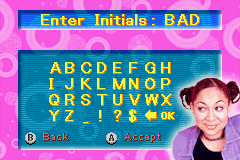
When you select a New Game slot, you must name the saved game. Use the +Control Pad and A Button to select a 3-letter name for your game. Select OK when you are done.
Entering Initials
Use the letter grid to enter the save name.
•
Select Letters: Use the A Button to highlight and confirm letters (A-Z) and symbols (_ ! ? $ &).
•
Back: Press B to go back.
•
Select: Press A to confirm the name.
Episode Selection
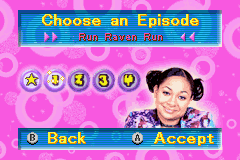
Disney's That's So Raven is divided into 4 episodes of 5 levels each. Once you successfully complete the main mission of a level, you unlock access to the next level. Completing secondary missions unlocks Year Book entries in the Bonuses section. You may go back and replay a level at any time. To choose an episode:
•
Use the +Control Pad Left / Right to browse unlocked Episodes and access the Bonuses section.
•
Press the A Button to enter your selection.
Level Selection
Once an episode is selected, you can choose specific levels.
•
Use the +Control Pad Up / Down to browse unlocked Levels within the selected Episode.
•
Press the A Button to enter the level selection.
Example levels include:
Managing Saved Games
•
Continue Game: To continue a previously saved game, select one of the used slots.
•
Delete Game: To delete a game, select the Delete Game option, then select the slot of the game you wish to delete.
Pause Menu
During a game, press the START button to pause. The Pause menu displays the main and secondary objectives of the current level, along with the following options:
•
Resume: Return to the game in progress.
•
Sound: Adjust the volume of sound effects (Sound FX) and music.
•
Sleep: Put the Game Boy Advance in Sleep mode. To reactivate, press SELECT, the L button, and the R button.
•
Exit Level: Quit the game and return to the level selection menu.
Gameplay Commands
•
Move: Use the +Control Pad.
•
Run: Press the A button and hold the +Control Pad in the direction you want to go.
•
Talk: Get close to one of Raven's friends and press the A button.
•
Use Perfume: Use the R button to spray perfume disruptors.
•
Use Water: Press the L button to spill water and make a person slip.
•
Throw Handbag: Press the B button to throw your handbag and deflect objects thrown at you.
Heads-Up Display (HUD)
•
Health Meter: Located to the right of Raven's image in the top left corner. This red meter goes down if Raven trips or is hit by students. Refill health by talking to friends Chelsea, Eddie, or Devon.
•
Blue Item Counter: Appears in the top left when items are needed for a level. It shows the item type and quantity required. Watch Raven's friends and listen to their visions to know what to do.
•
Green Item Counter: Appears when a friend needs help finding something. It shows the item and quantity to find. Return to the friend once all items are collected.
•
Perfume and Water Bottles: Located in the top right corner, these counters show how many bottles of perfume and water Raven has collected. Use them carefully to avoid trouble.


.png)

.png)



_1.png)




.png)



_1.png)






_1.png)
.jpg)

.png)