Getting Started
Set up your PlayStation 2 computer entertainment system according to the instructions supplied with your system. Check that the system is turned on (the on/standby indicator is green). Insert the MONSTER LAB disc in the system with the label side facing up. Attach game controllers and other peripherals as appropriate. Follow the on-screen instructions and refer to this manual for information on using the software.
Memory Card (8MB) (for Playstation 2)
To save game settings and progress, insert a memory card (8MB) (for PlayStation 2) into MEMORY CARD slot 1 of your PlayStation 2 system. You can load saved game data from the same memory card or from any memory card containing previously saved games.
Creating a Profile
When you save your progress for the first time in the Dat-O-Saver, you will create a Profile. Select this profile when you return to MONSTER LAB to continue a game.
After the game loads, you will be taken to the Main Menu. You are now ready to begin MONSTER LAB.
Main Menu
When the game begins, you see the Main Menu.
•
Select JOIN NOW! to begin playing.
The Mad Science Apprenticeship
Like any apprentice, you will have to learn the ropes. Your first experiment is to construct a monster to defeat other monsters roaming the perilous lands of the Uncanny Valley.
Monster building is only the beginning! You will also have to explore this weirdly wacky world, complete a host of Mini-Games and work towards the top MAD SCIENTIST ranking using a mix of strategy, cunning, and inspired experimentation.
Tutorial
You start in the Mad Science Castle. The first person you meet is Professor Fuseless—the Master of Mechanical Mad Sciences and one weird kook!
Listen carefully to his warped wise words, because he'll guide you through your first task in his own special way.
First Monster Mission
You'll have little time to explore the castle, because a message and plea for help comes through on the Troublescope: Cobbleshire is under attack!
Because you're still wet behind the ears, Professor Fuseless will guide you through your first task and lend you his monster in order to complete it.
The Outside World
Don't worry about being stuck in the Mad Science Castle, because you can see all the action on the Troublescope. You can interact with all the characters in the outside world and fully control your monster—even during Mini-Games. When your monster reaches its starting point in this first mission, guide it along the path until you meet the Mayor of Cobbleshire. He will ask you to do something about the two monsters that are running riot in the surrounding area.
•
Explore the area by continuing along the path. Eventually your monster will come up against your first enemy monster!
•
Now you'll begin your first combat!
Completing the Mission
To complete your first mission, you must defeat both enemy monsters that are terrorizing Cobbleshire. The second monster appears further along the path.
•
Follow the path until you meet the second monster.
Badges
When you successfully complete the mission, you may receive a Badge (check I.G.O.R. later on for a detailed summary).
Return to the Castle
After defeating the second monster, speak with Mayor Neidervoten at the gates of Cobbleshire. Your monster will then be transported back to the Castle.
Combat
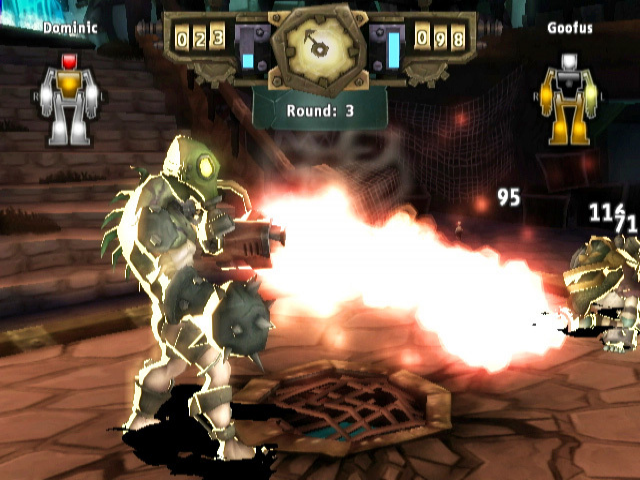
Combat in MONSTER LAB is turn-based. This means you take a turn to strike at the enemy, then it takes its turn to strike back.
•
In each display, your monster's data is on the left, and the enemy monster's data is on the right.
•
The monster icon in the top left corner displays the Health of each of your monster's key parts: Head, Torso, Arms and Legs.
•
When it is your turn, use the LEFT ANALOG STICK to highlight a part of the enemy monster to strike: HEAD, TORSO, ARMS or LEGS. Press the BUTTON to select the highlighted part.
Combat Actions
Now you can select a combat action to be performed by the selected part. Your choices are ATTACK, BLOCK, DODGE, RECHARGE and FLEE. You can see which enemy monster part will be affected by the action by highlighting the action with the RIGHT ANALOG STICK. Press the BUTTON to select the highlighted action. Your monster's energy value number shows how much energy your monster needs to perform the selected action. You must have at least that amount in your Energy Held to perform that chosen action. •
Your monster will use the selected part to strike at the enemy with your chosen attack.
Health
Each monster part has a different Health level that ranges from WHITE to YELLOW to RED.
•
YELLOW is moderate damage.
•
If it turns RED, a monster part is extremely damaged.
•
If a part turns BLACK, that means it's broken or knocked off, rendering it useless.
Recharge & Dodge
If you are low on energy during combat, you may need to command your monster to RECHARGE, but remember that this will use a combat turn.
You will also have the chance to DODGE an enemy attack but this will also use up your turn
.png)

.png)




.png)

.png)



.png)