Introduction
Thank you for buying this Advanced TurboChip Game Card, "Power Golf." Before using your new card, please read this instruction manual carefully to familiarize yourself with the proper use of your TurboGrafx-16 Entertainment SuperSystem and precautions concerning its use.
•
Always operate your TurboGrafx-16 SuperSystem and this TurboChip game card according to instructions.
•
Keep this manual in a safe place for future reference.
•
TurboChip game cards are made especially for use with the TurboGrafx-16 Entertainment SuperSystem and will not operate on other systems.
Warnings
•
Be sure power is turned off when changing game cards.
•
This is a precision device and should not be used or stored under conditions of excessive temperature or humidity.
•
Do not forcibly bend your TurboChip game cards.
•
Do not touch the inside of the terminal area or expose the SuperSystem to water, as this might damage the unit.
•
Do not wipe your SuperSystem or TurboChip game cards with volatile liquids such as paint thinner or benzene.
Inserting the Game Card
1. Remove the TurboChip game card from its plastic case.
2. Hold the card with the title side up and gently slide it into the Game Card Port until you feel a firm click. Do not bend the card or touch its metal parts.
3. Slide the Control Deck Power Switch to the ON position. If the game card is not inserted properly, the Power Switch will not move all the way to the right.
4. The title screen of your specific TurboChip game card should appear on your television.
Game Overview
Prepare for non-stop action across 18 holes in the most realistic video-golf game ever. Examine the course, practice your swing, and tee off with dozens of bunkers, potholes, fairways, and greens. Advanced 3-megabyte play action allows numerous playing options and free advice.
•
Slider arrows show you how to set your form.
•
Par is displayed for each hole.
•
Up to three players can golf at the same time.
Object of the Game
Complete the course with the fewest shots and lowest score in stroke and competition modes. In match mode, battle for each hole.
Before Playing
Follow these procedures to select play mode and characters before the game begins.
Title Screen
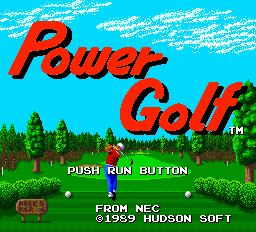
When the Title Screen appears, press the RUN Button. The Mode Selection Screen will appear.
Mode Selection
Use the Direction Key and Button I to select one of the following three Play Modes:
•
Stroke Play: The regular method of play where competition is based upon the total number of strokes. The lowest number of strokes wins.
•
Match Play: Compete for each hole against the computer or another player (VS Play). If you select Club Match, you compete for each other's clubs based upon who wins each hole.
•
Competition: Play occurs in the form of a contest, best for competition among players of different ability. Three players can play simultaneously in this mode only. Includes a driving contest and pin contest.
Player Selection
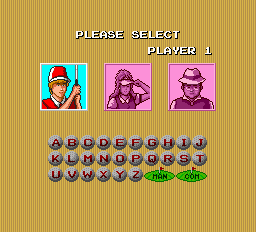
After selecting the mode, choose your player from among 3 different characters: 2 male and 1 female.
•
Player 1: Standard player with good shot direction. Overall playing balance can be achieved with this character.
•
Player 2: Has an unhurried swing, making it easy to get the timing just right. Good character for beginners; makes short shots.
•
Player 3: Swings fast, making it more difficult to coordinate timing. You'll get pro-quality action once you get used to controlling him.
Naming Your Character
Give your character a name by entering up to 6 letters of the alphabet. Select the letters with the Direction Key, and enter your choice with Button I. You can replace bad letters and back up one space by pressing Button II.
Selecting "MAN" and "COM"
After each character's name has been registered, determine whether that character will be controlled by a person or by the computer.
•
Select "MAN" if a person will control the action.
•
Select "COM" if it will be the computer.
•
You may select "COM" for all the players if you want to sit back and enjoy automatic computer play.
Game Start and Reset
Play begins after the mode and characters have been selected, proceeding to the first hole.
•
To reset the game to the beginning during play, hold down the RUN Button and press the SELECT Button at the same time.
Course Hazards
Just like real golf, various hazards are positioned on the course such as bunkers, trees, and water. Penalties and ball positioning after hitting an obstacle are the same as in a real game of golf.
•
Water Hazard: If your ball lands in a pond or river, you receive a one-stroke penalty.
•
Out of Bounds: Two-stroke penalty.
•
Rough: A shot from this area decreases performance and distance.
•
Sand Trap: It is difficult to get the ball out of the sand. A special club, the sand wedge (SW), should be used.
Calling Up Sub-screens
During play, three sub-screens can be called up:
Course Layout
•
Press SELECT from the ordinary play screen.
•
Press the Direction Key from the course layout screen and the screen will scroll.
Around the Green
•
Press Button II or SELECT to examine the green for that hole.
•
Press Button I or SELECT to return to the original screen.
Score Display
•
Press the RUN Button from the ordinary play screen to

.png)
.png)
