Kirby Power Bounce
Just before the ball hits the paddle, press the A Button. If timed correctly, the ball will change to Kirby. In Kirby form, you can destroy Power Blocks and gray blocks with a single hit. Normal balls cannot destroy Power Blocks. Spike Immunity
In Kirby form, you don't lose when you run into a spike. In normal form, hitting a spike will cause you to lose the ball. Abilities
If the ball hits a certain character, you can use a new ability by pressing the B Button. When using an ability, scoring for hitting blocks and characters is doubled.
Hitting a spike will cause you to lose your new ability.
Spark
The ball sparks for a period of time, running through the blocks it strikes.
Burn
The ball burns for a period of time, and it moves straight up.
Needle
Press the B Button just before the ball hits the paddle, then re-launch the ball.
Stone
The ball drops down, crushing the blocks below.
Starting the Game
Correctly insert the Game Pak into the Game Boy system. When the title screen appears, press START to begin play.
Select File Screen
This is the Select File screen. Your progress in the game is recorded in the file you select.
Use the + Control Pad to move Kirby, then select a file by pressing the A button or START. Deleting Saved Files
•
Move Kirby to the bomb in the lower right. •
Press the A button or START. Kirby will inhale the bomb. •
Move Kirby to the file you want to delete. •
Press the A Button to delete it.
Deleting High Score Rankings
•
Move Kirby to the bomb in the lower right. •
Press the A button or START. Kirby will inhale the bomb. •
Press on the + Control Pad and the B Button. The high scores will be erased.
Map Screen
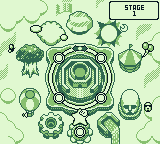
Press the A Button or START to enter a stage. You may play any previously cleared stage.
Use the + Control Pad to move from stage to stage in the direction indicated by the arrows. The stage number is displayed at the top of the screen.
You can move to any game in the Bonus Area by using the + Control Pad.
Stage Markers
The stages are marked in three different ways:
Borderline Display
If you clear the borderline score indicated at the beginning of each stage, a flag will be posted on the stage marker.
To play the 11th stage, you must have flags on all 10 stage markers.
Playing the Game
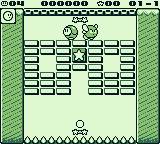
Each stage consists of three areas and five rounds. Destroy the blocks to proceed upward to the next round. Defeat the boss to finish the stage.
You can progress, regardless of borderline score, up to stage 10. Access to stage 11 requires clearing borderline scores in all 10 stages.
Stage Structure
•
TARGET SHOOTING AREA - ONE ROUND
•
BLOCK AREA - THREE ROUNDS
Damage Enemy
In order to proceed to the Boss Area, you must first hit the enemy with the ball to damage him, making a Warp Star appear. Hit the Warp Star with the ball to move to the Boss Area.
Erase All Blocks
If you erase all the blocks that can be destroyed in an area, that round will be cleared. After the score is displayed, a gate will open above, moving you to the next round.
Block Chart
Star Blocks
Located in Target Shooting Areas. The Star Blocks you have acquired will cover the spike gutters in the Boss Area. The more Star Blocks acquired, the more spikes that are covered.
In a Boss Area, if the ball hits a Star Block once, the spike it covered is revealed.
Switch Block
Once all the Switch Blocks are erased, the Bonus Round begins. You receive bonus points by clearing the screen perfectly.
Through Block
During a Bonus Round, blocks change to bubble-like Through Blocks. If you hit a Through Block, the ball flies straight through the block, destroying it.
Score Block
Each time you hit the ball, the points awarded increase. If you hit the block a seventh time while using a special ability, you will get a 1-Up and the block will disappear.
Power Block
You cannot destroy these blocks normally, but if you use the Kirby Power Bounce, you can destroy them. Pinball Block
This block causes the ball to accelerate when it bounces away.
Ability Block
This block can only be destroyed by using a special ability.
Warp Star
If you hit the star, it carries Kirby to the Bonus Game zone or the Boss Area. Bonus Round
If you erase all the Switch Blocks on a screen, the Bonus Round begins. All the blocks transform into Through Blocks, and a timer starts counting down from 30.
Bonus Round Scoring
If you destroy all the Through Blocks within the time limit, you get bonus points for the number of blocks you destroyed. You also receive bonus points for the time remaining on the timer.
(The number of blocks destroyed and time left on timer) X 500 = Bonus
When the timer ends, Through Blocks that you were not able to erase change back to their previous form.
Items
If you defeat a character on the screen, an item will appear. If you hit the item, it can be very helpful.
.png)

 (SGB Enhanced).png)
