Getting Started
The Main Menu
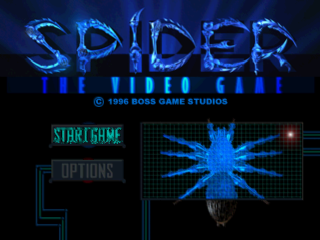
The Main Menu appears on the title screen after the animated introduction. Press Start or to skip the introduction and display the Main Menu immediately.
To use the Main Menu:
•
Press the Directional buttons and to highlight START GAME or OPTIONS.
•
Press to confirm your selection.
Start Game
Begin a new game from Area 1 on the Sector Map.
Options
Use Options to make game adjustments, remap the controls, or resume a saved or password game.
Options Menu
Select OPTIONS from the Main Menu to make game adjustments before starting play.
To use OPTIONS, in general:
•
Press the Directional buttons and to highlight options categories.
•
Press the Directional buttons and to make adjustments.
•
Press to reveal a category's submenu or confirm a button selection.
•
Press to exit to the previous menu.
Return
Confirm game adjustments and exit to the Main Menu. Changes remain effective until you reset or turn OFF the power.
Credits
See developers of SPIDER: THE VIDEO GAME.
Lives
Start Spider with 3, 4 or 5 lives.
Controls
Remap the game controls. When you press, the screen scrolls to the CONTROLLER CONFIGURATION SUBMENU.
•
With CONTROLS highlighted, use the and Directional buttons to select one of the 4 pre-set controller types (Type A-D.)
•
To set your own custom controls, select CUSTOM and press. As each function appears in the display line, press the controller button you want to map to that function. (You can set each button to only one function.)
•
Press the Directional button to highlight RETURN and press to confirm your settings and exit to OPTIONS.
Load Game
Load a saved game from a memory card, or resume a password game with no memory card needed. When you press, the screen scrolls to the LOAD GAME CONTROL CENTER.
•
Use the Directional buttons to highlight LOAD GAME.
•
Use the and Directional buttons to select MEMORY CARD and then press. On the MEMORY CARD Submenu: first choose Memory Card ONE or TWO. (Press the button to switch between the two.) Then highlight LOAD, press, and follow the on-screen prompts to load a saved game. Highlight CANCEL and press to exit without loading a saved game.
•
To resume a password game, highlight LOAD GAME and then use the and Directional buttons to select PASSWORD. To enter an original password press the Directional buttons and to choose a character, and press to place that character in the password line. Select BACK to delete the last character entered. Highlight END and press to confirm the password. (If you made a mistake in the password, it will be erased and you can re-enter it.)
•
Highlight RETURN and press to confirm your settings and exit to Options.
•
Exit to the main title screen and select START GAME to begin your saved game.
Audio Visual
Adjust the AUDIO and VIDEO settings. When you press, the screen scrolls to the AUDIO-VIDEO CONTROL CENTER.
•
Highlight VIDEO and press the Directional buttons and to turn the animated storyline ON or OFF.
•
Highlight SOUND FX or MUSIC. Press R1 or L1 to hear the next or previous sound effect or music sample. Press to sample the game's sound effects or music selections. Press the Directional buttons and to adjust the volume higher or lower. The red bars indicate the five loudest volume settings.
•
Highlight RETURN and press to confirm your settings and exit to Options.
The Sector Map
Beginning a New Game
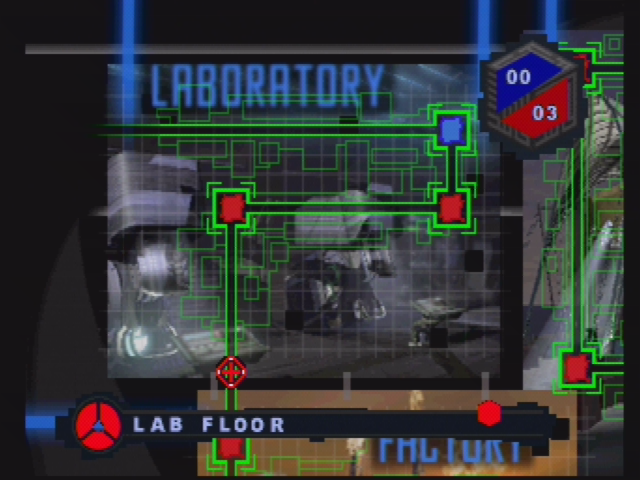
New games start at the Sector Map. The Map is actually a blueprint of the game's levels. It shows the path Spider must travel through each level in his hunt for the MicroTech assassins and his own kidnapped human body.
Each node on the path marks a search area, or sublevel, that Spider must explore. In each area, Spider must find an exit in order to move on to the next area. Exits contain microchips. Additionally, Spider must collect the required number of microchips in order to clear the level and progress toward his goal.
At the start of new games, only Area 1 in the Laboratory level is available. As Spider clears each area, the next one becomes accessible, while previous areas remain open. Spider can return to any open area to hunt for microchips and power ups. As you become more adept at playing the game, you'll learn how to take advantage of this feature to load up on lives and weapons before entering new, unexplored areas.
Use the Directional buttons to move Spider to the Area you want to explore, and press to begin searching that Area.
Free Stuff!
Fill out this card to receive full customer support and to be eligible to win free stuff. Winners will be chosen every month and will receive shirts, CDs, games or whatever other stuff we have lying around.
•
What Systems do you own: (check as many as apply)
•
What type of games are your favorite(s): (check as many as apply)
Pausing & Returning to the Sector Map
During game action, press Start to pause the game. You can also resume a paused game by pressing Start again. While the game is paused, press Select to
.png)


.png)


.png)