FW Operation: Name Registration
When you first get into an FW, register a start-up code to prevent others from moving it. This code acts as a passcode and serves as the FW's name.
•
Select characters with the cursor.
•
Confirm with the I button.
•
Cancel with the II button.
•
Once decided, the name cannot be changed.
Resuming a Mission
If you interrupt a mission for a long time, return to town and record the password displayed on the screen. Be careful, as an incorrect entry will cause the FW to stop working.
•
Select Continue from the start screen.
•
Enter your FW's start-up code.
•
Return to exploring Fula.
FW Movement
In corridors, use the directional keys to move the FW:
•
Press Left/Right to face that direction.
Commands During Movement
Press the I button while moving to display movement commands.
•
Use: Go out or travel to the Tuning Place.
•
ITEM: Displays held items. Select an item with the cursor and press I to use it.
•
STATUS: Displays the FW's condition, including current items, remaining option ammo, gun type, and armor type.
•
DIRECTION: Displays the current facing direction, useful for confirming orientation in mazes.
How to Read Movement Status
•
Codename: The FW's start-up code.
•
Shield Energy: The FW's S only.
•
Max: The current maximum value.
•
Attack Level: The current Attack Level.
•
EXP: Experience points for the Attack Level.
•
Defense Level: The current Defense Level.
•
EXP: Experience points for the Defense Level.
•
Target Point: The current Target Point.
Commands During Battle
When encountering an enemy, battle mode activates with commands on the front screen. Use the cursor to select, the I button to confirm, and the II button to cancel.
•
GUN: Attack with the FW's weapon. Up to 4 types of guns can be equipped. Select the command and press I to attack. Gun ammo is unlimited.
•
OPTION: Use auxiliary weapons. Up to 4 types can be equipped. Selection process is the same as for guns.
•
ITEM: Use held items. Select with the cursor and confirm with I. Cancel with II.
•
DATE: Displays opponent FW data, including name, bounty, and Attack EXP rewards. During tunneling, the opponent FW's name and pilot's name are displayed.
•
FLEE: Attempt to escape the battle. Failure results in damage, while success avoids the battle.
•
STATUS: Displays the FW's situation. Highlighting and pressing I shows items, option enhancements, gun type, and armor type.
•
AL/DL: Displays the current Attack Level (AL) and Defense Level (DL). These increase upon completing battles.
•
SE: Displays the current SE (parentheses indicate the maximum). The FW is destroyed if this reaches 0. The screen turns red as a warning if SE falls below 300.
How to Read Battle Status
•
Codename: The symbol of the FW.
•
Seed Energy: The current SE of the FW.
•
Max: The maximum value of the current SE.
•
Attack Level: The current attack level.
•
EXP: The experience value for the attack level.
•
Defense Level: The current defense level.
•
EXP: The experience value for the defense level.
•
Target Point: The current target point.
About Lara
Lara is a planet of ruins where countless tunnels have been dug for excavation, with towns existing within these passages. The FO mark indicates the entrance to each underground passage.
Lara contains eight cities with the same facilities:
City Facilities
•
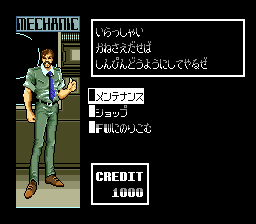
Mechanic Hangar: A place to repair FWs not found in every city. Repair damage until the FW's SSE temper has returned.
•
Armor Shop: Sells armor and shields for FWs. Vendors are shown if you have met them.
•
Salon: The main information source in Lara. Displays the names of people who have defeated duelists.
•
Gun Shop: A woman sells weapons for FWs. Weapons can also be acquired by hand.
•
Item Shop: Sells items and options for use against the strongest enemies in Lara.
Dueling
Dueling is competition against FWs in each city. You must win to earn the right to enter the next city.
•
Duelists are fickle; you may meet them without being able to fight.
•
Options cannot be used except for missiles.
•
It is rare to die from a loss.
•
The match ends when the computer determines you have lost.
•
Winning grants a prize and access to the next duelist.
•
The computer does not learn from each match, and there is no damage from losing.
Game Progression
First, go to the Salon to receive the instruction manual and listen for information on what to do. The Salon is a critical source of information on this planet.




.png)





_1.png)

.png)
_1.png)
-Back-cover.png)

.png)