PlayStation Setup
Set up your PlayStation™ game console according to the instructions in its Instruction Manual. Make sure the power is OFF before inserting or removing a compact disc.
Insert the Die Hard Trilogy disc and close the Disc cover.
Insert game controllers and turn on the PlayStation™ game console. The title screen will now appear.
Controller Buttons
Title Screen
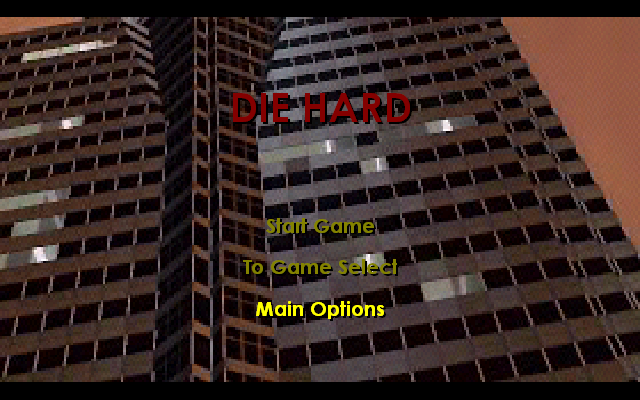
When the game begins, you'll see icons representing the different games: Die Hard, Die Hard 2: Die Harder and Die Hard With A Vengeance.
Press the LEFT or RIGHT Directional button on your controller until the icon you want is at the front of the screen.
Press the START button to load that game.
Press the SELECT button to display the MAIN OPTIONS SCREEN.
Press the START button to pause the game at any time.
Press the UP or DOWN Directional buttons to change the memory card slot in use. DHT uses one memory card block which contains 8 slots. Each slot holds one complete save for DH 1,2 and 3.
Main Options Menu
The following are all of the options displayed when the SELECT button is pressed.
From this screen you can change things like Music Volume, Sound Effects Volume, Controller Setup and Memory Card Options.
Press the UP or DOWN Directional buttons to highlight the Option you want.
Press the X button or use the LEFT or RIGHT Directional button to select.
Language
Press the LEFT/RIGHT Directional buttons to change the selected language.
Music
Use the LEFT or RIGHT Directional button to adjust volume slider.
SFX
Use the LEFT or RIGHT Directional button to adjust volume slider.
Memory Card Options
If you're using a MEMORY Card, you can select this option to save game information. Using one block, you'll be able to save up to eight DIE HARD TRILOGY games.
Password Entry
You can also change the password displayed on the screen with the following buttons.
•
Directional buttons: Moves cursor.
•
X button: Press to enter code.
•
button: Cycles backward through available letters.
•
button: Cycles forward through available letters.
Hardest Score
Displays all high scores for each game. Press the LEFT or RIGHT Directional button to change game.
Blood
Press the LEFT or RIGHT Directional buttons to change the level of gore in the game.
Controller
Access the controller configuration screen. Once in the controller configuration screen, you can change the controls for DH 1,2 & 3. Use the UP or DOWN Directional button to change the control method and the LEFT or RIGHT Directional button to change game.
Credits
Displays the credits.
Audio
Allows switching of audio from stereo to mono.
Die Hard 1 Levels
Enter the building from the dark, dangerous underground Garage and try to make it through Reception. Battle through terrorist-filled offices to the machinery-filled Maintenance Levels. Crash the party in the Ballroom, or meander through temporary partitions on the Construction Levels.
Hide in the boardroom of the Executive Level, or root out the Hostages in the Vault. Wind your way through Nakatomi Plaza until you reach the Computer levels, treacherous with broken glass scattered everywhere, home to the strangest, most heavily armed bosses, surrounded by their henchmen.
If you've been good and rescued the Hostages, you'll earn a bonus trip to the rooftop. Here, whilst picking off snipers and escorting the hostages to the escape Chopper, you can gain numerous rewards if you can find them before the last Hostage escapes. Yippie-Ki-Yay!
Die Hard 1 Bonus Screen
You've killed the terrorists, faced the Bosses, saved some hostages and made it to the elevator before the Level Bomb exploded. Here's where you relax and get your reward. Until the elevator doors open on the next level, that is. Yippie-Ki-Yay!
Vehicles
McClane starts out driving a TAXI. As the game progresses, you'll have the chance to try out dozens of other vehicles. Each offers different handling, speed, acceleration, braking, weight and skid capabilities. A skilful driver can learn to execute some incredible stunt manoeuvres.
Pickups
•
TIME: Gives McClane more time and a better chance to reach the next bomb.
•
TURBO: Activate with the button.
•
Launch: Drive over these mini-bombs to catch some air.
•
EMS: Summons an ambulance. Perfect when you're stuck in heavy traffic.
•
NITRO: Gives vehicle an extra surge of power.
Die Hard With A Vengeance Levels
Peel out of Harlem, past that famous New York landmark piles of garbage bags on the sidewalk and get on the Subway System with its dark maze of tunnels. Look out for oncoming trains!
Get off in Central Park and turn on Central Park Drive, where you'll quickly see if an 18-Wheeler makes a good off-road vehicle. Make it past the traffic lights of West Side Highway and it's welcome to Chinatown. The one-way streets are clogged with pedestrians and market stalls, but you can always use the sidewalks.
Challenge your driving skills in the Financial District as you race through Wall Street rush hour. When you hit The Aqueduct, an enclosed tunnel brings you face-to-face with
 (Rev 1).png)

 (Rev 1).png)

.png)
_1.png)
.png)
_1.jpg)
 (Disc 2).png)

 (v1.0).png)

 (Disc 2).png)