Game Modes
You can set up cunning ambushes for your enemies, go out with all guns blazing, or even drive the wrong way around the track and attack them head-on. The choice is yours. Bonuses are awarded for performing stunts.
Split Screen Single Race
Play a single race with a friend. Controller 1 controls the top screen, and Controller 2 controls the bottom. Both players must race the same type of vehicle.
Hot Seat
The Hot Seat option allows you to race against up to seven friends on one machine. Select a track and vehicle (all players use the same craft type).
The race begins with Player 1 in control. After a designated amount of time, the next player's name flashes on the screen, followed by a three-second countdown. Once 'Go' appears, Player 2 takes control while the computer controls Player 1's car. This continues until one player wins.
To modify the number of players and control time, see Hot Seat Options.
Main Menu
Return to Main Menu.
Track and Vehicle Selection
Once you have selected the race mode, you will arrive at the track and vehicle selection screen.
•
To choose a track: D-Button Left/Right.
•
To set the number of laps: D-Button Up/Down, then press Circle.
•
To highlight a vehicle: D-Button Left/Right.
•
To select a team: D-Button Up/Down.
When vehicle and team selection are complete, press Circle and the race begins.
Championship Menu
Continue
This option is only displayed if a Championship has already been started. Select this to take part in the next Championship race.
New Championship
A Championship consists of a series of 9 races. When setting up a New Championship, only the car and team options are available. Select these as in a Single Race. You cannot select a track, although each Championship race takes place on a different track.
Quit Championship
Discontinue the current Championship.
Options Menu
Change Name
Change the name of the players.
•
To change the letter: D-Button Up/Down.
•
To move the cursor: D-Button Left/Right.
•
Press Circle to confirm your choice. Repeat for each player name.
Optional Controls
Toggle between standard and alternative control methods.
Computer Players
Toggle computer players On/Off.
Hot Seat Options
Customize the Hot Seat option.
•
Hot Seat Players: The amount of people wishing to participate.
•
Hot Seat Racing Time: The length of time each player spends in control.
•
Death Match Lives: Choose between 0 (infinite) and 4.
•
Difficulty Level: Choose between 1 (easiest) and 3 (hardest).
Main Menu
Return to Main Menu.
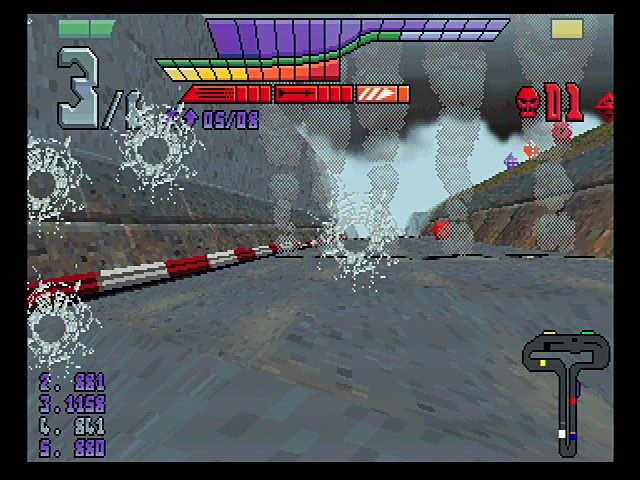
The Game Screen
•
Number of vehicles in race
•
Laps completed and laps in race
•
Follow the arrows when in doubt
•
Track map (colored dots represent other vehicles)
Power Ups
•
Minigun upgrade, Rocket upgrade and Boost Upgrade
•
Autotarget (turns red for best shot)
•
Evidence of a direct hit





.png)
.png)