WELCOME TO THE REALMS
Welcome to the fantastic world of the FORGOTTEN REALMS campaign setting. Black Isle Studios and Snowblind Studios are pleased to bring you Baldur's Gate: Dark Alliance, the first Dungeons & Dragons game to appear on the PlayStation 2 computer entertainment system. The challenges in the game are great, but so are the rewards, and many hours of challenging gameplay await you and your friends. If you have played any of the Baldur's Gate games for the PC, you are no stranger to the FORGOTTEN REALMS. Black Isle Studios and Snowblind Studios bring you another title set in the FORGOTTEN REALMS, a console role-playing experience you may undertake either alone or with a friend. Baldur's Gate: Dark Alliance is an epic that puts the fate of the FORGOTTEN REALMS in your hands. Countless lives depend on you, and it'll only be through your blood and perseverance that Baldur's Gate... and all the Realms... may be saved. Welcome to Baldur's Gate: Dark Alliance. BALDUR'S GATE
Baldur's Gate: Dark Alliance takes place in the world of Abeir-Toril (The phrase "Abeir-Toril" means "cradle of life"; the world is most often known by its shortened name, "Toril"). Your exploits in Dark Alliance will be centered in Baldur's Gate, a port city upon the winding Chionthar River. Baldur's Gate is a city recently plagued by a growing evil. Members of the city watch have been found dead, townsfolk are afraid to leave their homes, and unsettling rumors of a thieves' guild civil war beneath the streets runs rampant through the taverns of the city. Your arrival has placed you in the middle of this cauldron of danger. A young hero, fresh to Baldur's Gate and fresh to the world of adventuring, you're carrying little else except a blade and a small purse of coins. You've come to the city to seek your fortune. That is, if the danger that threatens Baldur's Gate doesn't claim you first... HOW TO START THE GAME/MAIN MENU DESCRIPTION
The opening movies can be skipped by pressing the START button or the button on the controller.
MAIN MENU
On the opening menu, you will be presented with four options:
•
Start New Game: Select this option when you are ready to begin playing. When selected, you will be asked to choose either a one-player or two-player game. If you are interested in transferring a character from another game into your game, jump ahead to "Transferring Characters from Other Games," p. 9.
•
Once you have selected a new game, you have an option to select the game difficulty: Easy, Normal, or Hard. Play on Easy if you're just getting your bearings; Hard if you're looking for a challenging experience.
•
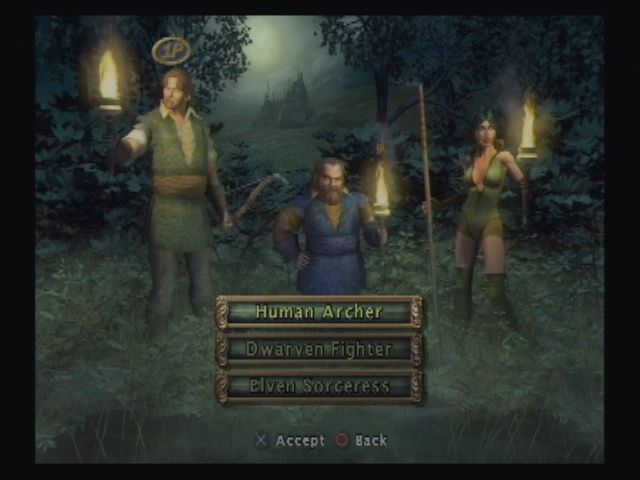
After selecting the difficulty level, you (and the second player if you are playing with someone else) will be taken to the Character Selection Screen. Use the directional buttons to cycle through your three choices: the Human Archer, the Dwarven Fighter, and the Elven Sorceress. A small icon will appear above each character as you cycle through the choices.
•
The advantages and disadvantages of each choice are listed under "Heroes," on p. 8.
•
Load Saved Game: This option will allow you to load a previously saved Baldur's Gate: Dark Alliance game from your memory card (8 MB) (for PlayStation 2). •
Options: Select this option if you want to customize your controller's configuration, adjust sound options, and other game options.
•
Credits: Selecting this option will allow you to see the creators and contributors to Baldur's Gate: Dark Alliance. Press the button to select an option, and the button to go back.
Dialog Text
When this is off, you will not see the text spoken by characters you speak to in the game (although you will see your own responses). When Dialog Text is on, a character's speech will be displayed at the bottom of the screen as they are speaking.
Damage Text
When this is on, you will see the number of hit points of damage you cause stream off a target when you hit (the number is colored yellow when you score a critical hit). Damage Text defaults to off.
LOADING AND SAVING
To save, you'll need to find a safe spot in the game to record your progress. These save points are indicated on the maps by pedestals with books on them.
When you reach one of these points, you can save your game by pressing the action button ( by default).
CONTROLLING YOUR CHARACTER
Once in the game world, you'll need to know the basics of moving around, attacking, jumping, and casting spells. Provided here is a list of all the actions your character can perform using the controller:
•
Moving Around: To move around, use the left analog stick and move it in the direction you want your character to walk.
•
Attacking: To attack a creature with a bow or melee weapon, press the button. You cannot attack in towns or other "safe" areas in the game.
•
Aiming: When you are holding a bow, you can lightly hold down the button and you can rotate while standing in place. This allows you to aim your bow before firing it, and it is useful when combined with the Targeting Feat (see Spells and Feats, p. 26). To fire the arrow after aiming
.png)

.png)
.png)
.png)
