Game Features
•
Compete against opponents in 33 stunning environments.
•
Compete through career mode to win the championship.
•
Build and save your own custom race tracks.
Starting Up The Game
Press the START button at any time during or after the SnoCross 2 opening movie.
Main Menu
The Main Menu is the central access point for all of the game's modes and options.
•
Quick Race: Engage in a quick race.
•
Multiplayer: Race head-to-head with your friends in 2 player split screen.
•
Career: Put your skills to the test as you battle to dominate the field through a full career.
•
Create-A-Track: Build your own track to race on.
Starting A Single Player Quick Race
To start a single player quick race:
1. Highlight the QUICK RACE option and press the X button. The RACE SETTINGS screen will appear.
2. At any time while on the RACE SETTINGS screen press the X button to begin the race with the currently selected settings. The button can be pressed to return you to the MAIN MENU.
3. Pressing up or down on the directional buttons while on the RACE SETTINGS screen will move the selecting highlight up and down over the available settings. Pressing left or right on the directional buttons while on a highlighted setting will cycle through that setting's options.
4. When all settings are set to their desired options press the X button to begin the race.
Race Settings Screen
Rider Select
Pressing the left or right directional buttons will cycle through the available riders. Additional riders can be unlocked by playing through the career mode.
Sled Select
Pressing the left or right directional buttons will cycle through the available sleds. Additional sleds can be unlocked by playing through the career mode.
Track
Pressing the left or right directional buttons will cycle through the available race tracks.
Objective
Pressing the left or right directional buttons will cycle through the following game modes: Circuit, Bowling, Rally, Trick Attack, and Elimination.
AI Players
Pressing the left or right directional buttons will increase or decrease the number of AI controlled racers that will compete against you. There can be up to three additional riders (depending on the Objective you've chosen) or you can ride the track solo by selecting zero opponents.
Laps
Pressing the left or right directional buttons will increase or decrease the number of laps in the race. You can select between one and five laps, depending on the Objective you've chosen.
Begin Event
Begins the race or selected game type.
The sled that you select will be one of the most important factors in determining if you'll dominate the pack or get left in the snow drift. Experiment with the sleds and pick one that matches your style of play.
On The Race Track
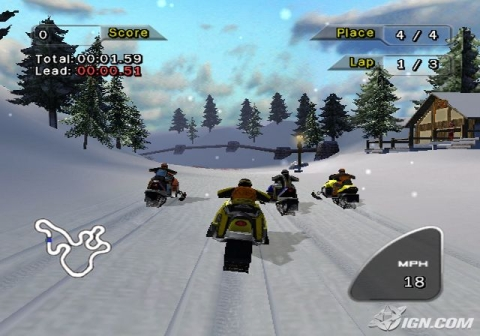
Heads Up Display
Score Box
The uppermost box on the left side of the screen is the Score Box. This box displays your current score as earned through tricks.
Total Time Clock
Just below the Score Box is the Total Time Clock. This clock tracks your total amount of time in the race.
Tricks
To perform a trick:
1. Find a jump that will provide you with the big air you're going to need and accelerate toward it.
2. While in the air press and hold the button and press any direction on the directional buttons or the left analog stick. You will perform a trick based on your control inputs. Experiment with pressing different directions to learn new tricks.
Successfully performing tricks will add points to your score and increase your Boost Meter. Wisely using your Boost can make the difference between winning and losing.
Trick List
•
Button = No Footed Can Can
•
Button + = Double Seat Grab
The longer you hold a trick the more points you will receive for completing it. Be careful though, if you don't land the trick you'll lose all points for attempting it. You'll also walk away with some bumps and bruises.
Rider Reset
Occasionally you may find yourself in a difficult position to recover from. In cases where it is simply easier to reset your character rather than to struggle with realigning yourself you can press the SELECT button to reset your sled to the center of the track.
Pause Menu
Press the START button to pause the game.
•
Continue: This option will return you to gameplay.
•
Restart: This option will start the race over from the beginning.
•
Options: This will take you to the options menu.
•
Quit: This option will exit the current race and return you to the main menu.
Options Menu
Once in the OPTIONS MENU, press the up or down directional buttons to highlight options. Press the left or right directional buttons to adjust the value of the highlighted option.
•
Sound Volume: This option adjusts the volume of world and sound effects.
•
Music Volume: This option adjusts the volume of the game music.
•
Vibration: This option turns the vibrating functionality of the DUALSHOCK®2 controller on or off.
Additional Game Modes
Bowling
The goal of bowling is to knock down as many pins as you can, just like the classic game, but there's a twist: YOU ARE
.png)


.png)
.png)
.png)

.png)
.png)


_1.jpg)



 (En,Fr,Es).png)
