STARTING THE GAME
•
Turn OFF the power switch on your Nintendo Game Boy Advance™. Never insert or remove a Game Pak when the power is ON.
•
Insert the FIFA 07 Game Pak into the slot on the Game Boy Advance™. To lock the Game Pak in place, press firmly.
•
Turn ON the power switch. The Nintendo Logo and Language Selection screen appears, followed by the legal screens.
•
Press the Control Pad ◄/► to highlight a language and then press the A Button or START to confirm. After the title screens, the Main menu appears.
KICK OFF
Get straight out onto the pitch and take on any club or country in the game.
TEAM STAR RATING
Your team is given a Star Rating, which is displayed beneath its name and indicates its overall ability. To improve it, you'll need to train players by earning Coaching Bonuses.
PLAYER STATUS BAR
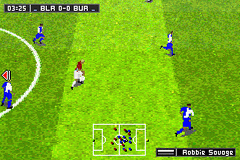
During a match, a Player Status Bar appears at the bottom of the screen, displaying the highlighted player's current level of fitness.
FITNESS
This level decreases the more a player sprints (hold the R Button), slowing him down, but replenishes when he returns to normal pace.
MOMENTUM METER
The momentum meter appears next to your team name. Keep one eye on the game and the other on your momentum meter to check that the momentum is with your team. When it is, the team's overall ability is boosted and the chances of finding the back of the net are increased.
Using the opposition's goal as target practice and finding the back of the onion bag builds momentum - but as your attacks decrease, so does your momentum meter.
INSTANT REPLAY
Press SELECT to watch the previous few moments of the game. Major match incidents are replayed automatically through Auto Replay.
CAREER
Think beyond the 90 minutes. Welcome to your career in football management.
MANAGER STAR RATING
As manager, you're given a Star Rating based on the amount of Prestige Points you earn, which is displayed after each match. At every Manager Prestige level, you're awarded a Coaching Bonus, which hands you the opportunity to increase player skills and thus your Team Star Rating.
FROM THE CHAIRMAN
It's simple; get the best out of the lads over five seasons, meet the Season Objectives that the board has set for you and while you're at it, cultivate your Manager Prestige.
Earn Prestige Points by winning games and meeting objectives. The more points you earn, the higher your Prestige level. Lose games, you lose prestige. Fail to meet objectives and your prestige takes a nosedive, your reputation is muddied and there's a chance your career could be over. Who said football is a beautiful game?
•
Select VIEW OBJECTIVES from the Career Options screen to review your career objectives at any time.
TEAM MANAGEMENT
STARTING 11
Select the best 11 to pick apart the opposition.
•
Press the Control Pad to highlight a player, press the A Button to select him then highlight another player. Press the A Button to swap them.
STRATEGY
Choose a formation for the team.
Note: When choosing a formation, your starting 11 are automatically sorted into the best positions for that formation.
KEY PLAYERS
•
Select a role to assign to a player (such as Penalty Taker), then press the Control Pad ◄/► to cycle through team names and assign a player to that role.
CAREER TICKER
As the season or tournament progresses, keep an eye on the ticker at the foot of the screen; it'll keep you up to date with news such as latest results and top goal scorers.
•
Press START at any time to fast-forward the ticker.
TOURNAMENT
Select a single tournament and team and bring home the silverware. Right after a match you can review other fixture highlights from the Latest Results screen and get the tournament low-down from the Tournament Options menu.
CHALLENGES
Put yourself into the boots of some well-known players over a variety of recent season match-ups - battle out a draw, pull off a storming comeback or inflict a humiliating pasting. Complete them all to lead a classic eleven out of the tunnel.
MULTIPLAYER
GBA LINK CABLE
This Game Pak includes a Multi-player mode which requires a Game Boy Advance™ Game Link™ Cable (Model No.: AGB-005).
Note: A Game Boy Advance™ Game Link™ Cable is required for Multiplayer mode. Link to another player and mix it up. Each player must have a copy of FIFA 07 to play a Multiplayer game.
•
Once connected, both players should select MULTIPLAYER from the Main menu.
•
Press the A Button to continue and start the game.
MY FIFA 07
Your game - the way you want it. Customise the look and feel of FIFA 07, set a club as your Favourite Team or reminisce over past glories by admiring the silverware in the club's Trophy Room.
SAVING AND LOADING
SAVING
When embarking on your Career or entering a Tournament, the game is saved automatically. The game then auto-saves after every match you play (including simulated matches).
Note: You cannot save a match in progress.
LOADING
•
When re-entering Career or Trophy mode, the previously saved game is loaded automatically.
DELETING