Two-Player VS Mode
1. Connect two Game Boy® Advance systems with the Game Boy® Advance Game Link® cable*.
2. Insert a TEKKEN ADVANCE Game Pak into each Game Boy® Advance. Turn them both on.
3. Both players select a VS Mode from the Mode Menu and both select characters.
4. Each player can choose a different handicap level and then press the A Button on both Game Boy® Advance systems to begin the game.
*Sold Separately.
Character Selection
Select a character with the + Control Pad, then press the A or R Button or START. Selecting a character with the A Button will give you the Player 1 costume, while pressing the R Button will give you the Player 2 costume and pressing START will give you the Player 3 costume. Press the B Button to cancel.
The Pause Menu
Pressing START during play will bring up the Pause Menu. Make selections with the + Control Pad and make a selection with the A Button.
•
CANCEL: Cancels the Pause Menu and returns to the game.
•
COMMAND LIST: Shows the Command List for the character you are using. Press any button to return to the Pause Menu.
•
CONTROLLER SETUP: Allows you to re-assign button configuration.
•
RESET: Cancels the game and returns you to the Mode Menu.
Battle Rules
•
Matches: When a character is attacked, his or her health meter goes down. If you beat on an opponent until their health meter goes down to 0, then you win that round and earn a point! You can also clear stages by earning a set number of points in a match.
•
End of Round: There is a time limit on each round. If this time expires, Time Up is called. At this point the player with the most health remaining wins. If both players' health meters are the same level when Time Up is called, the match is a Draw, and both players are awarded points.
•
Game Over and Continue: When you lose in Arcade Mode, the game is over. However, pressing START on the Continue Screen (before time runs out) allows you to restart the game from the last stage you played.
•
Soft Reset: Press START with SELECT.
•
Clear Data: Press START + SELECT + A Button + B Button and turn on your Game Boy® Advance to clear saved data.
Mode Menu
Arcade (Single Player)
One player against the computer. Defeat all the opponents and you win the game. There is no limit to how many times you can continue.
VS Battle (Two Player)
•
Set up 2 Game Boy® Advance systems as shown on the “TWO-PLAYER VS MODE” section on pg. 5.
•
Each player selects a character to compete against each other. After character selection, you can set your character's strength with the + Control Pad as a handicap function.
•
After the match ends, you are returned to the Character Selection Screen, where match results are also displayed. Option settings are determined by Player 1.
Time Attack (Single Player)
In this mode, you compete against the clock until you complete all the stages and beat the game. The degree of difficulty, time limit, or the number of rounds cannot be changed. The fastest time for each character is saved.
Survival (Single Player)
You compete to see how many computer opponents you can defeat before your health meter runs out. Each battle counts as one round. The game is over when your health meter runs out. When you defeat an opponent, your character is awarded a little extra health. You cannot change the degree of difficulty, the time limit, or the number of rounds in this mode. Greatest survivors are saved in the records.
Practice (Single Player)
This is where you can perfect your techniques. You may choose both your character and your opponent. If you press START in this mode, the Pause Menu will appear. Selecting RESET will return you to Title Screen. For more details, please refer to the “Learning to Fight in Practice Mode” section on pg. 24.
Tag Battle (Single Player)
In Tag Battle Mode, you can select three characters to fight against a three character team controlled by the computer.
•
Change characters at any time by pressing the L Button. Unused characters will recover a portion of their health if they are damaged.
•
Character order cannot be changed during a match.
•
Win a match by forcing the opponent's health meter to 0. You can also win by maintaining a combined health level of your three characters that is higher than your opponent until the end of the round.
VS Tag Battle (Two Player)
•
Set up 2 Game Boy® Advance systems as shown on the "TWO-PLAYER VS MODE" section on pg. 5.
•
Each player selects a team consisting of three characters that compete one at a time against the other team. After character selection, you can set your character's strength with the + Control Pad as a handicap function. The game rules are the same as the single player Tag Battle Mode.
Options
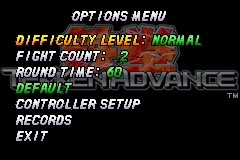
Game Options [Arcade, VS]
In the Arcade and VS Modes for Single Player Mode, the following options are available:
•
Game Difficulty Levels (EASY, NORMAL, HARD)
•
Change Round Times (30, 60, 99, INFINITY)
•
Number of Rounds Needed to Win (1, 2, 3)
Set game difficulty and match rules. Select items by pressing ▲ and ▼ on the + Control Pad, then change them by pressing ◄ and ►. Select EXIT to




.png)
.png)

.png)
 (Rev 1).png)
 (Rev 2).png)
_1.png)
 (Rev 1).png)