Controller
Displays a diagram of the controller configuration.
Settings
Adjust audio and video settings to your liking. Press left or right on the Controller + to adjust each setting. Press Button A to confirm your choice.
•
Volume effects: Adjust the volume of in-game sound effects.
•
Music volume: Adjust the volume of in-game music.
•
Brightness: Adjust the screen brightness.
•
Sound Mode: Define the audio system mode (Mono, stereo or surround).
•
Vibration: Activate or deactivate the vibration function.
•
Subtitles: Show / Hide cinematic scene subtitles.
•
Camera controls: Invert normal camera controls or reset them.
•
Camera rotation: Invert camera rotation controls or reset them.
•
Tips: Activate / Deactivate the display of tips on the screen.
Quit level
Exit the game and return to the main menu.
HEADS-UP DISPLAY
During the game, important information appears on the screen.
Health
Displays your current health status. When the bar is empty, you have failed your mission.
To replenish your health, you must have a health kit in your inventory. Equip the health kit like any other gadget and press Button A to use it. Press the bottom of the Controller + to immediately use a health kit.
Map
The map shows your objective destinations as well as tracking arrows. When a security camera is in the sector shown on the map, it shows the camera's field of view. Hold the Controller + up to zoom out on the map.
Weapon
This icon shows the currently equipped weapon or gadget, the number of rounds in the magazine, as well as the total number of bullets in the inventory.
Shadow zone coverage
When you enter a shadow zone, this gauge appears and fills up quickly. The icon located below this gauge changes from blue to black, indicating that you are completely hidden by the shadows.
Stealth attack
This icon appears when you are close enough to an enemy to perform a stealth attack or grab them by surprise.
Aiming cursor
The aiming cursor appears in the middle of the screen in aiming mode. The outer circle of aiming assistance appears when you immobilize yourself. They both turn from blue to red when an enemy enters the outer circle.
Any shot fired will hit its target as soon as an enemy enters the assistance circle. Press Button B and Button Z to activate aiming assistance.
The electronic combat pistol has a special reticle indicating which of the three available ammunitions it will fire. Three icons appear to the right of the central aiming circle. One of them is orange and indicates what type of ammunition will be fired.
Radio communications
Your long-time teammate at IMF, Luther, tracks enemy radio communications using links in their security system. He and other teammates will assist you during your missions. A transcript of the dialogues will appear in the radio communications box.
GAME ELEMENTS
Movement
Move the directional Stick slightly to walk and more firmly to run.
If you face a ledge, press Button A to jump. You can then move left or right by moving the directional Stick. Press Button B to let go.
•
Press the X Button and move the Directional Stick left, right or up to perform an evade roll. This makes you harder to hit in combat and gives you a little speed.
•
Press the L Button to crouch. You then adopt a more defensive, slower and quieter approach to avoid being detected. Use this mode to slip behind an enemy and kill or discreetly grab them.
•
To hang onto an overhead pipe, pull a microrope from below. You can then move using the Directional Stick. Press the L Button to raise your legs and gain discretion. Press the A Button or the X Button to fall back to the ground.
•
Press the A Button to attack discreetly from above.
Item Usage
Press the Y Button to use interactive points in the game or open unlocked doors. When the door is blocked, pressing the Y Button will automatically use an opening gadget, such as the ELP (ACE) or the laser cutter.
Using the Y Button will also trigger a hacking gadget on a target computer or force a captured enemy to place their hand on a digital recognition command.
Surveillance cameras
The map displays surveillance cameras and their coverage areas. These are represented as cones whose color varies depending on the status:
•
White means the enemy controls the camera and it is active.
•
Orange indicates that the enemy suspects your presence and is looking for confirmation.
•
Red indicates that you have been spotted and an alarm will soon sound.
•
Green means Luther controls the camera.
Alarms
Alarms can sound when a surveillance camera or an enemy discovers your presence or that of a body lying on the ground. If it's a guard, he will run to the nearest alarm and trigger it.
You can stop the guard before he reaches the alarm. The best strategy is to be careful and discreet to avoid being spotted.
You have a short amount of time to turn off an alarm. If you wait too long, your team will be disapproved. Press and hold the Y Button for a few seconds to automatically activate the ELP (ACE), neutralize the security system and silence the alarms.
HAND-TO-HAND COMBAT
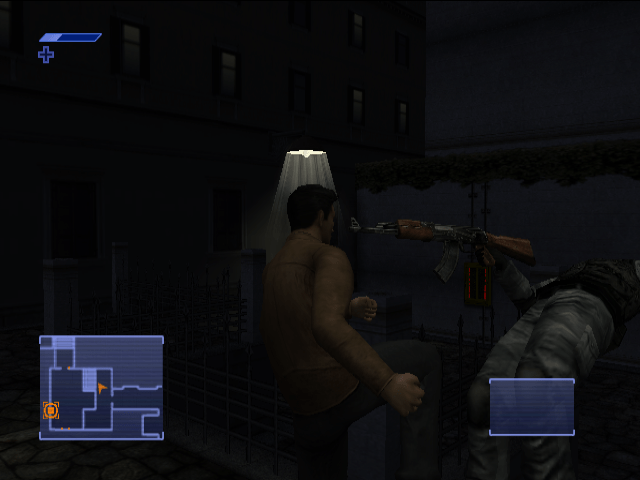
Three-hit combo
Approach an enemy and press the A Button up to three times.
Jump kick
Run


.png)

.png)

 (En,Fr,Es).png)

_1.jpg)






_1.png)


_1.png)
.png)
_1.png)
_1.png)
.png)