Control Options
In this mode you can adjust the following game settings:
•
CONTROL: Each player can choose their preferred control configurations for the four basic shots: WEAK, STRONG, SUPER and LOB. The Numbers indicate each of the 4 players. Use the ← and → directional buttons to position your player number above the desired configuration.
•
BALL MARKER: When this is set to ON, a ball marker appears during play to indicate where the ball bounced.
•
SOUND: Choose between STEREO or MONO output for the sound effects and music for the game.
•
BGM: Toggle the background music on and off.
•
VIBRATION: You can switch the Analog Controller (DUAL SHOCK) Vibration Function ON or OFF here.
•
ADJUST SCREEN: Hold down the △ button and use your directional buttons to adjust the screen display. Press the ▢ button to return the screen display to its original settings.
Exhibition Mode
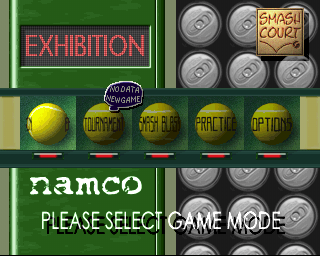
This is a mode to play a one-off game. After choosing EXHIBITION on the Main Menu, the Game Mode selection screen appears. Choose whether to play SINGLES or DOUBLES with the directional buttons, then press the X button. Up to 4 players can play at the same time.
To start an exhibition match:
•
Press ↑ or ↓ to select the match type: P# stands for player, COM for computer-controlled player. Then press the X button.
•
Choose your player: Use the directional buttons to highlight a player on the screen. There are 3 player types: NET PLAY (strong volley), ALL ROUND (average) and BASELINE (powerful shots).
•
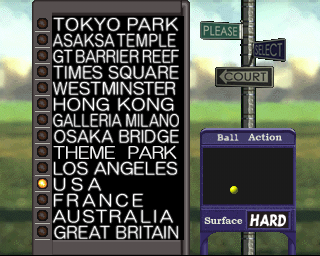
Use the ↑ and ↓ buttons to select a court. The type of playing surface is shown in the bottom right hand corner of the screen, either LAWN, CLAY or HARD.
•
Select the match length. Choose between a 1 SET, 3 SET or a 5 SET match. The player who wins the majority of sets will be the overall winner.
Scoreboard
Press the START button during a match to bring up the Scoreboard:
Match Results Screen
This screen displays the following statistics at the end of a match:
•
Points acquired by opponent's miss
•
Points acquired through your own service / return
•
Break points / Break chances
Press the START button to leave this screen and return to the Main Menu.
Tournament Mode
In this mode you can select a player and try to win prizes on the way to becoming World #1. You can choose to enter a series of Street Tournaments or a Professional series of Grand Slam Tournaments. Use the ↑ and ↓ directional buttons to select your player, then press the X button to confirm.
•
STREET TOURNAMENT: An easy series of matches progressing in difficulty. A good way for beginners to break into the competition scene. Play here to improve your ranking, before entering the Pro-circuit.
•
GRAND SLAM: A more difficult series of matches, also progressing in difficulty. Play here if you're an expert player, or have completed the Street-series.
•
RECORDS: You can keep track of your current position on the rankings screen. Once you reach a certain ranking you will become a seeded player enabling you to skip the 1st round.
Tournament Equipment
Prizes / bonus items or characters will be awarded in most of the competitions you enter. Use this screen to select and equip the items you have won.
You can assign items to any character and use them in an EXHIBITION match or SMASH BLAST game too. Once the item is assigned to the character, exit the tournament mode and hold the START button while selecting this same character in either EXHIBITION or SMASH BLAST mode.
Note: Items can be used for two players in a singles match, but can't be used in a doubles match.
Tournament Setup
•
EXIT: Select this option to quit and return to the main menu screen.
•
CHOOSE YOUR COURT: Use the ↑ or ↓ directional buttons to choose your court, or highlight the No. OF SETS option to choose between 1, 3 or 5 set matches.
Choose Your Game-Type
The type of tournament will be decided by the type of player or players you choose:
•
MEN'S SINGLES: Requires a MALE character for a SINGLES match.
•
WOMEN'S SINGLES: Requires a FEMALE character for a SINGLES match.
•
MEN'S DOUBLES: Requires MALE characters for a DOUBLES match.
•
WOMEN'S DOUBLES: Requires FEMALE characters for a DOUBLES match.
•
MIXED DOUBLES: Requires MALE & FEMALE characters for a DOUBLES match.
Tournament Table
At the beginning of each match you will see the Tournament Table, which will show you the player you are due to compete with next. Use the directional buttons to highlight whether to PLAY MATCH or QUIT TOURNAMENT, then press the X button. Each match is played in the same way as individual EXHIBITION matches.
Smash Blast Mode
This is a party game for 2-4 players. Each player may select up to 5 characters to play on their team. After selecting your characters, set up a match in the same way as you would an EXHIBITION game. Once you have made your choices,
 (Rev 1).png)

 (Rev 1).png)


.png)
_1.jpg)
.png)


.png)
.png)










.png)
