STARTING UP
Set up your PlayStation® game console according to the instructions in the Instruction Manual. Make sure the power is OFF before inserting or removing a compact disc. Insert the CTR (Crash Team Racing)™ disc and close the Disc Cover. Insert a game controller and turn ON the PlayStation game console. Follow the on-screen instructions to start a game. Memory Cards
To save game settings and progress, insert a MEMORY CARD into MEMORY CARD slot 1 of the PlayStation game console before starting play. You can load your saved games from the same card, or from any MEMORY CARD containing previously saved CTR (Crash Team Racing) games. If using a Multi Tap, the MEMORY CARD should be inserted into slot 1A of the Multi Tap.
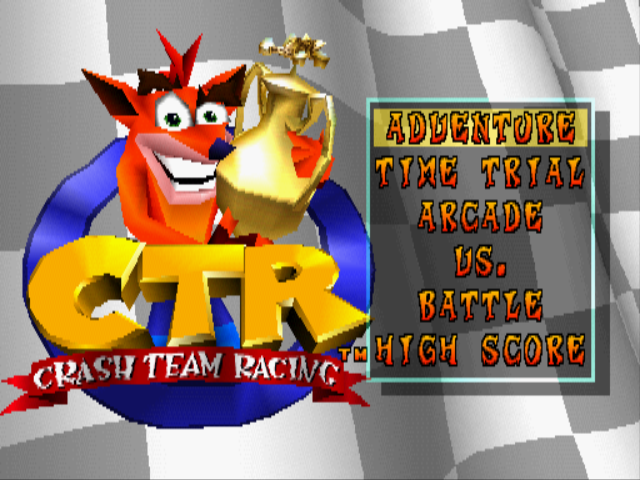
MAIN MENU
CTR (Crash Team Racing) gives you a choice of five different racing modes. You pick your character in every mode. At the start you can select Crash, Coco, Pura, Dingodile, Tiny, Polar, N.Gin or Dr. Neo Cortex.
To pick a racing mode on the main menu, press the Directional Button or the Left Stick UP/DOWN to highlight a mode and press the button.
The CTR Adventure
Adventure is a one-player game. Race through all of the levels in the game and collect every Racing Trophy, Relic, Letter, Boss Key, CTR Token and Gem you can win.
You can save the Adventure mode to a MEMORY CARD so you can come back later and pick up where you left off.
Time Trial
Time Trial is a one-player game where you race against the clock. Pick any level you want and speed through it as fast as you can. There are no other racers here to slow you down, making this a great event to practice your kart handling. There are also no power-ups, so this race comes down to you against the road.
After a Time Trial, you have the option to Save your "ghost". The "ghost" is an exact replay of the race you just ran. Race against your "ghost" and shave seconds off your own time!
Race Through a Time Trial
1. On the Main Menu, highlight TIME TRIAL and press the button.
2. Pick a Racer. Press the Directional Button or Left Stick to highlight a character and press the button.
3. Press the Directional Button or Left Stick UP/DOWN to scroll through the tracks and press the button to make your selection.
If your time is a new best score, you can save it to the MEMORY CARD.
Arcade
This mode allows a player to jump in quickly and race on a selection of tracks. You can select a Single Race or choose to enter a Cup where you race on four tracks in a row for points.
In a Single Race, one or two players race with the remaining computer drivers. You can set the difficulty of the races to Easy, Medium or Hard, pick your track, and set the number of laps to 3, 5 or 7.
In a Cup Race, one or two players race with 4 additional computer drivers. You can choose which Cup to Race and set the difficulty to Easy, Medium or Hard.
Play an Arcade Game Single Race
1. Highlight ARCADE and press the ✖ button.
2. Select SINGLE race type.
3. Highlight 1 or 2 PLAYERS and press the ✖ button.
4. Highlight EASY, MEDIUM or HARD difficulty and press the ✖ button.
5. Select a Racer by highlighting the one you want and press the ✖ button.
6. Choose a race track by scrolling through the list and pressing the ✖ button.
7. Highlight 3, 5 or 7 LAPS and press the ✖ button.
Play an Arcade Game Cup Race
1. Highlight ARCADE and press the ✖ button.
2. Select CUP race type.
3. Highlight 1 or 2 PLAYERS and press the ✖ button.
4. Highlight EASY, MEDIUM or HARD and press the ✖ button.
5. Select a Racer by highlighting the one you want and press the ✖ button.
6. Highlight Wumpa Cup, Crystal Cup, Nitro Cup, or Crash Cup and press the ✖ button.
Vs.
Up to four players compete on the track of your choice or race in a Cup across four tracks for points. Set up a Vs. game just like the Arcade game (see above), but you must have two or more players.
•
A Multi Tap is required on your PlayStation game console in order to play a three or four player game. Battle
Up to four players wage kart warfare launching weapons during combat in one of seven special battle arenas. You can team up or have a free for all.
High Score
Check out the High Score screen after you get in a few races to see how your stats stack up against the other racers. You must enter your name on the Save screen after winning a race for your name to show up on the High Score screen.
•
Press the Directional Button or the Left Stick LEFT/RIGHT to select the level you want to check stats for.
•
Press the Directional Button or the Left Stick UP/DOWN to select either TIME TRIAL MODE or RELIC RACE stats.
•
Best track times are on the left. Best lap times are on the right.
THE CTR ADVENTURE
Save the world from Nitros Oxide by winning races on 16 different tracks in levels throughout the island. Starting at the World Map, choose one of the Warp Pad Vortexes that lead to each track. In the beginning of
.png)

.png)

.png)

_1.png)


_1.png)