GETTING STARTED
Do not insert or remove peripherals or memory cards once power is turned on. You will need a memory card to save your games.
•
Set up your console according to the instructions in its Instruction Manual.
•
Make sure the power is OFF before inserting or removing a disc.
•
Insert the Glover disc and close the disc cover.
•
Insert the game controllers.
•
If you want to load or save your progress during play, insert a memory card into memory card slot 1.
•
Turn ON the console and the introductory sequence will begin.
MEMORY CARDS
You will not be able to save your progress if you don't use a memory card. Make sure there is at least one free block on your memory card before beginning your game.
You cannot swap memory cards during play and you must leave the memory card in the memory card slot for the complete duration of play.
Warning! Don't forget to save your progress before you turn off the console.
YOUR CHALLENGE
Guide Glover and the rubber balls through 6 perilous worlds of danger and evil. Return all of the crystals to the Castle to restore the Wizard and save the Kingdom!
To do this, you must control Glover to find and guide one crystal (turned rubber ball) through each world and back to the castle where it will transform back into a magic crystal.
THE START SCREEN
After the introductory movie, you will be presented with the Start Screen. From here, you can choose from: START, OPTIONS and HI SCORES.
If you do nothing for a while, you'll see a demo of Glover in action. •
START – Will begin a NEW GAME or allow you to LOAD A GAME from the memory card.
•
NEW GAME – Will start a new game.
•
LOAD GAME – Will allow you to load a Glover saved game.
•
OPTIONS – Will allow you to change some GAME SETTINGS on further screens. Here are the options:
•
SOUND OPTIONS – Allows you to adjust the music and sound effect volumes.
•
CONTROLS – Allows you to view the control layout.
•
CENTER SCREEN – Allows you to center the display.
•
SHOW INTRO – Allows you to view the introduction movie again.
•
VIBRATION – Allows you to alter the Dual Shock™ vibration setting.
•
HI SCORES – Will allow you to view the BEST SCORES.
MANEUVERING WHILE STANDING ON THE BALL
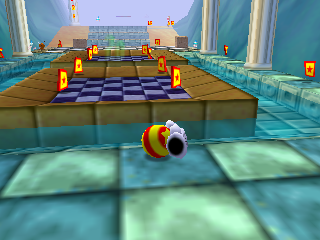
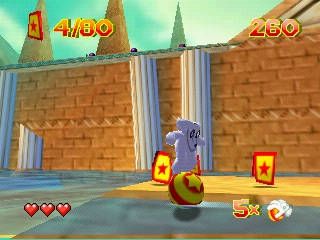
Glover can jump up on top of the ball, and use it to maneuver over water or land.
•
To stand on the ball, hold the L2 button while holding the ball, and while holding the key down, press the ✗ button.
•
To hold the ball again, just press the L2 button.
SLAP BALL
There are two ways of slapping the ball and many reasons for doing so!
•
The first way is to quickly tap the ■ button, aim with the directional buttons and then tap the ■ button again. Glover will slap the ball where you aimed it.
•
The second way is just to hold the ■ button and aim. When you let the ■ button go, Glover will slap the ball in the direction that you were aiming.
While you're aiming, you'll see a dotted line that shows where the ball will hit. When you slap the bowling ball at enemies, you can defeat them. You can also slap the bowling ball at cracked walls to break them.
Slapping the ball is a great way of getting the ball from one ledge to another one nearby. Slapping the ball makes it go further than throwing it.
TRAMPOLINE BALL
When standing on the ball, jump up and then fist-slam it. You can get really high up onto otherwise unreachable areas with this move.
THROW BALL
Like slapping, there are two ways of throwing the ball.
•
The first way is to tap the ● button, aim with the controller and then tap the ● button again.
•
Alternatively, you can just hold the ● button and aim. When you let the ● button go, Glover will throw the ball in the direction that you were aiming.
While you're aiming, you'll see a dotted line that shows where the ball will land. Throwing the ball is a great way of hitting wall targets. Throwing the ball makes it go higher than slapping it.
BOUNCE (DRIBBLE)
Hold the ✗ button to make Glover bounce the ball. Then use the directional buttons or left stick to maneuver. This is especially handy for going up stairs.
CANCELLING MOVES
You can cancel most moves by pressing the L2 button.
CAMERA CONTROLS
•
Press the ▲ button to change the zoom setting on the camera.
•
Use the L1 button and the R1 button to rotate the camera.
•
If you have a Dual Shock™ analog controller, the right stick allows you to aim the camera quite freely in most places.
GAME DEFINITIONS
•
CARDS - For every 10 cards you collect, you get an extra health point. You will get an extra life if you collect all the cards on a level!
•
CHECKPOINT - Lob, or bounce the ball through a checkpoint. This will enable you to restart at this location, instead of at the beginning of the level, if you lose a life. Players can move between checkpoints that have been passed through.
•
TIPS - Pressing the ● button near one of these question marks will give you a valuable tip on how to play the game. These glowing question marks become dim once you have read them, so you
.png)

.png)
.png)
.png)





 (Es,It,Pt).png)

.png)




.png)
.png)



.png)

