Main Menu
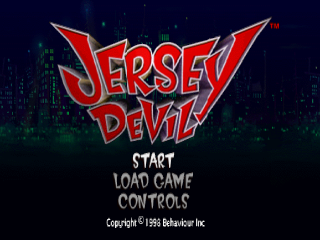
The Main Menu appears at the beginning of a game. Press † or 4 to highlight your selection and press the Button.
•
START: Start a new game.
•
LOAD GAME: Use the Load Game Menu to load a previously saved game. Use the Directional Buttons or Left Analog Controller to cycle through the available saved games on the Memory card, and press the Button to select. Each selection has a percentage number showing how much of the game has been completed.
•
Note: You must have a Memory card in slot 1 with a previously saved game on it in order to load a game.
•
CONTROLS: Use the Controls Menu to change the default Controller Configuration. Press 1 or 1 to cycle through four different settings and press Button to select.
End of Mission Status Screen
Your performance is rated whenever you complete a mission. The Status Screen shows you:
•
What percentage of the game you've completed.
•
What power level you've reached.
•
How many K-Tokens you've acquired.
•
How many hostages you've rescued.
Press the Button to resume the game or see below for saving your progress.
Saving a Game
To save a game from the Status Screen, press the Button. On the Save Game Menu, use the Directional Button or Left Analog Controller to cycle through the game slots, and press the Button to save to the selected slot.
If a game has already been saved to any slot, a percentage number shows how much of that game has been completed. If all the slots are full, you can save your current game by overwriting a previously saved game.
•
Note: You must have a Memory card in slot 1 in order to save a game.
Pausing
Game Pause
Press Start during a game to pause. Press the Button to resume or press the Button to exit back to Downtown (after pressing the Button for YES).
Downtown Pause
Press Start when J.D. is Downtown to see an expanded Pause Menu. Use the Directional Buttons or press or to highlight your selection and press the Button.
•
Button RESUME: Return to the game.
•
Button OPTIONS: Use the Options menu by pressing or to highlight your selection and pressing the Button.
•
CONTINUE: Return to the game.
•
CONTROLS: Same as Main Menu.
•
CALIBRATION: Use the Left Analog Controller to calibrate your analog controller. (This function does not work for the Dual Shock Analog Controller, which is calibrated automatically.)
•
Button EXIT GAME: Return to the Main Menu.
•
Button STATUS: Check your performance on the Status Screen.
How to Play
Starting a Game
Watch the opening animated video that starts shortly after you turn on the PlayStation game console. (If you've already seen the animation, you can press Start or the Button to display the Main Menu.) When the animated video ends, the Main Menu appears. Before starting the game, watch the demo shorts for hints about how to overcome some tough obstacles and puzzles in the game. (Press the Button to stop the demos whenever you want.)
When the Main Menu appears, press the Button to start the game.
•
Note: For information on the Main Menu options, see page 8.
Your Mission
JERSEY DEVIL has six big, twisted areas – plus Boss Levels and hidden Bonus Levels. Your job is to:
•
Find and destroy all the labs.
•
Collect the Tokens to spell K-N-A-R-F, and gain the Golden K that opens locked doors into the next areas.
•
Break open all the green Nitro Boxes (marked with K) to power up Jersey Devil.
•
Acquire the K-Token by defeating the Boss defending the lab at the end of each area.
•
Release all the hostages trapped in cages throughout the levels and secret levels.
•
Defeat Dr. Knarf and his army of hors d'oeuvres and blow up his secret lab.
Downtown Hub
The Downtown hub is the entry point to all parts of town. Jersey Devil starts the game by following (and collecting) the KNARF Tokens to the entrance of the first level, the Museum.
When Jersey Devil successfully completes a mission, he returns to Downtown, and:
•
You see your progress report on the Status Screen.
•
You can choose to save your progress to a Memory card.
•
J.D. looks for the next mission entrance.
Giant K-Tokens
At the beginning of the game, only the Museum entrance will open. Other parts of town become accessible as Jersey Devil completes levels. When Jersey Devil completes a level at least once, that area is marked with a giant, colored K-Token:
•
Red K-Token: Jersey Devil completed the level, but it still contains hostages and Nitro Boxes.
•
Purple K-Token: J.D. freed all the hostages, but you still need to find all the Nitro Boxes.
•
Aqua K-Token: J.D. found all the Nitro Boxes, but some of the hostages are still trapped.
•
Gold K-Token: J.D. completed the level, found all the hostages and destroyed all the Nitro Boxes.
After getting Red, Purple or Aqua K-Tokens, Jersey Devil can return to the area and try to collect whatever he hasn't found yet. However, J.D. can finish the game with any of the colored key tokens.
Screen Items