GETTING STARTED
*Note: Illustration may not match all PlayStation 2 console types. For owners of SCPH-70000 series PlayStation 2 systems, refer to the setup instructions supplied with your system.* Set up your PlayStation®2 computer entertainment system according to the instructions in its Instruction Manual. Make sure the MAIN POWER switch (located on the back of the console) is turned ON.
Press the RESET button. When the power indicator lights up, press the OPEN button and the disc tray will open. Place the DT Racer™ disc on the disc tray with the label side facing up. Press the OPEN button again and the disc tray will close. Attach game controllers and other peripherals, as appropriate. Follow on-screen instructions and refer to this manual for information on using the software.
Free Run Mode
Enjoy driving in various cities. 2 Players Mode
2 players can race together using split screen.
Replay Theater
You can view saved/copied replays. You need sufficient free space on Memory card (8MB) (for PlayStation® 2) to use this.
Load/Save
You can load or save the game data. You need a Memory card (8MB for PlayStation® 2).
Options
You can change game difficulty, camera view, controls, sound, and various other settings.
How to Play
Before and after the race in each game mode, a race menu is displayed. The menu items differ according to game mode and play results.
Select Racing Car and Color
Use the DUALSHOCK®2 analog controller directional buttons or left analog stick to move the cursor and use the O or X button to select the racing car and color. Use O or A button to cancel. Select Transmission
You can select from AT (Automatic Transmission) or MT (Manual Transmission). Use the directional buttons to move the cursor and use the O button or X button to select.
Select Crash Mode
If you select crash mode, damages to your vehicle caused by obstacles on the course, course walls, and competing vehicles may hinder your vehicle's performance.
Select Race Menu
This menu is displayed after the race in each mode. You can start a race or change your settings in this menu.
Pit-In
There is a pit zone where you can receive fuel and tires at the race start position. In grand prix mode, you can't finish a race with the given fuel, so you must fuel up at the pit zone.
Just stop the car anywhere in the pit zone to start fueling up. If you want to change your tires, press the SELECT button.
ARCADE MODE
In arcade mode, each course has a minimum qualification rank that you must achieve to move on to the more challenging courses. You must compete with other vehicles (CPU) to achieve the qualifying rank, so the player must be able to handle the racing controls and techniques well. •
You can check the qualification rank in the course data.
Select Racing Car and Color
Use the DUALSHOCK®2 analog controller directional buttons or left analog stick to move the cursor and use the button or button to select the racing car and color. Use button or button to cancel. Select Transmission
You can select from AT (Automatic Transmission) or MT (Manual Transmission). Use the directional buttons to move the cursor and use the button or button to select.
Select Crash Mode
If you select crash mode, damages to your vehicle caused by obstacles on the course, course walls, and competing vehicles may hinder your vehicle's performance.
Course Data
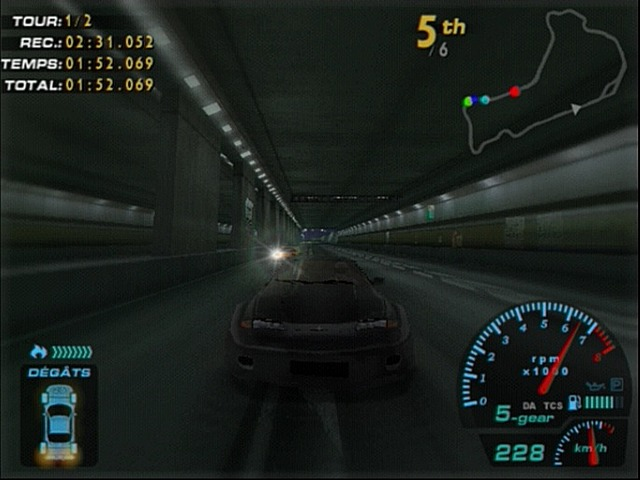
You can check the course name, street information, weather, and the course background image in this menu.
Race Menu
After the race is over, the player can select whether to continue racing or not from here. Race Menu
•
Replay: View the replay of the race you just completed.
•
Retry: Play the current racing course again. •
Save Replay: Save replay data of completed race.
•
Save: Save data of completed races.
•
Next: Go to next course.
•
Exit: Quit all races and go back to main menu.
Car Repair
After the race is over, the player can check for damage to the vehicle and repair the car before moving on to the next stage.
Grand Prix Mode
GRAND PRIX
The garage holds all the cars you possess. Select one car for active racing. In Grand Prix mode, the player becomes a racer to participate in various grand prix to compete with other racers. Grand Prix Mode Main Screen
•
Garage: All cars purchased by the player are stored here.
•
Car Shop: You can purchase cars here.
•
Reset: Go back to default settings.
•
Credits: You are given 15,000 points to start with. The credit is used to purchase racing car and repair cars. You can earn more credits by winning the races. Select Racing Car and Color
In Grand Prix mode, you need to purchase the car you wish to use in the car shop before participating in a race.
GP Schedule
You must pay a certain
.png)

.png)


_1.png)
.png)


.png)

.png)
.png)