In an Age of Turmoil
Heroes Will Rise!
Starting a Game
1. Place the Dynasty Warriors 3 disc in the disc tray. 2. Place a Memory Card (8MB) (for PlayStation®2) in MEMORY CARD slot 1.
3. The title screen appears after an intro movie. (Pressing the START button during the intro movie allows you to skip the movie and title screens. At this point, the Game Select screen will appear.)
You will need at least 200KB to save data for one game. Refer to your PlayStation 2 user's manual for details on using memory cards. Choosing a Mode
Press the START button to show the Game Select screen from the title screen.
Saving
You can save a game and play at a later time. There are different ways to save your game.
Saving a Game at the End of a Stage (Musou Mode/Free Mode)
When you successfully complete a stage, the game will ask you whether or not you wish to save the game. The game will be saved when you select YES from the dialog box.
In Musou Mode, choose the number you wish to save the game at. You can save up to three locations.
This procedure is the same for 2Player. If it already has a saved game at the selected location, the new game will overwrite any previously saved data.
Saving a Game in the Middle of a Stage (Musou Mode/Free Mode)
Press the START button during the stage to display the Information screen. Choose QUIT. You can only save one game.
The second time you save your game in the middle of a stage, the new game will overwrite the previously saved data from the middle of the same stage. If you save your game at the end of a stage, it will delete previously saved data.
Saving a Game from the Options Screen
You can save a game's option settings or records. Choose SAVE from SAVE/LOAD in the OPTIONS screen.
Loading
Continue a previously saved game.
Saved Game: In the Middle of a Stage (Musou Mode/Free Mode)
If you saved a game in the middle of a stage, CONTINUE appears on the menu screen. Choose CONTINUE to play.
Saved Game: At the End of a Stage (Musou Mode/Free Mode)
Choose Musou Mode or Free Mode from the menu screen. If you have previously saved data, NEW GAME and LOAD GAME appear on the screen. Choose LOAD GAME and select a game you want to play from the saved data list.
Game Mode
Choose a mode you want to play from the menu screen. Press the SELECT button and START button at the same time to return to the menu from each mode.
Musou Mode (2P available)
Select an officer and play. The game situation changes depending on which officer you choose.
You can choose from the following when you have completed a stage and saved:
•
NEW GAME: Start a new game.
•
LOAD GAME: Load a previously saved game.
Free Mode (2P available)
Select a stage and play. When you play in Musou Mode or meet certain conditions in the game, more stages or troops become available.
Continue
You can continue the game once you have quit and saved in the middle of a stage. CONTINUE appears only when you save your game in the middle of a stage.
2 Player in Musou and Free Mode
In Musou Mode and Free Mode, a 2Player option is available. Player 1 and player 2 can fight together.
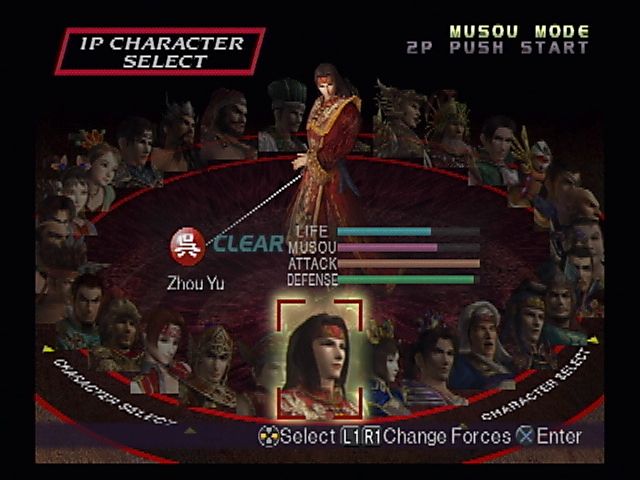
When you choose Musou Mode or Free Mode, 2P PUSH START appears in the Character Select screen or on the top right of the Information screen, which is displayed at the beginning of a stage. 2Player can join in by pressing the START button here.
In Musou Mode, you can play a previously saved game (completed stage) in either 1Player or 2Player Modes.
Develop Your Character
As you clear the Musou Mode or Free Mode, your character is able to improve his abilities. A character developed in the Free Mode can be used in the Musou Mode, and vice versa.
If you reach a stage in the Musou Mode that you just can't seem to clear, you can always take your character to the Free Mode, raise his abilities, and then try again in the Musou Mode.
Increase the Number of Characters
When you clear the entire Musou Mode or meet certain conditions in the game, more characters become available. There are some characters, however, that appear only in the Free Mode.
VERSUS Mode
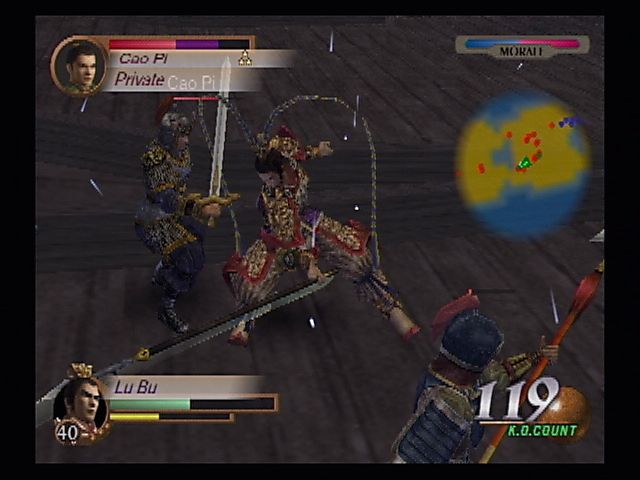
2P available. Two players fight against each other within the given time (90 min.). There are 8 stages to choose from.
In the Versus Mode, the characters' abilities are set specifically for this mode. Weapons are set to a maximum of 6 hits.
3 vs. 3 Elimination
Set in the plaza at Hu Lao Gate, three officers on horseback fight.
191 A.D.
The Battle at Hu Lao Gate
197 A.D.
Assault on the Wu Territory
Struggle for the Imperial Seal
Who is going to be the one to get the Imperial Seal hidden in Wu Territory and earn additional warriors?
208 A.D.
The Battle of Chang Ban
Skirmish of the Chang Ban Bridge
Destroy the wall of enemy soldiers blocking the Chang Ban Bridge!
208 A.D.
The Battle at Chi Bi
Battle at Sea
.png)

.png)



.png)

.png)



.png)
