PLAYING ETERNAL QUEST
Eternal Quest involves exploring increasingly difficult dungeons to unveil the diabolical mystery of the village of Jinuma. You must guide Gyokuro through each dungeon map, searching for the hidden door to the next level.
Your abilities and striking power will increase as you advance, as will the power of your enemies. Demons will try to hinder your quest by all means.
Use your card to pave your way to victory, all while making the best use of the weapons and armor you find, as well as magical grimoires and other mysterious relics. Good luck, brave adventurer.
THE DISPLAY SCREEN
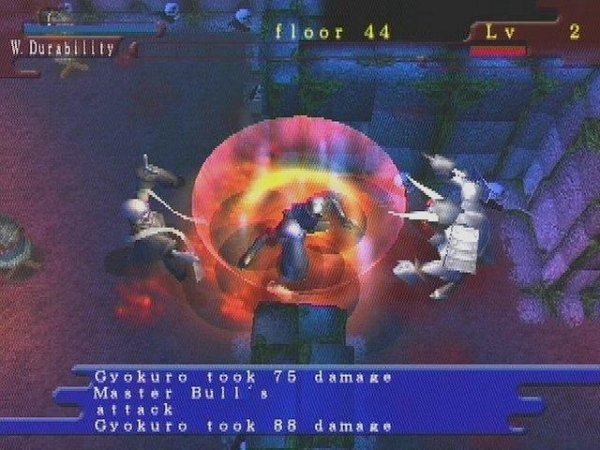
The in-game screen contains the following information to help you get the most out of Eternal Quest:
As your weapons lose their resistance, the blue lights of this gauge turn dark blue. When the gauge is completely dark blue, the weapon is destroyed and can no longer be used.
Indicates the current dungeon floor being explored.
Indicates Gyokuro's current experience level. See the Status Menu for more information.
Represents Gyokuro's energy level. As attacks are received, the red gauge decreases, although it can increase through healing or simply after a certain time. If the red gauge is completely empty, Gyokuro dies and the game ends.
This text provides information on what is happening in the game, for example when Gyokuro or an enemy attacks, dodges, etc., or when an item is picked up or used.
The map expands as you progress. Gyokuro is indicated by a white dot, enemies by red dots, and items/equipment by yellow dots. Exits appear as white squares or blue circles. Rooms and their contents appear on the map as soon as you enter them. However, corridors only appear when you use them.
THE STATUS MENU
During the game, you will access the status menu by pressing the button. This menu presents the following options:
This option allows you to act using the items you have discovered during your quest. Once an item is selected, you can choose the options Use, Equip/Remove, Discard, or Throw the item. Information relating to an item's properties is displayed below it, in the blue information box.
This option allows you to Equip/Remove, Abandon, or Throw the weapons and armor accumulated during your quest. When you select an item in the Equipment menu, its effects on your status (e.g., a sword can improve or weaken your attack degree) are displayed in the status menu to its right. An improvement in status is indicated in green, while a weakening is indicated in red. Information relating to the properties of your equipment is displayed below it, in the blue information box.
Unleash the power of the mystical jewels you carry. The place where you activate the jewel on the map will sparkle with force and help you defeat your enemies when you are within its field of action.
Using this option, choose a Stereo or Mono sound.
This option allows you to save the game and return to the title screen.
STATUS INFORMATION
On the right of the status menu screen, you will be able to see your current abilities, classified in the following order:
Indicates Gyokuro's current level. When his general level increases, his energy, attack, defense, and mana levels will increase.