GETTING STARTED
SETTING UP YOUR PLAYSTATION 2 CONSOLE
Set up your PlayStation®2 computer entertainment system according to the instructions supplied with your system. Check that the system is turned on (the on/standby indicator is green).
Insert the (Hot Shots Tennis) disc in the system with the label side facing up. Attach game controllers and other peripherals as appropriate. Follow the on-screen instructions and refer to this manual for information on using the software.
MEMORY CARD (8MB) (FOR PLAYSTATION®2)
Throughout this manual, the term "Memory Card" is used to describe the Memory Card (8MB) (for PlayStation 2). To save game settings, player status and current progress, insert a Memory Card with at least 256KB of free space into MEMORY CARD slot 1. Any previously saved Hot Shots Tennis game data will be auto-loaded upon start-up. Hot Shots Tennis uses an Autosave feature which means that progress will be automatically saved to Memory Card at certain points during the game.
AUTOSAVE
When the Autosave function is turned on, game play data will be automatically saved to Memory Card upon completion of a match in Challenge Mode and Fun Time Tennis Mode, or upon completion of a practice session in Training Mode. The Autosave function can be turned on or off in the Options Menu.
DELETING PLAY DATA
To delete previously saved play data on the Data Selection Screen, simply highlight the play data to be deleted and press.
PLAYING THE GAME
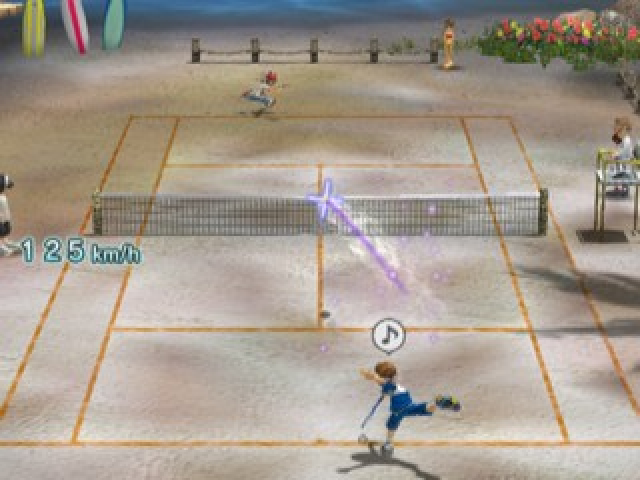
THE GAMESCREEN
•
A Character and his/her tennis tier
SHOT COLORS
The flight path of the tennis ball changes color according to the type of shot hit:
TIMING BUBBLES
Speech bubbles are displayed based on how well you time your shots. Bad timing can cause the shot direction to deviate.
STAMINA
Characters use up stamina whenever they move. When they run out of stamina, they become sluggish. The amount of stamina varies from character to character.
REPLAYS
Sometimes a replay will start automatically after a point is scored. Press when "replay" is displayed in the upper right of the screen to force a replay if one is not automatically shown.
Change how often replays are shown by selecting "Short Replay" in the "Options" menu.
AFTER THE MATCH
Review the number of sets or games won on the post-match Score Screen, which will be displayed at the conclusion of each match. Press to access the Stats Screen to review the latest statistics.
HOT SHOTS CHALLENGE MODE
Win Hot Shots Challenge Mode matches to unlock new characters, costumes, courts and umpires, and progress through the ranks from Beginners class, through Amateur and Semi-Pro up to the top-ranking Pro class.
TENNIS TIERS
Each player's "tennis tier" is a current skill level grading. Beginning at "Tennis Lv 5", defeat opponents on higher tennis tiers to move up a grade.
HOT SHOT'S CHALLENGE MODE
CHOOSE A CLASS AND OPPONENT
Press or to select a class and press or to select an opponent. You can continue playing matches in lower classes even after you have advanced to higher ones.
At the foot of the screen, the prize for beating your opponent will be displayed. Choose an opponent and press to continue.
REVIEW MATCH DETAILS
•
Opponent: The opponent's name, tennis tier and playing style.
•
Match: The number of sets and games in the match.
•
Court: Indicates if the court is accessible or not.
•
Items: The item you win for defeating the opponent. After winning once, this will change to None.
•
Conditions: Special rule conditions, such as a fixed camera position.
PARTNER CONTROL (DOUBLES MATCHES ONLY)
When only one controller is connected, your partner in doubles matches will be computer controlled "COM". When more than one controller is connected, your doubles partner can either be computer-controlled or controlled by a second player.
CHOOSE A CHARACTER
Select a character and press to confirm. Press L1 or R1 to change the character's costume, and press to check their attributes.
CONFIRM SETTINGS SCREEN
Review the selected characters, opponents and court; and when ready to begin, select "Start The Match!". Alternatively, alter any of the following settings:
•
Select Court: The tennis court on which the match will take place.
•
Sets: The number of sets to play.*
•
Games: The number of games per set.*
•
Select Umpire: The umpire who will be in charge of the match.
•
Set Handicap: The handicap settings that will apply to each character.*
•
Offbeat Rules: The rule settings that will apply to the match.*
*Options available in Fun Time Tennis Mode only.
NOTE: Items marked with an "X" cannot be altered.
FUN TIME TENNIS MODE
NOTE: Insert a Multitap into controller port 1 to play matches with more than two people. Please




.png)


_1.jpg)




.png)








_1.png)