PlayStation 2 Setup
Set up your PlayStation®2 computer entertainment system according to its Instruction Manual. Ensure the MAIN POWER switch (located on the back of the console) is turned on.
Press the standby/RESET button. When the power indicator lights up, press the open button to open the disc tray.
Place the FIREFIGHTER F.D. 18™ disc on the disc tray with the label side facing up. Press the open button again to close the disc tray.
Attach game controllers and other peripherals as appropriate. Follow on-screen instructions and refer to this manual for information on using the software.
Console Ports
Basic Rules
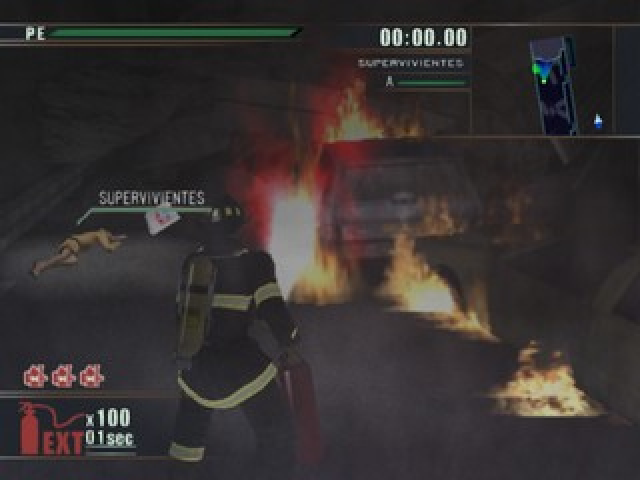
Take control of firefighter Dean McGregor, a member of Port Serens's F.D. 18, conducting search and rescue operations. Extinguish fires, get blazes under control, and remove victims to safety. The primary mission is to rescue people. Victims are indicated on the mini-map in the top right of the screen. You must reach them before their stamina runs out. If a victim's stamina depletes, you fail your primary mission and the game ends.
Damage Types
The character can receive two types of damage: fire damage and physical damage. Fire damage to the stamina meter replenishes when the character is no longer taking fire damage (unless not wearing a firecoat).
Physical damage to the stamina bar can be healed with healing items. The maximum fire damage tolerance is tied to physical stamina. As physical damage increases, fire damage tolerance decreases.
Ranking and Bonuses
A higher ranking is awarded for quicker rescues and extinguishing more fires. Spending too much time on fires may reduce time for rescues.
Hidden items add bonus points to your score. Finding enough and clearing the game may unlock secrets.
Obstacles
Fire is not the only obstacle. Smoke and gas obscure your view, and dangerous chemicals may ignite. Watch out for sinister traps. Avoiding these while completing missions leads to the best ranking.
Starting the Game
After the Konami logo, the opening movie starts. Press the START button at any time to go to the Title Screen.
Title Screen
•
2004 Konami Computer Entertainment Tokyo
Main Menu Window
•
Continue: Continue from a previously saved game.
•
New Game: Start a new game.
•
Options: Adjust various options.
Options Screen
Control Type
Choose control scheme.
•
Standard A: Utilizes both analog sticks.
•
Standard B: Utilizes both analog sticks. Vertical spraying direction is inverted.
•
Simple: Only the left analog stick is used.
Vibration
Turn vibration function on/off.
Sound
Change sound options.
Subtitles
Turn subtitles on/off.
Map
Mini-map. Can be set to rotate or not.
Screen Position
Adjust screen position.
Restore Defaults
Return all settings to original settings.
If settings have been adjusted and you try to return to the Main Menu, a window asks if you want to save changes to the memory card (8MB) (for PlayStation®2).
Sound Settings
•
Music: Adjust music volume.
•
Sound Effects: Adjust sound effects volume.
•
Voice: Adjust voiceover volume.
•
Sound: Change between Stereo/Monaural/Dolby® Pro Logic® II.
*NOTE: Sound effects volume setting is not reflected on the demo movie volume. See P. 28 for Dolby Pro Logic II setting.*
Equipment Screen
Press the SELECT button to open the Equipment Screen. You can equip different firefighting tools, use items, and check the number of people rescued.
Choose equipment or items with the left analog stick and confirm with the button. Press the SELECT button again to close the Equipment Screen.
(The Equipment Screen cannot be opened while crawling through air ducts or hanging off of a rope.)
Pause Screen
Press the START button to pause the game. Press the START button again to resume the game.
Results Screen
•
Clear Time: Time taken to complete a mission.
•
People Rescued Unharmed: Number of people rescued with no injuries.
•
Injured: Number of people rescued with major injuries.
•
Extinguish Points: Score for the number of fires extinguished.
•
Continues Used: The number of attempts needed to complete the stage.
When a stage is cleared, a ranking will be assigned depending on the results.
Difficulty Setting
The difficulty setting can only be changed when 'New Game' is selected from the Main Menu.
•
Easy: Fire attacks and damage are lighter.
•
Normal: Normal difficulty setting.
•
Hard: Fire attacks are more damaging as well as more aggressive.
Narrow Spray
The spray hose is adjusted to a narrow stream of water. This delivers more water to a small area and is very effective in putting out a fire quickly.
Wide Spray
The spray hose is adjusted to a wide stream. This delivers water to a wider area but takes longer to put out fires. It also has a shorter range. It protects the character
.png)


.png)
.png)



_1.png)









_1.png)




.png)


.png)