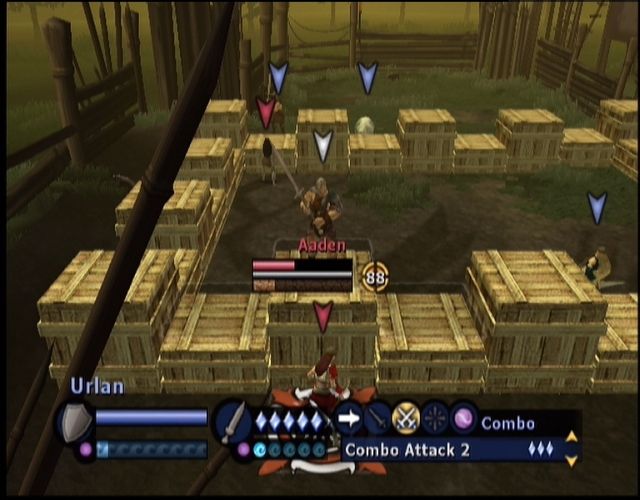
Battle Interface
•
3. Health Bar/ Health Points
•
5. Defensive Affinity Bar
Basic Fighting Mechanics
Gladius is a turn-based role-playing game (RPG) that includes movement in a 3D world during battle. The game uses an interleaved system of turns, allowing multiple characters to move at once after orders are given.
This system speeds up non-combat movement during battles, keeping the focus on attacking and using various hit meters.
Moving
Characters can maneuver freely around the arena during battle. When moving the cursor, the movement arrow is split into two colors: white and gray.
The white section of the arrow shows how far a character can move without interruption. The gray section shows the completion of movement if it continues uninterrupted.
After a character's interleaved turn, any remaining arrow turns blue, giving the player a chance to change the move or continue. Be cautious, as planned movements may be interrupted or blocked by opponents.
Targeting
The orange targeting cursor has many uses. Moving it around the arena provides views of the opposition's formation.
Players can select any unit with the cursor and press the button to get information on that unit, including hit points, skill points, and status effects. At the start of a character's turn, any opponent within attack range of a move-to-attack skill will have an orange cursor around them.
As players scroll through skills, shadow squares may appear on the ground to indicate the skill's effective range. The selected skill can be performed on any character or object with an orange target underneath them.
If performing a ranged attack and the orange target doesn't appear, it means something is obstructing the gladiator's view. Press the R1 button to toggle a line-of-sight indicator. Defensive and other skills may require players to target themselves.
Attacking
Combat can begin once an opponent is within move-to-attack range or two characters are in adjoining squares. Every character has a standard move-to-attack skill for basic melee damage.
To use a variety of melee attack skills, two characters must be in adjoining squares at the start of the turn. Some attack skills do not require characters to be in adjoining squares.
Distance attacks using bows, spears, and magical spells have a range, allowing opponents to be attacked as long as they are within that range.
Accuracy
After selecting an attack method and highlighting an enemy, an Accuracy icon appears above the enemy's head. The number inside indicates your gladiator's chance of hitting.
To the left of the icon is the enemy's health bar (on top) and their defense Affinity bar (below). The health bar flashes to indicate damage inflicted after a successful hit.
The defense Affinity bar flashes to indicate how much defensive Affinity the enemy will gain. If attacking with a weapon powered by the same Affinity as the enemy's defensive item(s), the bar will flash to indicate how much defensive Affinity will be taken away from the enemy. Skill Selection
The Skill Selection bar is at the bottom right of the screen. Players can navigate icons to separate skills by type.
Alternatively, press the L1 button to see a list of all skills of the selected type, then use directional buttons to choose a skill. Skills will be discussed in more detail later, but it's important to know that many different attack skills exist.
Facing and Engaging
It's important to remember the advantages and disadvantages of engaged characters. Two gladiators in adjoining squares who have attacked or defended each other in a previous turn are engaged.
An engaged character will take a different stance. If attacked from the side or rear, they will receive extra damage.
If multiple opponents surround a character, it's a good idea to move the surrounded character out of harm's way. Otherwise, that character may receive extra damage from the side or back from gladiators who are not engaged. Some characters have innate abilities to always face their attacker.
Crowd Meter
Gladiator combat in an arena is affected by the crowd's enjoyment. Each school has a crowd meter that appears on the screen edges after each gladiator's turn.
The meter is color-coded to indicate the gladiator's school and matches the small arrow above each gladiator's head. Different battle tactics and gladiators will receive varied crowd responses depending on the arena. Positive crowd reactions can provide a school with various boosts during battle, from better accuracy to increased movement. Schools that win over the crowd have a better chance of winning.
Terrain Modifiers
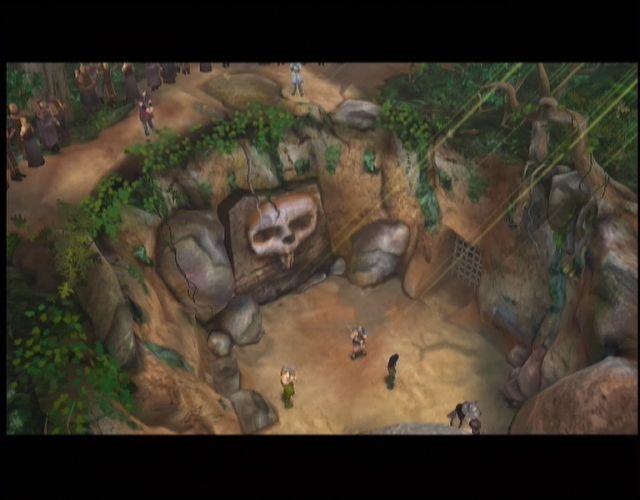
Terrain advantages are another important aspect of combat. Players must navigate various obstructions in arenas that can hinder or help them.
Simple objects prevent movement or ranged attacks. Other objects allow players to stand on them, providing sight advantages for ranged attacks or damage bonuses for melee attacks.
When an attacking player is standing higher than their target, they receive a substantial attack bonus. Conversely, attacking an opponent on higher ground results in a weaker strike. Keep this in mind to avoid terrain disadvantages. Too great a height difference will prevent attacking at all.
Battle Objectives
Players will encounter several battle types. Each arena hosts battles reflecting its region and people.
Standard arena combat involves two schools trying to defeat all members of an opposing school. Other objectives include timed battles to score the most damage or break the most barrels.
King of the Hill matches require remaining on the highest point of the arena for the longest time. Rival Nations contests involve destroying an opponent's
.png)


.png)







_1.png)



_1.png)





.png)

.png)


_1.png)