Starting the Game
1. Set up your PlayStation®2 computer entertainment system according to the instructions in its Instruction Manual.
2. Make sure the MAIN POWER switch (located at the back of the console) is turned on.
3. Press the RESET button. When the power indicator lights up, press the open button and the disc tray will open.
4. Place the Harry Potter and the Sorcerer's Stone™ disc on the disc tray with the label side facing up. Press the open button again and the disc tray will close.
5. Attach game controllers and other peripherals, as appropriate.
6. Follow on-screen instructions and refer to this manual for information on using the software.
Main Menu
The day Harry receives an unexpected letter, his life is transformed.
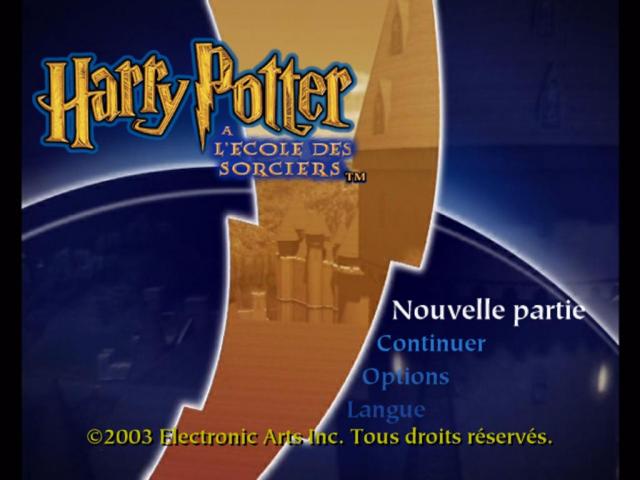
New Game
Highlight and press the button to begin your adventure.
Continue
Highlight and press the button to continue a previously saved adventure.
Options
Adjust a variety of game settings.
Language
Choose the language for the game.
To start your adventure, highlight NEW GAME in the Main Menu and press the button. The introductory sequence runs and the game begins.
Note on Saving and Loading
For information on saving your progress or loading a saved game, see Saving and Loading.
Interacting with the World
Move Harry close to people and objects to see if he can interact with them. If he can, the onscreen Action button (the button) tells you what to do.
Harry can push and pull heavy objects to clear his way, or use them to help him climb.
Tip: Pushing and Pulling Objects
Pushing and pulling heavy objects could also help to solve puzzles.
Making Harry approach and explore unfamiliar objects can be extremely useful in your adventure.
Jumping, Climbing and Hanging
When every door Harry tries is locked and cupboards do not contain vital clues, sometimes the only way out of a situation is to climb.
Harry can climb up and down ladders. Press the Action button (the button) to make him take hold of one.
Run towards an edge and Harry jumps. Walk towards a gap and he'll grab hold of the edge and hang there.
•
To drop from a ledge, press the button.
•
To climb up onto a ledge when hanging, press the left analog stick.
Note on Exploration
There are a number of other ways of exploring but you'll discover these as you play through the game. Watch the onscreen Action button (the button) as Harry steps up to walls, doors and other objects.
Flying
•
To steer your broomstick press the left analog stick.
•
To accelerate press the button.
Bumps and Knocks
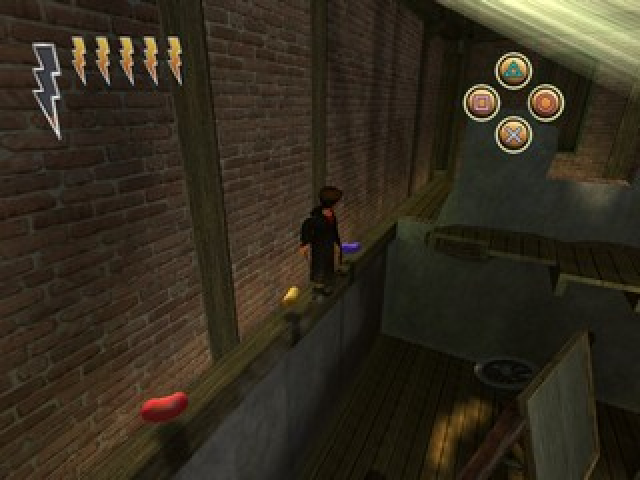
Though tough, Harry is not invulnerable. When pelted with Stink Pellets or confronted by nasty creatures, he'll be knocked over and lose stamina. The lightning bolts show Harry's stamina. If all Harry's stamina gets used up, Harry faints and is set back in his adventure.
Tip: Earning Extra Stamina
You can earn extra stamina by collecting Witches and Wizards Cards – one extra lightning bolt for every twenty cards collected.
Tip: Restoring Stamina
To partly restore stamina, get Harry to eat a Chocolate Frog or a Cauldron Cake. If you have a Wiggenweld potion in your Inventory then Harry will drink it and fully replenish his stamina. Look for cauldrons to fill Harry's potion vial.
Casting Spells
Hold the R1 button to mark the target with the sparkling indicator.
At first, you can only cast very basic spells at Ollivanders Wand Shop. After reading Miranda Goshawk's famous The Standard Book of Spells, you can learn how to cast the perfect spell.
Note on Assigning Spells
Before you can cast any spell, you need to assign it to your controller buttons. See Inventory for information on how to assign spells.
To Aim a Spell
1. Face in the direction of the desired target then press and hold the R1 button. If you can aim at the target, a sparkling indicator appears around it.
Tip: Aiming
You don't always need to press the R1 button, but you always need to face the target.
2. As soon as you've aimed, press the chosen spell button and Harry casts the spell.
•
Press the button to try to dodge any projectiles or spells.
Note: Holding R1
Keep the R1 button held down until the spell is cast or you may miss the target!
Targeting Multiple Objects
If Harry encounters multiple opponents, you can target each of them in turn as long as they are in front of Harry. Press the R1 button repeatedly to cycle through the potential targets.
Tip: Experimenting with Spells
Try spells on everyday objects. A well-aimed Flipendo or Incendio could reap valuable rewards!
Advanced Spell Casting
As Harry progresses through his classes, he'll come across many challenges, which could help him learn new spells. Each additional spell can open up gateways to new realms and adventures.
How To Cast A Perfect Powered-Up Spell
1. First, make sure Harry has a copy of The Standard Book of Spells in his Inventory. Without it,


_1.jpg)
_1.png)



.png)

.png)



.png)

 (En,Fr,De,Es,It).png)