GETTING STARTED
Set up your PlayStation®2 computer entertainment system according to the instructions supplied with your system. Check that the system is turned on (the on/standby indicator is green).
Press the OPEN button to open the disc cover. Place the JUSTICE LEAGUE HEROES™ disc with the label side facing up in the disc holder, and then close the disc cover.
Attach game controllers and other peripherals as appropriate. Follow the on-screen instructions and refer to this manual for information on using the software.
MEMORY CARD (8MB) (for PlayStation®2)
To save game settings and progress, insert a memory card (8MB) (for PlayStation®2) into MEMORY CARD slot 1 of your PlayStation®2 system.
You can load saved game data from the same memory card or any memory card (8MB) (for PlayStation®2) containing previously saved games.
CONTROLLER
DUALSHOCK 2 ANALOG CONTROLLER CONFIGURATIONS
•
left analog stick (L3 button when pushed down)
•
right analog stick (R3 button when pushed down)
JUSTICE LEAGUE HEROES has both single-player and two-player game modes. For single-player games, connect a DUALSHOCK®2 analog controller to controller port 1 of your PlayStation®2 system before starting play.
For two-player games, connect a second DUALSHOCK®2 analog controller to controller port 2 of your PlayStation®2 system.
THE MENUS
BASIC MENU CONTROLS
•
Press the button to begin.
•
Use the left analog stick or directional buttons to view and cycle through the different game options.
•
Press the button to make a selection, accept changes to an option setting or progress to the next screen.
•
Press the button within a sub menu to return to the previous screen.
MAIN MENU
Start New Game
Start a new game. Select one player or two players when prompted. Select difficulty level from Easy, Medium, or Hard. (Elite and Superhero difficulty levels will be unlocked upon completion of game.)
Continued Play
Restart the game using characters from a completed game. Now you can continue to level up the Heroes to their maximum abilities. When starting the game again, you can select a different level of difficulty from the previous play-through.
Load Saved Game
This menu offers you a choice of previously saved games. Select the saved game you would like to play and press the button to load.
Options
Make the following option adjustments using the menus provided. Press the button to select and confirm an option, adjust settings with the directional buttons or left analog stick, and return to the previous screen with the button.
Set the brightness level (0-100) using the slider provided.
Set the music volume (0-100) using the slider provided.
Set the SFX volume (0-100) using the slider provided.
Change the distribution of experience the characters pick up. The number shown is the percentage the character who picked up the experience bubble receives.
Switch to ON to display the amount of damage your Hero inflicts on enemies.
Set the controller vibration ON/OFF.
Extras
View the cinematics from JUSTICE LEAGUE HEROES (once unlocked) and trailers for upcoming DVD releases for Smallville, Justice League Unlimited and Batman Beyond.
Credits
View the full list of game credits.
HEROIC METER
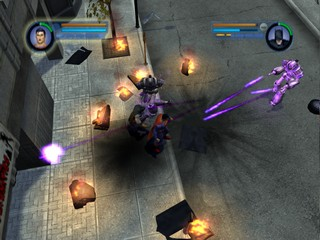
The Heroic Meter increases as the Heroes flawlessly deal out damage to their enemies. Bonuses are awarded when the meter is full, signalling a Heroic attack.
The Heroic Meter is filled by delivering complex combinations — simple punches or superpowers will fill the meter but will take much longer. The Heroic Meter is drained if the Heroes receive any damage.
MESSAGES
Text below the HUD gives messages about pick-ups and possible actions.
ENEMY HEALTH METER
The Enemy Health Meter (located at the bottom of the screen) shows how close the Heroes are to defeating their current enemy.
ATTACK STATUS
In single-player mode, you can set your partnering AI Hero's attack status, choosing from:
•
Normal (directional buttons)
•
Offensive (directional buttons)
•
Defensive (directional buttons)
MAPS
You can view the map by pushing in the button (push in right analog stick). Push the button repeatedly to toggle between large view, small view, and off.
THE STATS SCREEN
Press the button to access the Stats Screen for the Hero you are currently controlling. To swap Heroes while in the Stats Screen, press the button.
•
In two-player games, if either player presses the SELECT button, the game will pause and the Stats Screen will be displayed. The screen is divided vertically, displaying stats for both Heroes. Both players