Introduction
Legends of Wrestling 2 brings together iconic professional wrestlers like Hulk Hogan, Andre The Giant, and Bret "Hitman" Hart for ultimate mat mayhem. Guide a grappler through a grueling Career, take on single Exhibition matches, or create your own legendary wrestler. The game offers Tag Team action, Tournaments, and plenty of punishing moves.
Experience steel cage savagery and last-gasp ladder matches. Special features include a Shop for in-game goodies and a Theater for exclusive interviews and more.
Menu Navigation
•
Directional buttons: Move cursor/highlight
•
Left analog stick: Move cursor/highlight
Main Menu
Press the START button at the title screen to advance to the Main Menu.
•
EXHIBITION: Play a variety of Standard and Tag Team matches against the computer or human player(s).
•
CAREER: Choose a wrestler and battle your way through an entire career to earn your coveted belt.
•
CREATE: Create your very own wrestling legend to compete wherever you like.
•
TOURNAMENT: Enter a Vs., Tag Team or Tag Belt Tournament with up to sixteen teams. A chance to earn coins, too.
•
SHOP: Enter the Shop to access special goodies and spend your winnings.
•
THEATER: Enjoy unique game content such as wrestler interviews, Career endings, and original concept art.
•
OPTIONS: Adjust your settings for the ultimate gaming experience.
Situations From Behind Tie-Up
Example: Vertical Suplex ISP
•
button: Hanging Vertical Suplex (Vertical Suplex ISP Attack 1)
•
button: Hanging Brainbuster (Vertical Suplex ISP Attack 2)
•
button: Snap Suplex (Vertical Suplex ISP Attack 3)
•
button: Fisherman Buster (Vertical Suplex ISP Attack 4)
If you do not press another button, you will do your default move. If you have more than one move from the ISP, press the button to perform your second move.
If you have all four possible ISP moves, press the button for the first, the button for the second, the button for the third, and the button for the fourth ISP move. This applies to all ISPs (Holding Legs, Choke, all Behind Tie-up ISPs) in the game. You can also check your move set in Create A Legend to see and assign moves for button presses in each situation.
From the Turnbuckle
Once your wrestler climbs the turnbuckle, they can launch an aerial move. Press the L1 button to climb the turnbuckle, then press the or button to deliver your airborne gift. Press the L1 button to cancel the move and climb down.
Example: Standing on Turnbuckle
Outside the Ring
Press the L1 button to climb over the ropes. Press the directional buttons and the L1 button to climb down to the floor or back into the ring.
Try pressing the, A, O or buttons in any situation outside the ring (on the apron, on the floor) to see what moves you can do.
Weapons and Objects
Press the R2 button to pick up a handy object or weapon.
Example: Holding Weapon
Ladders
•
button: Open and position the ladder.
•
button: Throw or drop the ladder.
•
button: Close the ladder.
•
button: Try out this button.
Game Display
•
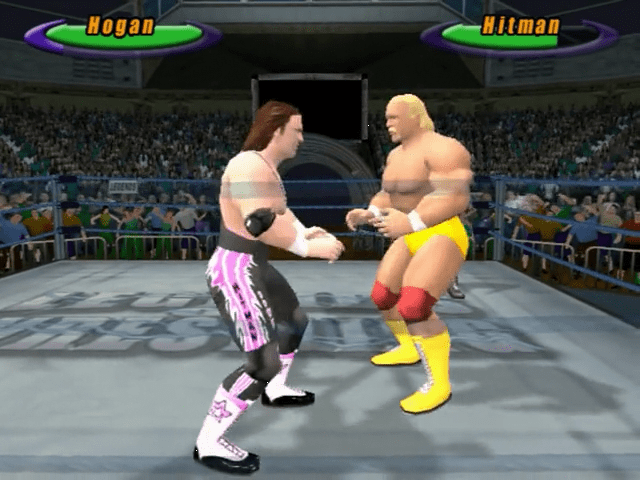
HEALTH METER: As you take damage, the meter under your name turns from blue to red as it empties. The lower it gets, the easier you are to be pinned or submitted.
•
COMBO/REVERSAL METER: At times, a yellow box appears below the Health Meter. As the box moves, a red dot travels along the edge. If you can press the button while the red dot is over the yellow box, you'll reverse your opponent's move! Try to extend or combo your move!
•
FINISHER METER: Around the edge of the Health Meter is the Finisher Meter. When this meter is full and flashing and you have your opponent in the proper situation, you can perform your Finishing Move. You may perform your finisher by pressing any direction on the directional button.
•
STUN METER: When the Stun Meter appears, it's time to mash the button like there's no tomorrow, or there very soon won't be.
Pausing the Action
Press the START button at any time during play to pause the action and bring up the Pause Menu.
•
RESUME: Resume the current match.
•
MOTION BARS: Turn reversal, combo, and stun meters OFF or ON.
•
HEALTH METERS: Turn the Health Meters ON or OFF. When OFF, it's pretty hard to tell who's hurt more.
•
EXCITE METER: In career mode, turn Excite Meter ON or OFF. When ON, the crowd excitement helps you.
•
SFX: Adjust sound effects volume level sliders.
•
MUSIC: Adjust music volume level sliders.
.png)


.png)
