STARTING THE GAME
Set up your PlayStation 2 computer entertainment system according to the instructions in its Instruction Manual. Make sure the MAIN POWER switch (located at the back of the console) is turned on.
Press the RESET button. When the power indicator lights up, press the open button and the disc tray will open.
Place the Looney Tunes: Back in Action disc on the disc tray with the label side facing up. Press the open button again and the disc tray will close. Attach game controllers and other peripherals, as appropriate.
Follow on-screen instructions and refer to this manual for information on using the software.
PLAYSTATION 2 COMPUTER ENTERTAINMENT SYSTEM
COMMAND REFERENCE
DUALSHOCK 2 ANALOG CONTROLLER CONFIGURATIONS
•
directional buttons- (D-buttons)
•
left analog stick (L3 button when pushed down)
•
right analog stick (R3 button when pushed down)
SETTING UP THE GAME
Let's talk you through the basics, Looney Tunes fans! MAIN MENU
Begin action at the Main menu...
Default options are listed in bold in this manual.
Choose from three Film Reels (A, B and C) from which you can play and save a game. Select a Film Reel by bopping it from underneath (press the button to jump). You can then either Play a game, have a quick go at a Traffic Attack, Erase a game or check out your Score.
TO START YOUR LOONEY TUNES ADVENTURE
1. Press the left analog stick to highlight PLAY.
2. At the Map Screen, select the available stage you would like to play. Press the button to confirm selection.
When you select PLAY for the first time, the Looney Tunes intro is played out and you automatically begin the game. Whenever you select PLAY again, you will be taken to the Map Screen. 3. Press the left analog stick to highlight the Challenge you wish to play and press the button to begin playing the game.
There are five challenges per stage and four bonus challenges to find in each level. A new Challenge becomes available when you complete the previous one.
PLAYING THE GAME
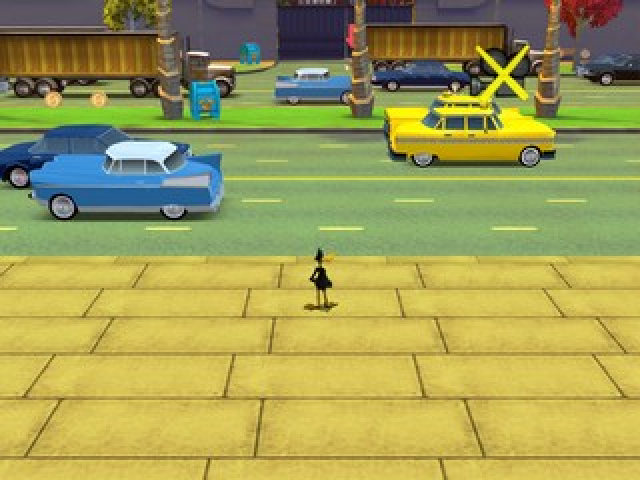
To have any chance of tracking down the Blue Monkey Diamond, you're going to need all the help you can get. Luckily for you, with their different skills Bugs and Daffy make an excellent team. So what are you waiting for? Learn the basics and start playing! "Toons" refers to Bugs and Daffy. An active toon is the playable toon that you are currently controlling. The inactive toon is the character you are not playing and is off screen. He often appears in the Toon Bubble. GAMEPLAY SCREEN
Not sure what's what? Then read on...
The following will appear on your screen from time to time:
•
Carrots: The Carrot shows how much health you have remaining. It appears when it has depleted or been replenished.
•
Action Button Icon: This multi-task button (the button) allows you to perform a multitude of actions.
•
Munkeys Collected: Displays the number of Munkeys caught so far. It appears whenever you manage to catch a Munkey.
•
Statues Collected: Indicates how many Michigan J. Frog statues you have collected within your current stage. It appears whenever you pick up a Michigan J. Frog statue.
•
Munnies: Shows you the total amount of Munnies accumulated by both Bugs and Daffy. •
Toon Bubble: When one toon is inactive and off-screen, a Toon Bubble will appear in the bottom right-hand corner of the screen. The Toon Bubble is an invaluable link between Bugs and Daffy, who will provide you with either encouragement or jeers. Whenever both toons are on-screen at the same time, the Toon Bubble will disappear. •
ACME Birdseed Boxes: Shows you the total amount of ACME Birdseed Boxes accumulated by both Bugs and Daffy. •
No Camera Icon: This icon appears whenever you are unable to control the camera.
TOON TIPS
Need advice? Along the way, you are given Toon Tips. These helpful hints pop up on-screen whenever information is needed.
MONKEYS
Once upon a time, these little creatures were innocent people. Unfortunately, they were transformed into Munkeys by the evil ACME Chairman, and now they roam the world. There are five Munkeys to capture on each stage and four Bonus Munkeys.
Other toons have managed to bag Munkeys but have no use for them. So by doing little favors for these crazy characters or by offering them Munnies, they will be more than happy to hand them over!
When you successfully complete a challenge, the location of a Munkey is revealed to you. Get to this Munkey and capture him by simply bumping into him. Only by bagging every Munkey are you able to enter the final challenge. If you fail to collect at least 35 Munkeys, then the Blue Monkey Diamond cannot be
.png)


.png)
.png)
.png)

.png)


 (En,Fr,De,Es,It).png)


_1.png)



_1.png)



.png)
_1.jpg)