Beginning a Game
•
Place a Memory Card (8MB) (for PlayStation®2) in MEMORY CARD slot 1. You will need at least 57 KB to save data for one game. Refer to your PlayStation 2 user's manual for details on using memory cards. •
Set up your PlayStation 2 and place the Mystic Heroes™ disc in the disc tray following the instruction in "Getting Started" on page 2. The opening movie will start. Pressing the START button will take you directly to the Title Screen. Select a Mode
In the Title Screen, press the START button to select the Mode you want to play.
•
New Game: Play the Story Mode.
•
Continue: Play the Story Mode from a previously saved point.
•
Survival: How far can you go in this challenge mode?
•
Game Info: View High Scores, the Rune Dictionary, and Character Profiles.
•
Settings: Change game settings.
•
Multi Play: Play the Multi Play Mode.
•
Mission Mode: Complete various missions!
What is Free Mode?
When you clear Story Mode, Free Mode becomes available, and you can begin play at any of the stages.
You can only select the character(s) you used to clear Story Mode. To continue the development of your character, match the difficulty of Free Mode with that of the cleared Story Mode. For example, if you cleared Story Mode on Normal, set Free Mode to Normal.
Save/Load
Save
Story Mode data can be saved at the Pre-Battle Menu. You can save a maximum of 5 games on one memory card. You have the choice to return to the Title Screen following the save.
Load
Selecting [Continue] from the Title Screen allows you to load data.
Game Info
In the Game Info screen, you can view the following items.
•
High Scores: View High Scores based on Time, Total Points, Enemies Defeated, and Best Combo.
•
Character Profiles: View the profiles of the various characters.
•
Rune Dictionary: View the runes you have gathered during play.
Settings
You can change various game settings in Settings.
•
Brightness: Adjust the brightness of the game on your TV.
•
Sound: Switch between Stereo and Mono.
•
BGM/SE Volume: Adjust the volume of the in-game music and sound effects.
•
Vibration: Turn vibration ON or OFF.
•
Camera: Switch between Normal and Reverse targeting. Reverse - Up and Down are reversed for movement of the camera.
•
Targeting: Switch between Normal and Reverse targeting. Reverse - Up and Down are reversed for movement of the sight.
Story Mode
Defeat the enemies scattered throughout the map and clear the stage! There are a total of 8 stages, with a maximum of 5 maps per stage.
Playing the Game
1. Select a Character: Select New Game from the main menu, then choose a difficulty level from Easy, Normal and Hard. After the opening movie finishes, select your character in the Select Hero screen. The story will begin after you have made your choice. (After clearing the game, if you begin a new game at the same difficulty level, you can Inherit Stats that you accumulated in the previous game.)
2. Pre-Battle Screen: A number of things can be done at this screen: save data, review player information, and change runes. Once you're ready, select [Start Battle] and press the button.
3. Begin Battle!: The objective of the stage will be displayed and you will be asked whether you want to start the battle or not. Select [Yes] and press the button to begin the battle. Be careful, you lose if your health falls to 0.
4. Aim for the Final Map!: A main boss character is located on the final map of each stage. Defeating the boss clears the stage.
5. Stage Cleared!: Your points are shown on this screen. Points are awarded based on such factors as time, number of enemies defeated, and the number of allies you lose.
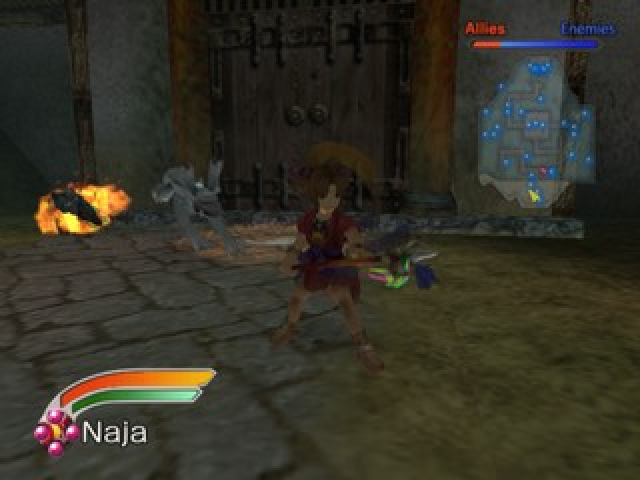
Battle Screen
•
Leader: A little different from your normal peon.
•
Magic Gauge: This decreases when you use spells.
•
Affinities: Shows the character's affinity and that of his equipped spells.
•
Battle Status: Red is your force. Blue is the enemy. The more of your color that shows, the better you're doing overall.
Pre-Battle Screen
•
Save: Save data for the story mode.
•
Start Battle: Start the battle.
•
Stage 1: The Road to Castle Kokei. Invited by Raja, Shiga and Lani head for the city Kokei. But, it's not Raja that is waiting for them.... •
Map Display: (Press the Button) View a map of the terrain for this level.
Hints for the Story Mode
Nurturing your character
Break all of the vases you can find
.png)

.png)
