PlayStation 2 Components
Multitap (for PlayStation 2) Components
Getting Started
1. Set up your PlayStation®2 computer entertainment system according to the instructions supplied with your system.
2. Check that the system is turned on (the on/standby indicator is green).
3. Insert the NBA LIVE 09 disc in the system with the label side facing up.
4. Attach game controllers and other peripherals as appropriate.
5. Follow the on-screen instructions and refer to this manual for information on using the software.
Multitap Note
When using the multitap (for PlayStation®2), a controller must be connected to controller port 1-A.
User Profiles
Create a new Profile to save personal statistics, accomplishments, and settings in various game modes to your memory card (8MB) (for PlayStation®2). You can create more than one Profile.
All Profiles are managed from the Head-to-Head Tracker.
Head-to-Head Tracker
Keep track of your wins and losses for single and multiplayer games. Check your overall record and any ongoing winning streaks to see how your team measures up.
Select Jerseys Screen
Choose a Home, Away, Alternate, Practice, or classic throwback jersey before tip-off.
Starting Lineups Screen
Strategize before tip-off by swapping hot and cold players in and out of the starting lineup. Hot players have a flame icon; cold shooters have a snowflake. You can bring players back into the game using the pause menu.
Player Hotspots
Identify a player's hot and cold-spots on the court using the Hotspot grid. Shooting from a red area increases the likelihood of making a shot, while shooting from a blue area decreases it.
Player Hot Spots are also shown inside the player indicator (at his feet). If the indicator pulses red, the player is hot; if it pulses blue, the player is cold.
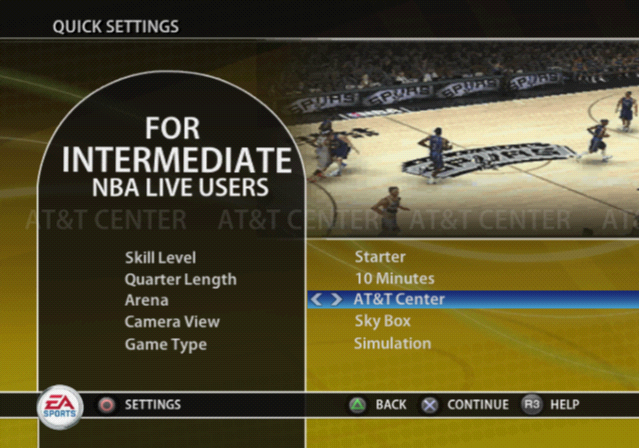
Quick Settings
Customize your game atmosphere by selecting the Skill Level, Quarter Length, Arena location, Camera View, and Game Type. You can also adjust rules and preferences from the Settings screen or the pause menu.
On the Court
Quick Plays
Direct traffic on both ends of the court. On offense, you can run Isolation, Post Up, Pick-and-Roll, or Pick-and-Pop plays. On defense, 2-3 Zone, Double Team, Full Court Man-to-Man, and Half Court Man-to-Man options are available.
Double tap the Directional buttons on offense or defense to bring up a set of customizable plays via the Playbook screen in the pause menu.
Role Icons
Understand a player's specialty with on-court role icons: Generic, White Star, and Gold Star.
Go-To Move
Create opportunities with signature ballhandling and shooting techniques like fadeaways, step-backs, dunks, and putbacks. Master the signature moves of NBA's elite players.
If you're in the right spot, a superstar like Kobe Bryant will uncork his deadly accurate fadeaway shot. Unveil your most dominating Go-To Move when you need it most.
EA SPORTS™ Freestyle Control
Express yourself by pressing the right analog stick in any direction while dribbling to perform a Freestyle move. Making the same shape on the right analog stick results in the same move every time.
You can create combinations of Freestyle moves; use Individual Practice mode to perfect them. Remember that not all players have the same moves.
Touch Passing
Perform a second touch pass by pressing the pass button and the left analog stick in the desired direction while a pass is in mid-air.
EA SPORTS™ Defensive Assist
Trigger Defensive Assist by pressing the L1 button when defending a ball-handler (press the left analog stick to stay in front of your man). This allows you to force turnovers or set up double-teams.
•
Press the button to draw a charge.
•
Press the button or press the right analog stick for a steal attempt.
Playbook
Adjust defensive matchups, defensive playbook, offensive playbook, and team strategies mid-game. The Playbook menu is accessible through the pause menu.
Momentum
The momentum bar appears under the scoreboard when your team generates significant momentum through scoring runs, defensive stops, and more.
Player Stamina Meters
A player's stamina meter, located next to their feet, decreases as they tire, indicating when to substitute them.
Saving and Loading
Save your progress to your memory card (8MB) (for PlayStation®2) in MEMORY CARD slot 1 before exiting a game mode or menu where changes have been made. Unsaved information will be lost. You can also save or load manually from the LOAD/SAVE screen.
Game Modes
Season
Play a 29-, 58-, or 82-game season to make a run for the championship. Select any team using current NBA rosters or assemble a squad through a Fantasy Draft. You can randomize your schedule. Trades and roster moves are allowed.
.png)


.png)








.png)


_1.jpg)



_1.png)

.png)
.png)


_1.png)
