NEW NBA ALL-STAR WEEKEND
Use these moves during the All-Star events.
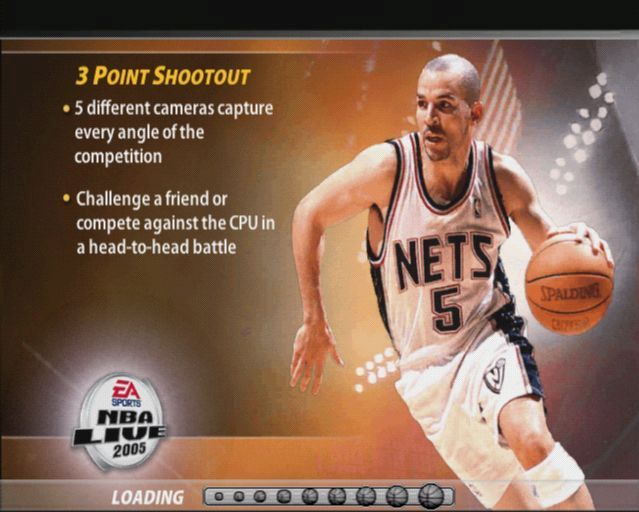
3 POINT SHOOTOUT
•
ACTION: Switch camera view
•
COMMAND: button, button, button, or button (press to jump, release to shoot)
SLAM DUNK CONTEST (ON GROUND)
•
ACTION: 1 foot 180 Gather
•
ACTION: 2 foot 180 Gather
•
COMMAND: right analog stick
•
COMMAND: left analog stick
•
COMMAND: L1 button/ B1 button
SLAM DUNK CONTEST (IN AIR)
•
ACTION: Rotate player (on 180 Gathers)
•
COMMAND: left analog stick
•
COMMAND: L1 button/R1 button
PLAY NOW
Get your feet wet with an exhibition game against your toughest rival in Play Now mode.
TEAM SELECT SCREEN
•
To choose a team, press the D-button to choose your desired team when the controller icon is set to either Home or Away.
•
To view (or edit) starting lineups, press the button.
•
To select teams at random, press the R1 button.
•
Press the button to continue to the Jersey Select screen.
JERSEY SELECT SCREEN
From the Jersey Select screen you have the option to change your team's jersey for the upcoming game. Press the D-button to select a Home, Away, Alternate, Hardwood Classics, or Practice jersey.
Some jerseys have to be unlocked in the NBA Store (using earned Task List points. See p. 12).
SETTINGS
Select the skill level for the next game, along with quarter length, arena location, and camera view. You can also adjust the rules, preferences, gameplay settings, and in-game settings from the Settings screen.
ON THE COURT
Elevate your game on both ends of the court with NBA LIVE 2005.
GAME SCREEN
EA SPORTS™ FREESTYLE CONTROL
Express yourself with EA SPORTS Freestyle Control. While dribbling, press the right analog stick in any direction to break out a Freestyle move. Making the same shape on the right analog stick results in the same move every time. You can also create combinations of Freestyle moves, so be sure to use Individual Practice mode to help perfect these moves.
OFF-BALL SWITCH
Control players on the floor with or without the ball. Call for passes, have a teammate shoot, or set a screen with the push of a button.
Once you activate Off-Ball Switch mode (R3 button), switch to another player on the court by pressing the corresponding button callout.
QUICK PLAYS
Direct traffic on both ends of the court by calling a Quick Play. On offense, you can run plays such as Isolation, Post Up, Pick-and-Roll, Basket Cut plays, and more.
On defense, the 2-3 Zone, Double Team, Full Court Man to Man, and Half Court Man to Man defensive options (and more) are available. You can change your Quick Play settings on your controller via the Playbook screen.
PLAYBOOK
Adjust to your opponent's playing style mid-game. You have the option to adjust your defensive matchups, defensive playbook, offensive playbook, and team strategies.
The Playbook menu is accessible only through the Pause menu during a game.
PLAYER ICONS
During gameplay, players are represented with an icon indicating their skill specialty. Use these players to your advantage.
PLAY ONLINE
Go Freestyle against the best basketball players in the country.
REGISTRATION AND TERMS
REGISTRATION REQUIRED TO ACCESS ONLINE FEATURES. TERMS & CONDITIONS AND FEATURE UPDATES ARE FOUND AT www.easports.com. YOU MUST BE 13+ TO REGISTER ONLINE.
EA MAY RETIRE ONLINE FEATURES AFTER 30 DAYS NOTICE POSTED ON www.easports.com OR 30 DAYS AFTER THE LAST DAY OF THE 2004-2005 NBA SEASON.
DNAS (DYNAMIC NETWORK AUTHENTICATION SYSTEM)
This software uses "DNAS" (Dynamic Network Authentication System), a proprietary authentication system created by Sony Computer Entertainment Inc. ("SCEI"). "DNAS" retrieves information about user's hardware and software for authentication, copy protection, account blocking, system, rules, or game management and other purposes.
The information collected does not identify the user personally and will not be shared with any non-SCE company. A PUBLISHER CAN COMBINE THIS INFORMATION WITH PERSONALLY IDENTIFYING INFORMATION FROM THE PUBLISHER'S RECORDS IF THE USER PROVIDES THE PERSONALLY IDENTIFYING INFORMATION. BEFORE PROVIDING ANY PERSONAL INFORMATION TO A PUBLISHER, PLEASE BE SURE TO REVIEW THE PUBLISHER'S PRIVACY POLICY AND TERMS
.png)

.png)