PlayStation 2 Setup
Set up your PlayStation 2 computer entertainment system using its Instruction Manual. Ensure the MAIN POWER switch on the back of the console is ON. •
When the power indicator lights up, press the OPEN button to open the disc tray.
•
Place the Saturday Night Speedway™ disc on the disc tray with the label side facing up.
•
Press the OPEN button again to close the disc tray.
•
Attach game controllers and other peripherals as appropriate.
•
Follow on-screen instructions and refer to this manual for software information.
Memory Card (8MB)
To save game settings and progress, insert a memory card (8MB) (for PlayStation®2) into MEMORY CARD slot 1. You can load saved game data from the same memory card, or from any memory card containing previously saved Saturday Night Speedway games.
At least 417 KB of free space must be available to save. If less free space exists, erase older data before saving. Do not remove the memory card or turn off the power to the PlayStation®2 while data is being saved or loaded, as your game data may be lost.
DUALSHOCK®2 Analog Controller
Saturday Night Speedway is best played with the DUALSHOCK®2 analog controller. The controller should be connected to controller port 1, and the ANALOG mode button and mode indicator should be red (ON).
Introduction
Welcome to Saturday Night Speedway — the complete dirt track racing experience. Speedway racing is a popular spectator sport in the United States, raced on over 700 tracks.
Saturday Night Speedway offers 13 actual tracks from across the U.S., with racing in three popular dirt car classes: Pro Stocks, Midgets, and Late Models.
Game Modes
You can compete in a single race or individual class championship (solo or with a friend). Test your skills, lines, and car setups in Time Trial Mode, or challenge your racing sponsorship and money management in Career Mode.
On your way to becoming a champion, you can unlock extra vehicles, vehicle skins, and fantasy tracks. Trophies and game rewards are presented as you progress.
Racing on Dirt
Racing on a dirt track is different from racing on a paved surface. Your car will want to spin out in corners; you must control the spin and slide to be the fastest.
Control your car by turning into the slide, then easing off the gas and/or applying the brake. Once you start to control the slide, reapply the gas right away. Start as an Amateur and work your way up to Pro difficulty.
Saturday Night Speedway tests your nerve and skills, so concentrate and practice. Don't be afraid to take risks.
Tip: Power Slide
To take corners in a "power slide," steer hard into the turn while keeping your foot on the accelerator. Counter steer back and forth to create a "fishtailing" effect. As you exit the turn, let off the gas for a split second, then hit it again to straighten out.
Glance Function
A unique function in Saturday Night Speedway is the ability to glance left and right using Controls Configuration B (L1 button / R1 button) or C (L2 button / R2 button). Speedway cars often slide deeply into corners, and it can be useful to look to your side during cornering to see other cars.
Note: This "glance" function simulates the type and range of movement available to a driver, so it is only available in bumper or cockpit view.
Tear-Offs
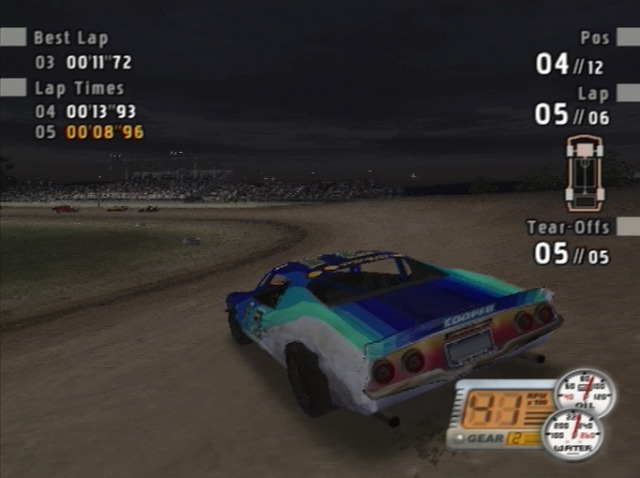
When racing on a dirt track in an open-cockpit vehicle, mud will get on your visor. Speedway drivers cover their helmet visors with strips of clear plastic called tear-offs, which can be removed one at a time to clear their view.
Saturday Night Speedway simulates this with the tear-off control. Each time you press the tear-off button (R1 button in Controls Configuration A; button in Controls Configuration B and C), the outermost strip of plastic on your visor will be removed, clearing your view temporarily.
It's important to use tear-offs carefully. If you run out before the race is over, you won't be able to clear your vision, making it impossible to see the finish line, walls, or other cars.
Gears
Cars in Saturday Night Speedway have varying transmission setups. Pro Stocks have a four-speed transmission, and Late Models have a two-speed transmission. You can tune the ratio of each gear individually for both Pro Stocks and Late Models.
Midgets have no gear shifting because they lack a gearbox. Instead, they use a direct drive with a quick-change transmission, located behind the rear assembly. This allows you to set the overall Drive Ratio of the transmission on Midgets.
See the "Car Tuning" section for more information on setting the Drive Ratio of gears and transmissions.
Quick Start Guide
The quickest way to get into Saturday Night Speedway action is to jump into a single race.
•
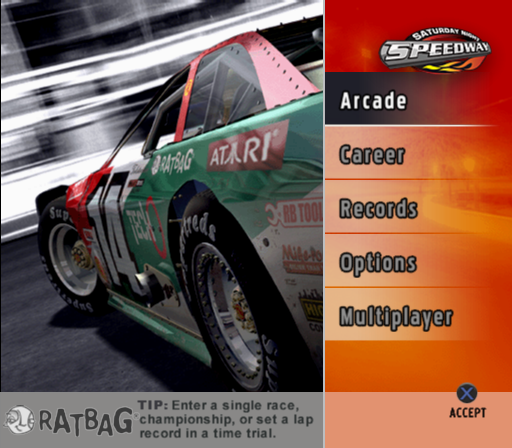
After the introduction, select Arcade Mode from the Main Menu.
•
Select Single Race from the Mode Select screen.
•
Choose your car class, car model, car skin, and transmission type.
•
Accept your selections to move to track selection.
•
Select the track, event length, and race difficulty.
•
Choose Amateur or Semi-Pro difficulty for beginners, or Pro difficulty if you're experienced.
•
To change the event format, adjust Race Length (number of laps), Race Format (qualifying stage then "A Main" race), or include practice, qualifying, heat races, and main race for a full event.


_1.png)
.png)


.png)

.png)
.png)
_1.png)


