STARTING THE GAME
1. Set up your PlayStation®2 computer entertainment system according to the instructions in its Instruction Manual.
2. Make sure the MAIN POWER switch (located at the back of the console) is turned on.
3. Press the RESET button. When the power indicator lights up, press the open button and the disc tray will open.
4. Place The Simpsons™ Skateboarding disc on the disc tray with the label side facing up. Press the open button again and the disc tray will close.
5. Attach game controllers and other peripherals, as appropriate.
6. Follow on-screen instructions and refer to this manual for information on using the software.
SETTING UP THE GAME
Before you can get all fancy-pants with your game mode selection, you have to take care of a couple things first.
To set up a single player game:
1. Select NEW GAME or LOAD GAME from the Main menu.
2. Select SKATE THE TOUR from the Game Type pop-up. The Character Select screen appears.
3. Press the D-button to highlight an unlocked character, then press the button to select. The character skates down the ramp.
4. Press the button again to confirm your character. If you have any unlocked boards, the Board Select window appears.
5. Press the D-button to highlight an unlocked board, then press the button to select. The Level Select window appears.
6. Press the D-button to highlight an unlocked level, then press the button to select. The Tour menu appears.
PLAYING THE GAME
Now don't get nervous. Just because the entire town of Springfield is watching your every move doesn't mean you're going to choke. Just stay calm. STAY CALM! Remember your moves and you'll be fine. Or, you might land flat on your face and be utterly humiliated. You never know.
Following a Skillz School, Skatefest, or Timed Trick Contest game, the What Next? screen appears. From here you can retry the current game, change levels, enter the Shop, and more.
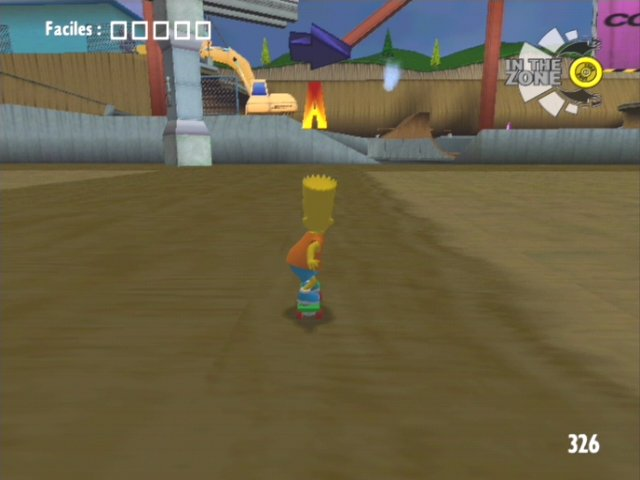
GAME SCREEN
•
Tricks you just pulled off
IN THE ZONE
Pull off a rapid series of cool tricks to add to your In The Zone meter. Once the meter is full, all of your attributes are temporarily boosted—sort of like Bart on an all-syrup Squishee rush—and you can pull off ultra cool In The Zone Grabs and Inverts. If you biff, either while you're building up the meter or while you're In The Zone, the meter resets to zero.
The In The Zone meter only appears in Skillz School when necessary for the current trick.
PAUSE MENU
If somebody tried to tell you how to ride your board, would you listen? Heck no! So why would you let somebody tell you which course to ride, or which music to listen to? From the Pause menu, you can set up the game the way you like to, not the way The Man tells you to!
The following is the Pause menu for Skatefest and Timed Trick Contest modes.
•
Resume: Continue your current game
•
Set Start: Restart at Start Point
•
Restart: Show the objectives for the level
•
Show Objectives: Check out the commands for all tricks
•
Trick List: Select a new level for your current game
•
Shop: Spend you hard-earned cash to boost your attributes
•
Mode/Level Select: Access the Options window
•
Options: Return to the title screen
The Skillz School Pause menu differs from the above Pause menu in two regards: There is an additional BEGINNER TIPS option in Skillz School, but there is no SET START option.
Selecting RESTART from the Pause menu resets your score to zero.
SET START POINT
When you see one of these markers on the ground in Skatefest mode, you can choose this spot as your new starting point for the level. Afterwards, when you select RESTART in the Pause menu, you will restart at this point.
To choose a Start Point marker as your new start point, skate onto it and select SET START from the Pause menu.
OPTIONS
The Simpsons™ Skateboarding has more options than a Kwik-E-Mart candy rack. Come to the Options screen and see for yourself.
•
Change the music played during the game
•
Save a game to a memory card (8MB)(for PlayStation®2)
•
Toggle the vibration on your controller ON/OFF
•
Turn Kent Brockman's commentary ON/OFF
•
Load a game from a memory card
•
Change the overall sound level
•
View the high scores for the current level
•
View your unlocked cheat codes
•
The Grind Arrow gives you a visual idea of where you'll land when transferring from a grind
SHOP
After you earn the cold hard cash, the first thing you're gonna wanna do is spend it on boosting your attributes. Pay a visit to the Shop and get hooked up with better turning, faster speed, and more, provided you have the money to pay for it.

_1.png)

.png)


.png)
.png)


.png)
.png)
 (SGB Enhanced).png)

.png)