Table of Contents
Your Sega Saturn
1. Set up your Sega Saturn™ system by following the instructions in the Sega Saturn instruction manual. Plug in Control Pad 1 (Sega Saturn Control Pad™ or Sega Saturn 3D Control Pad™). For 2-player games, plug in Control Pad 2 also. Note: Fighters Megamix™ is for one or more players.
2. Place the Fighters Megamix disc, label side up, in the well of the CD tray and close the lid.
3. Turn on the TV or monitor and the Sega Saturn. The Sega Saturn logo will appear on screen. If nothing appears, turn the system off and make sure it is set up correctly before turning it on again. 4. If you wish to stop a game in progress and return to the onscreen Control Panel, simultaneously press Buttons A, B, C and Start on the Control Pad. When the Title screen appears, press again to access the Control Panel.
5. To reach the System Settings control panel, hold down the right or left shift button (Button L or R) while pressing the Reset button on the Sega Saturn console. Important: Your Sega Saturn compact disc contains a security code that allows the disc to be read. Be sure to keep the disc clean and handle it carefully. If your Sega Saturn system has trouble reading the disc, remove the disc and wipe it carefully, starting from the center of the disc and wiping straight out toward the edge. Quick Start
Can't wait to jump into the action? Here are some quick tips to get you where you want to go. Press Start from the Fighters Megamix Title screen to enter Mode Select. In Mode Select, select one of the following modes: •
1P Mode: Fight against the CPU in one of several battle courses.
•
Survival Mode: See how many opponents you can flatten before time runs out.
•
VS Mode: Play against a friend or the CPU.
•
Team Battle Mode: Pick teams and fight in elimination team play versus the CPU or a friend.
•
Training Mode: Work on your moves against a practice dummy.
•
Records: View the best records for 1P and Survival Mode.
•
Options: Change the configurations for several aspects of play, or sample sounds heard in the game.
The default key commands for the Control Pad in the fighting modes are: •
D-Pad: Control direction and movement
•
Start: Pause/restart game
•
Button X: Punch + Defense
•
Button Y: Kick + Defense
•
Button Z: Punch + Kick + Defense
A Note on the Megamix System
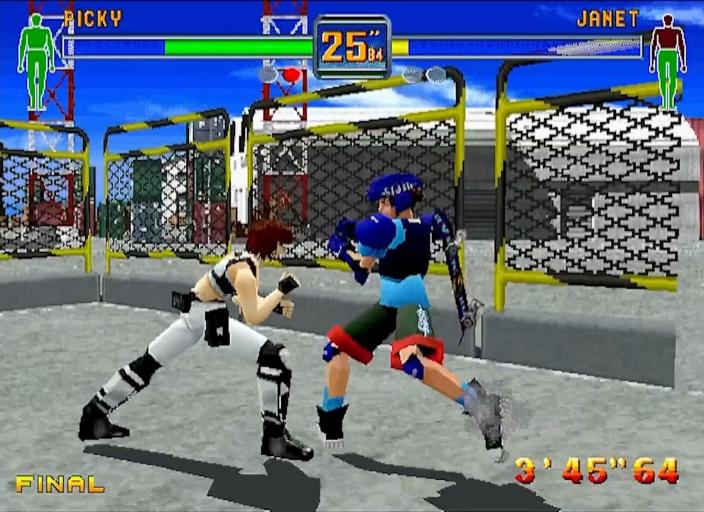
Fighters Megamix is a hybrid game incorporating some of the most popular features of both the Virtua Fighter 2 and Fighting Vipers fighting styles, with some new tricks from Virtua Fighter 3 thrown into the mix. Some of the things to watch out for include: Body Armor
The Fighting Vipers are wrapped up nice and fight in protective armor. The armor can be destroyed, but only with certain attacks. When they lose their armor, the Vipers are more vulnerable and exposed. (And more likely to catch a cold.) Walls/No Walls
There are two kinds of stages in Fighters Megamix - those with walls and those without. The Virtua Fighters may feel more comfortable with the borderless freedom of No Wall stages (especially now that there's no Ring Out). Vipers, on the other hand, are accustomed to the nowhere-to-run environments of a cozy razor-wire cage or in a candy glass elevator on the 70th floor.
Escape
Straight from the ROM of Virtua Fighter 3™, the hottest arcade fighting game around, the Escape command adds a new dimension (the third) to every fighter's range of motion. Step aside from a charging foe and let the physics of momentum work its magic. Each fighting mode has a slightly different set of rules and conditions, but the objective is essentially the same: knock your opponent's Life Gauge down to zero before losing your own Life or running out of time. See the sections relating to each individual fighting mode for details. Starting the Game
The Fighters Megamix Title screen appears following the Sega and AM2 logos. Watch the animated sequence that follows, or press Start to move forward to Mode Select. In Mode Select, press the D-Pad UP/DOWN to highlight modes and Button A or C to select the highlighted mode. •
1P Mode: Allows you to select a fighter and fight your way through preset courses of opponents.
•
Survival Mode: The object is to defeat as many opponents as possible within the time allotted.
•
VS Mode: You can play individual matches against the CPU, or another human-controlled fighter.
•
Team Battle Mode: Lets you create a team of fighters to pit against a CPU-controlled team, or one controlled by another player.
•
Training Mode: Hone your skills by practicing all of the moves for any fighter against a CPU-controlled dummy.
•
Records: Check out the records for 1P Mode course clear times and Survival Mode wins.
•
Options: Adjust several gameplay settings