Starting the Game
After inserting your Game Pak and turning on your Super NES, choose the desired mode with the Control Pad. Start the game by pressing the START button or the B button.
Game Modes
•
BATTLE: Challenge mode with real conditions for one or two players. Race against another player or compete against up to thirteen computer controlled opponents.
•
WORLD GRAND PRIX: Become the F-1 Champion of the World during an entire racing season. You can play alone or with someone else. •
TEST RUN: A good way to learn the different tracks. This mode allows you to practice alone; you can choose the circuit, the weather conditions and the number of laps desired.
Battle Mode Setup
•
1/ Circuit Select: Use the Control Pad to choose the circuit, the weather conditions (Dry, Half, Wet), set the "Trouble" function to ON or OFF, and determine the number of laps (30 laps maximum). Select EXIT or hit the B button to return to the "Machine Select" screen.
•
2/ Machine Select: Choose your car and validate your choice using the left/right arrows of the Control Pad. In two player mode, you can modify your choice using the Y button as long as your opponent hasn't validated their car choice.
•
3/ Opponent Select: Choose your opponents using the up/down arrows of the Control Pad and then the B button. Place the cursor on EXIT and validate when finished. You can choose between 1 and 13 opponents for single player, and between 0 and 12 for two players.
•
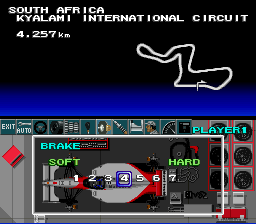
4/ Car Settings: Choose the items needed to fine tune your car by using the left/right arrows of the Control Pad. The game will start when you choose EXIT.
Post-Race Options
When the race is over, the records are displayed. You must choose one of the following options and validate your choice:
•
TRY AGAIN: Repeat the same race.
•
CHANGE CIRCUIT: Race again on a different track.
•
END GAME: End the game and return to the main menu.
World Grand Prix Setup
•
1/ Register your name: Select one player or two player mode to bring up the name registration screen. Enter your name using the Control Pad (red cursor for the first player, blue for the second). Choose escape to go on.
•
2/ Choice of the car: Choose your car using the Control Pad and validate. In two player mode, you can modify your choice using the Y button as long as your opponent hasn't validated their choice. A "Mode Select" screen will then be displayed.
Test Runs Setup
•
1/ Circuit Choice: Choose your circuit and weather condition.
•
2/ Car Choice: Choose your car and validate your choice.
•
3/ Settings: Choose the desired settings for your car.
•
4/ Departure from the Pit: You start from the pit. You can drive up to ten laps, or stop by pressing START + SELECT to return to the settings menu. To leave this mode, press RESET.
Pit Stops
To enter the pit, take the deceleration track indicated by the yellow arrows on the side of the road. Press the B button, and the necessary repairs will be made automatically.
If you want to change your tires, use the left/right arrows of the Control Pad and validate. When the pit stop is complete, you will automatically re-enter the race.
Saving Results and Settings
You can save three different race results and three different tracks in WORLD GRAND PRIX mode.
•
1/ CIRCUIT: If there is data to be saved, "SAVE" will be displayed along with the new number. Use the Control Pad to choose the file you would like to have on screen while you are racing. Validate with the B Button or with START. •
2/ SAVE: When a race is over, a Save screen is displayed. Choose the file (1, 2, 3) that you wish to save and validate.
•
3/ SAVE TRACK/CAR SETTINGS FILE: Choose the "DISK" icon (to the right) when viewing the CAR SETTINGS screen to open a circuit settings file. Use the left/right arrows of the Control Pad to save, and type the file name using the Control Pad.
Car Settings Options
•
AUTOMATIC SETTINGS: Automatic settings take into account the circuit and choose the parameters to be used.
•
STEERING: Modify the ease of steering. EASY makes steering easier, while HEAVY makes it more difficult. Type 1 automatically returns the wheel to position when you let go. Type 2 does not automatically return to position.
•
TIRES: Choose between DRY WEATHER and RAIN. SOFT tires offer more traction and grip better in dry conditions. HARD tires offer less traction, last longer, and grip better in wet conditions.
•
SPEED: Short gear ratios (LOW) mean faster acceleration but a lower maximum speed. Long gear ratios (HIGH) mean less abrupt acceleration but a higher maximum speed.
•
TRANSMISSION: Choose between automatic and manual. In automatic mode, you can still force a gear change by using the R Button to shift up and the L Button to downshift.
•
BRAKES: The closer you are to "SOFT", the more resistant your brakes will be, but they will be less effective. The closer you are to "HARD", the less resistant they will be, but they will be more effective.
•
SUSPENSION: Adjust the stability of your car's frame. A soft suspension is more effective on tracks with
.png)

.png)
_1.png)

.png)
.png)

.png)
.png)


.png)

.png)


.png)



.png)



.png)