Introduction
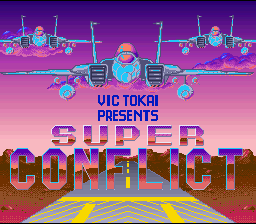
Super Conflict is a war-simulation game for one or two players. It requires military strategy and decision-making based on changing variables like terrain and enemy movement. The player maintains total control of land, air, and sea units. In one-player mode, the player controls the Blue forces against the computer across 5 skill levels and 55 scenarios. Two-player mode features head-to-head play with Blue and Red forces, including a handicapping feature to equalize different skill levels.
The goal is to destroy the opposing side's Flag Unit. In Levels 1-4, the Flag Unit is a tank, while Level 5 introduces a Flag Ship. If any Flag Unit is destroyed, the scenario ends. Remaining forces vary in strength, movement, and capabilities.
Beginning/Selecting a Game
•
Use Left or Right on the Control Pad to select One-Player, Two-Player, or Continue Game.
•
Use Up or Down on the Control Pad to switch to the option to be changed.
•
Use Left or Right on the Control Pad to change the highlighted option.
•
Press START to begin the game.
Game Styles and Options
•
One-Player: Player controls Blue forces against the computer.
•
Two-Player: Head-to-head play. Player 1 controls Blue forces; Player 2 controls Red forces.
•
3 Units / All Units: Determines how many units each side can utilize per turn. The 3 Unit mode is recommended for beginners.
•
Production Points: Determines which units can be produced in two-player scenarios with factories (values 3-16). This can also be used as a handicap.
•
Continue Game: Allows players to continue 1 of up to 5 saved campaigns. Highlight the desired game with Up or Down on the Control Pad and press the A Button to select. Reset the game entirely to escape this menu.
Scenario Select Screen
The game consists of 55 scenarios across 5 skill levels, saved via battery backup. Players must complete all necessary scenarios in a level to unlock the next level's darkened sector. Completed scenarios are marked with a star and can be replayed.
•
Level 1: 6 Scenarios (5 + 1 final)
•
Level 2: 9 Scenarios (8 + 1 final)
•
Level 3: 11 Scenarios (10 + 1 final)
•
Level 4: 13 Scenarios (12 + 1 final)
•
Level 5: 16 Scenarios (15 + 1 final)
Unit Movement
Selecting any action constitutes a turn and consumes one unit of fuel. Players can only take action with units of their corresponding color. The available actions are:
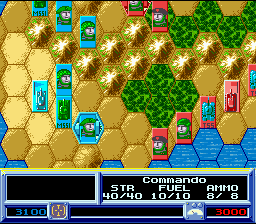
To move, place the cursor on a unit and press the A Button. Highlight the desired action and press the A Button. If MOVE is selected, the unit's movement range will highlight. Move the cursor to the destination hex and press A to execute.
Press the B Button to cancel an action. If battle is possible after moving but not desired, press B to darken the unit and make it inoperable for the rest of the turn.
Deploying Units
•
Highlight the factory or airport with the Control Pad and check the information window for stored units.
•
Highlight the factory or airport icon name and press the A Button.
•
Use Up or Down on the Control Pad to highlight the desired unit, then press the A Button to select.
•
Highlight an unoccupied adjacent hex and press the A Button to deploy.
Deploying a unit does not count as an action. Players can deploy as many units as they want or can during a turn, but deployed units must be moved normally.
Overview Mode
Press the Y Button during Normal Mode to shrink the scenario map and view it in its entirety. The map displays terrain types, Blue dots (Blue units/possessions), Red dots (Red units/possessions), and Black dots (neutral cities/airports).
Use the Control Pad to move the cursor to a new area and press the Y Button to close-up on that location.
Pause Menu
Press the START Button during Normal Mode to pause and access the following options:
•
Resume Play: Returns to the active game.
•
Game Rules: Accesses general help screens.
•
Preferences: Modifies game settings.
•
End Game: Ends the current scenario without saving.
Under Preferences, players can adjust:
•
Sound Effects: MONO/STEREO/OFF
Engaging the Enemy
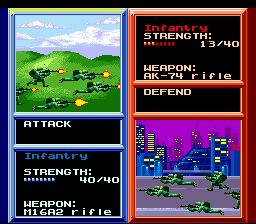
Opposing units can engage in battle from adjacent hexagons. Attacks can only be initiated during your turn. Highlight the BATTLE option, press the A Button, select the target unit, and press the A Button to engage.
Battle Modes
•
Short Mode: Automatically calculates and displays the outcome of the battle based on unit types and terrain, returning immediately to the strategic map.
•
Long Mode: Gives the player full control of their unit during battle through up to 4 rounds of action.
Long Mode Controls
•
A Button (Attack): 100% chance of firing, but suffers maximum damage if hit by return fire.
•
B Button (Switch Weapon): Switches weapons. The computer automatically selects the best weapon, but special weapons may have little effect on certain targets.
.png)

.png)
.png)
.png)


.png)


 (En,Fr,De).png)
.png)
