The Planets
Each planet features its own unique terrain, ranging from deserts with space moss to lush forests, arctic tundra, lava flows, and sulphurous lakes.
The landscape restricts your colony's layout and provides clues about potential enemy attack directions. You can move to a new planet at any time, but scenarios increase in difficulty.
The Aliens
Each planet supports a hostile alien race with a colony located out of map range. Spies can be funded to provide information on alien features, habits, military strength, and attack plans.
The Colony
You start each venture with a small nucleus colony of 100 settlers. You must construct living quarters, life support, hospitals, food domes, laboratories, and other facilities.
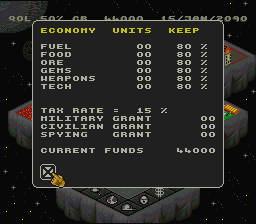
The Federation provides a Colony Grant for the first few years, after which you must rely on taxes and trade. Defense is a primary concern, requiring weapons, radar, tanks, and spaceships.
A map and radar facility displays surrounding areas, forces, enemy strength, and underground fuel and ore deposits. Research must be funded through Military and Civilian grants to invent new weapons and devices.
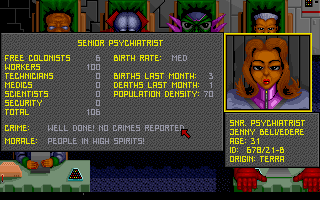
A team of six expert advisors keeps you informed of daily affairs and problems. Their counsel chambers are open unless there is an energy shortage or the Command Center is destroyed.
The Mission
Your ultimate goal is to raise the colonists' Quality of Life (QOL) rating to the highest possible level. You must manage living space, food, air, crime, and military presence.
Morale can be boosted by holding sports events, building hospitals, lowering taxes, and controlling pollution. The game is open-ended and features ten unique scenarios.
Getting Started
•
1. Place the Game Pak into your Super Nintendo Entertainment System® and turn on the unit. •
2. When the title screen appears, press any button to begin.
Game Options
The first panel displays three options. Use the Control Pad to highlight an option, then press the Y Button to select.
•
MUSIC ON/OFF: Turn the music on or off.
•
START NEW GAME: Choose from 10 planets or Practice mode. Practice mode places you on the first planet (Rhendor IV) without an alien threat.
Planet and Alien List
Select a Ship
•
1. Position the Question Mark cursor over a Ship Yard and click the left mouse button.
•
2. Select a ship from the information panel.
•
3. Click either button to begin construction.
Deploy a Ship
•
1. Position the Question Mark cursor over a ship and double-click the left mouse button.
•
2. To change orders, position the cursor over the ORDERS line and click either button.
•
3. To select a marker, position the cursor over a marker number and click either button.
•
4. To exit and deploy, position the cursor over the X icon and click either button.
Practice Session
This learning guide allows you to create a small colony and access major screens without combat. You begin on Rhendor IV with 500,000 credits and a Quality of Life factor of 50%.
The screen shows a 3-D isometric view of the planet surface with seven icons displayed beneath it.
Every scenario begins with a nucleus colony containing 100 colonists (150 in Practice). Use the Control Pad to scroll the view.
The flashing cursor indicates the current mode: Build Mode (Construction Truck), Information Mode (Question Mark), or Demolish Mode (Bulldozer).
Getting Information
•
1. Press the X Button until the cursor changes to a Question Mark.
•
2. Position the cursor over a building and press the A Button.
•
3. Press the B Button to exit the panel.
Construction and Demolition
•
1. Press the X Button until the Construction Truck cursor appears.
•
2. Press the B Button to display a Hand cursor at the bottom of the screen.
•
3. Select the Build icon (Hard Hat) and press the A Button.
•
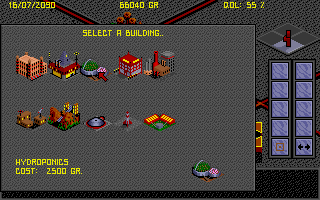
4. Select a building (such as Living Quarters) and press the A Button.
•
5. Press the B Button to return to the Planet View.
•
6. Position the cursor over the target spot and press the A Button.
To demolish a structure:
•
1. Press the X Button until the Bulldozer cursor appears.
•
2. Position the cursor over the structure and press the A Button.
•
3. Press the A Button again to remove the resulting rubble.
Looking at the Map
•
1. Press the B Button to display the Hand cursor.
•
2. Position the cursor over the Map icon (the Planet) and press the A Button.
•
3. Use the Control Pad to scroll the flashing square.
•
4. Press the X Button to cycle between buildings, resources, and military views.
•
5. Position the flashing square over your colony and press the B Button to exit.
Getting Advice
•
1. Press the B Button to display the Hand cursor.
•
2. Select the Advisor icon (the Face) and press the A Button.
•
3. Position the cursor over an advisor and press
.png)

.png)
.png)
.png)
.png)
