How to Play
Tetris Attack is a puzzle game in which you rearrange the order of a stack of panels in order to clear them. As the stack begins rising, switch two horizontally adjacent panels. If you place at least three identical panels in a row vertically or horizontally, they will disappear. If the stack of panels touches the top, the game is over. For example, after positioning the cursor and pressing the B Button, the panels framed by the cursor will switch places. When the three ★ panels align vertically, that row of panels disappears. Any panels left above fall into the space left by the eliminated row of panels.
Next, when half of the cursor frames an empty space, the panel and the empty space will be swapped. After switching, if there is an empty space below the panel, it will fall. Panels cannot be switched vertically, only horizontally; however, by switching them wisely with empty spaces, you can often achieve the same result.
1 Player Game Modes
To choose from any of the five different one-player game modes, select 1 PLAYER GAME on the Select Screen.
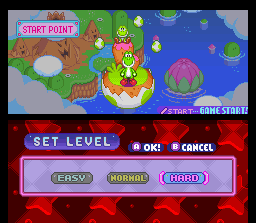
When playing ENDLESS, TIME TRIAL or VS. Game Modes, you must establish the levels before you start. (In VS. Mode, you establish GAME LV. only.)
•
SPEED LV.: This setting determines how fast the stack of panels will be raised.
•
GAME LV.: This setting will change the speed of disappearing or falling panels. In the ENDLESS Mode, it will also change the number of panels with which you begin.
Endless Mode
In this mode, play continues until the stack of panels reaches the top. As time progresses, the speed at which the stack rises will gradually increase. Before beginning a game, you must select a mascot. The character you select for a mascot will determine which playfield background and music you will see and hear.
Time Trial Mode (1 Player)
In this mode, you must try to score as many points as possible in two minutes. You can select your favorite mascot, just like in the ENDLESS Mode.
•
Elapsed / Remaining Time
Stage Clear Mode
In this mode, the object is to clear all the panels above the clear line. When you begin the stage, you cannot see the clear line, but it will appear as you begin to eliminate the stack. As the stages advance, the speed at which the stack is raised will increase. After each screen is completed, a password will be displayed. If you write down your password and enter it later, you can resume your game from where you left off.
Puzzle Mode
In this mode, you must clear all the panels on the screen with a limited number of switches. After each screen is completed, a password will be displayed. If you write down your password and enter it later, you can resume your game from where you left off.
If you press the X or Y Button, you can cancel your last switch. Press them simultaneously to restart the current puzzle. Password Entry
Every time you clear a screen in the STAGE CLEAR, PUZZLE or VS. Modes, an eight-character password will be displayed. To resume playing at this point, select the same mode, then choose PASSWORD. When the Password Entry Screen is displayed, enter the password. VS. Mode (VS. Computer)
The VS. game is played against an opponent. When played as a 1 PLAYER GAME, you will compete against the computer (CPU). If your opponent's stack of panels reaches the top before yours, you win.
There are three ways to attack your opponent:
Clear a row of Shock Panels (indicated by the [!] panels), complete Chain Reactions or complete Combos. When you complete Chain Reactions or Combos, Garbage Blocks will fall onto your opponent's playfield.
•
Shock Panel: This is a Shock Panel.
•
Garbage Block: Caused by a Chain Reaction.
•
Garbage Block: Caused by doing a Combo.
•
Shock Block: Caused by clearing Shock Panels.
Chain Reactions
It only takes three like panels placed together to make them disappear. However, should you place four or more together or should one clear cause another clear to occur, there are great advantages.
A Chain (chain reaction clear) happens when the panels sitting on top of a cleared row fall and are themselves cleared.
Example of a x3 Chain Reaction:
•
1. Switch [star] and [triangle] ...
•
2. [star] and [triangle] will disappear.
•
3. Then, [diamond] falls and disappears.
•
4. When the [circle] falls, it too disappears.
Combos
Combos (combination clears) occur when you simultaneously clear four or more panels. The rows cleared can either be all the same or multiple types of panels.
Example of clearing six panels simultaneously:
•
1. Switch [triangle] and [heart] ...
•
2. [triangle] and the two rows of [heart] and [diamond] will disappear simultaneously.
Dealing with Garbage Blocks
You can neither clear nor move Garbage Blocks. You can only lower them by clearing or removing the panels on which these rest.
To deal with Garbage Blocks, simply clear a row of panels on which the Garbage Blocks are resting. The Garbage Block
 (En,Ja).png)

 (En,Ja).png)

_1.png)

.png)


.png)

.png)