Starting the Game
After the beginning animation, the Title Screen will be displayed. You can cancel the animation by pressing the START button.
Title Screen Options
The Title Screen offers two options:
•
START: Begins a new game.
•
CONTINUE: Resumes playing a previously saved game.
Continuing a Saved Game
Before choosing "CONTINUE", ensure the Memory Card is firmly inserted into Memory Card Slot 1. Do not remove the Memory Card or press reset during a save or load operation.
If "CONTINUE" is chosen, previously saved games will appear as diary books on tables. Move Alundra to the table with the diary you wish to open.
When a book is opened, it will show the save location, maximum health points, and game time. To confirm, select "YES" and press the button. To cancel, select "NO" and press the button.
Game Over
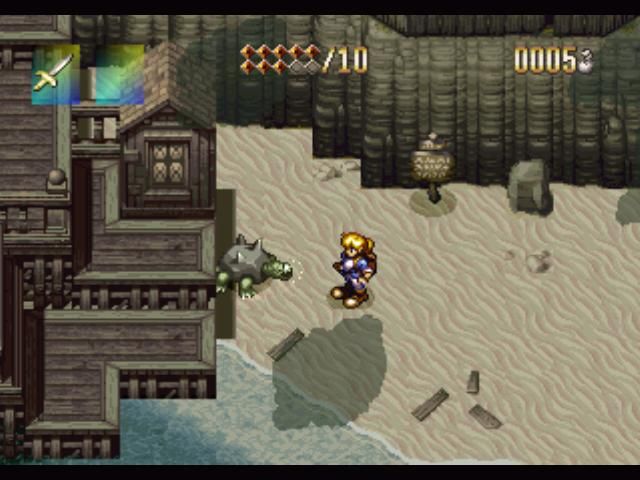
Alundra's life gauge decreases when he takes damage. When it reaches zero, it's GAME OVER.
Game Over Options
After a game over, a screen will appear with two options:
•
QUICK RESTART: Continues from the last save point. Save frequently to avoid starting far back.
•
TITLE: Returns to the title screen and attract mode.
Alundra's Actions
•
Run: +Directional Buttons
•
Tackle: or Button when Running
•
Charge Attack: Hold down the Button
•
Pick Up Objects: Button+Directional Buttons
Running
By pressing the Directional buttons with the button, Alundra will run in the pressed direction. You can change direction while running, but mastering this skill requires practice.
Tackling
If the,, or button is pressed while Alundra is running, he will elbow the enemy. Tackling causes damage, but it's not as powerful as using a weapon.
Attacking
Press the button to attack with the currently equipped weapon. Damage varies by weapon, so experiment to find the most effective one for different monsters.
Charge Attack
Alundra can be equipped with swords, flails, bows, and wands. Certain weapons allow for a more powerful charge attack.
To perform a charge attack, hold down the button until Alundra flashes. While flashing, move toward the enemy and release the button. The charge attack will be carried out in the direction Alundra is facing, causing severe damage.
Picking Up Objects
To pick up an object, position Alundra next to it. Then, push the button while pressing the Directional Button toward the object.
Throwing Objects
Once an object is picked up, press the button again to throw it. Pressing the button while also pressing a Directional Button will throw the object further. Jumping can also increase throwing distance.
Be careful not to throw all objects, as some are fragile and will break if mishandled.
Conversation
To start a conversation with a villager, stand next to them and press the button. Pay attention to what people say, as their messages often provide clues for what to do next and help solve puzzles.
Investigate
If anything looks strange or unusual, press the button to examine it. Investigating everything can help Alundra solve many puzzles.
Using Equipped Items
To use an item, ensure it is displayed in the Item Window. Then, press the button. Alundra will use the currently equipped item. If only one of the items remained when was pressed, the item will disappear from the equipped item box at the top of the screen.
Playing the Game
The following pages cover basic game mechanics and strategies, including saving games, buying goods, fighting, recovering health and magic points, getting past traps, and solving mysteries.
Saving the Game
Save data is written to diary books. A diary book is located on the second floor of Jess' house, and some can be found in dungeons.
To save, stand in front of a diary book and press the button. The Save Screen will appear.
Alundra can use a maximum of four diary books. On the Save Screen, use the up or down Directional Buttons to select a book. After selecting, press the button. To confirm, select "YES" and press the button. To cancel, select "NO" and press the button.
Do not remove the Memory Card or press reset during a save or load operation.
Shops
Throughout the game, shops will sell items. Alundra needs enough gilder to purchase items. Gilder can be acquired by destroying enemies, searching treasure boxes, and clearing plants around the village.
To purchase an item, first pick it up (use the button + the Directional Buttons). Then, throw the item onto the counter next to the cashier. The cashier will then tell Alundra the price.
To purchase, select "YES" and press. The item will be added to Alundra's inventory. To cancel, select "NO" and press.
Combat Strategy
Outside and sometimes inside the village, Alundra will be vulnerable to monster attacks. Before attacking, observe the enemy's attack pattern. Once determined, slay the beast. Rushing in unprepared will likely lead to defeat.
When Alundra takes damage, his body flashes briefly, making him invincible to other attacks. Enemies also flash and become invincible when damaged. With powerful monsters, it's wise to attack, then back off until the enemy stops flashing before attacking again.
Recovering Health
Alundra can recover power using items. Ways to refill Alundra's Life Gauge include:
 (Rev 1).png)

.png)
 (v1.1).png)
 (Rev 1).png)


.png)
.png)



.png)







.png)


.png)
