LOAD GAME
The Load Game screen shows all saved Seasons and Custom Circuits. Seasons and Tournaments can only be saved between races, not during a race.
•
To load a saved game, D-Pad to highlight the desired game, then press the X Button.
OPTIONS
The Options screen lets you customize the game to your preferences and skill level. We recommend starting at the Amateur Difficulty Level.
•
To change an option, D-Pad up/down to highlight the option and left/right to change it.
DIFFICULTY
There are four difficulty levels, which determine the skill of other riders. When continuing a Season, the difficulty automatically increases as new tracks are unlocked.
In Novice or Amateur, you must re-qualify on all previously completed tracks at the new level to proceed to newer tracks.
LAPS PER RACE
Choose from two-lap sprints to six-lap endurance runs.
TURBO
Turn this option off to disable the Turbo booster on all bikes.
GRAPPLE
Turn this option off to disable the magnetic grapple on all bikes.
BIKE HUD
HUD stands for "Heads Up Display," which is the panel on the bike showing meters and indicators. Turn this option OFF to remove the HUD from the screen.
HANDICAPPING
When handicapping is On, the 2nd place rider stays close to the 1st place rider. You will always have a chance to catch the leader if you are in second place.
CONTROLLERS 1 AND 2
Jet Moto 2 offers 6 different controller configurations. Experiment to find the one that suits your player style best.
MUSIC AND SOUND
Move the sliders to adjust Music, Sound Effects, and Overall Volume.
CREDITS
View the men and women who produced and tested this game.
EXIT
Return to the Main Menu.
The Bikes and Riders
The Jet Moto circuit has 10 different riders from five teams. Each rider has a unique bike with special attributes.
Read about each rider and bike in the Rider Bio area for an idea of what to expect when you select them.
•
To change riders, D-Pad left/right.
•
To view rider bios, press the Circle Button.
The three attribute bars provide a graphic analysis of the three performance categories.
WEIGHT
Bike weight affects handling. Lighter bikes are generally more agile and jumpy, while heavier bikes are more stable and require a power-slide mentality.
Heavier bikes are less likely to throw you when rammed or hitting an obstacle. They can also more easily unseat or knock other riders off course during collisions.
TOP SPEED
Maximum bike speed is important on longer, straighter tracks. Tracks with many curves do not fully utilize bikes with great top speed.
ACCELERATION
Acceleration is rated from a standing start to top speed. However, a bike's weight can create unexpected advantages and weaknesses.
Some bikes may have great initial jump but no mid-range, while others start slow but quickly reach top speed. Experiment with different bikes.
The Races
The four options below offer a variety of race formats to develop and test your skills.
FULL SEASON (UNLOCKING THE TRACKS)
The Full Season option sets up a pre-determined Championship Circuit using all available tracks. Qualifying on easier tracks unlocks more difficult tracks and automatically increases the difficulty level.
If you start on Novice or Amateur levels, you'll need to re-qualify on earlier tracks once the second group of tracks opens. If you start in Professional or Master mode and maintain first place, you can play all tracks without re-racing any.
CUSTOM CIRCUIT
The Custom Circuit offers two racing formats: Rally and Championship. Rules for each are described on screen.
Before starting, select the order of tracks. Each track can only be used once.
•
Press START to exit the circuit screen.
Important: You need to save the winning season and return to the Main Menu to open new tracks. Otherwise, the tracks will not be available.
SINGLE TRACK
A Single Track race is a one-time competition for bragging rights.
PRACTICE
In Practice mode, you are on a solo run against the clock. You can select any tracks you have earned. Load a saved season to make additional tracks available.
SAVING A GAME
To save a Season or Circuit, select Save Game at the end of a race, then highlight Empty Slot.
•
Use the D-Pad to enter a name for the saved game, then press START.
The Tracks
Jet Moto offers nine tracks and a special bonus track. Each track has unique difficulties and challenges. The more you practice, the better you'll handle obstacles at high speeds.
•
Blue Square — intermediate
TRACK SELECTION
•
To choose a track, D-Pad left/right to spin the wheel until the desired track appears at the top.
•
To select the track, press the X Button.
Track Overview
Racing Display Information
Checkpoint Information
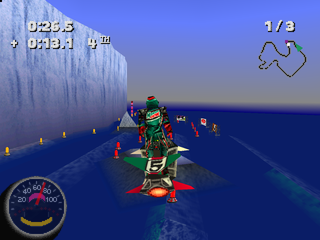
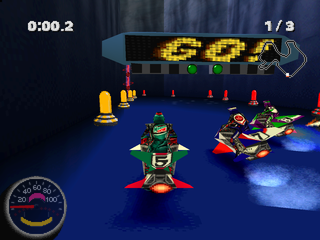
When you pass through a checkpoint, you'll see your race position and time difference from the leader.
If you fall off the track, you will return to the last checkpoint and resume the race.
On The Bike


.png)

.png)
.png)
_1.png)
.png)
.png)
.png)

_1.jpg)

.png)
.png)