Console Instructions
Top View
Front View
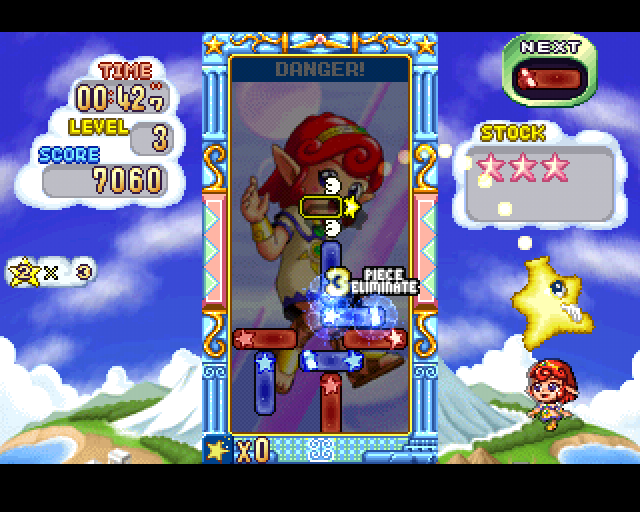
Set up your PlayStation game console according to its Instruction Manual. Make sure the power is off before inserting or removing a compact disc. Insert the STAR SWEEP disc and close the disc cover. Insert game controllers and turn on the PlayStation game console. Follow on-screen instructions to start a game. You have to move and rotate a cursor. If you push the confirmation button, a block will be thrown onto the screen. Each block has a star mark.
You have to put the same color and star mark close together, and then the blocks will be destroyed. If your blocks pile up to the ceiling, you will be given a star three count. When the count reaches zero, your game is over.
Erase many blocks with chain reactions to get a high score.
How to Play the Game
How to Destroy a Block
If you get blocks of the same color and star mark together, the block is destroyed.
If your block is in contact with an obstacle, both the block and obstacle are destroyed.
How to Build a Chain Reaction
The easiest way to set up a link is to place a block so that it is touching other blocks on as many sides as possible.
If you place the blocks as shown, it is easier to learn to make many chains.
What is a Quick Chain Reaction?
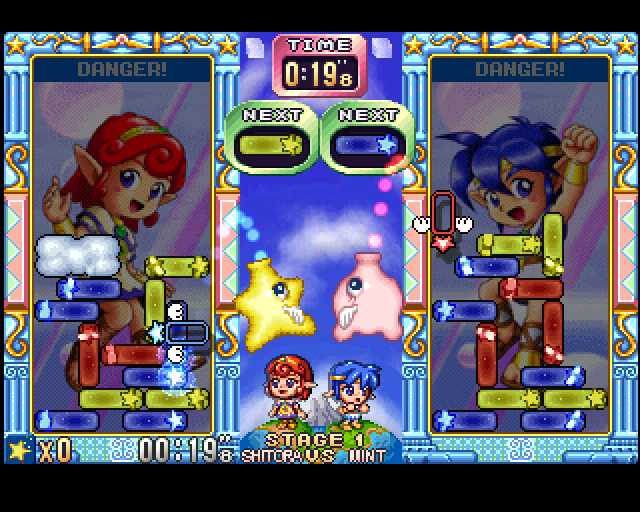
Blocks are going to be erased at the same time, so you have to quickly move your cursor when you put the new block next to one that is about to be destroyed. You have to make a new link.
This technique is to make more chain reactions and also to make an obstacle for another person's screen.
If you are playing with a friend, don't worry too much about the obstacles they're building on your screen. You can just put a block on top of the obstacle. It is easy to erase an obstacle.
About Game Mode
One Player Mode
During the game, boss characters will sometimes show up on the screen. When this happens you have to erase blocks the same as the heart mark on boss character's body.
When you finish this mode, each 5,000 points awards you one stardust. Also, if you clear this mode, you will get a star fragment, but it depends on which level you chose.
Story Mode
Play with different characters each time. If you win with each character, you will get five stardusts.
If you clear the story mode, you will get a star fragment but each level gets you a different number of fragments.
VS Mode
Before you play with a friend, you will need to set a handicap. If you choose a very easy handicap, you can win easily. Also, if you choose a very hard handicap, it will be much harder to win.
If you and a friend are using a Memory Card, you can bet your stardust with your friend. If you insert a Memory Card into Memory Card Slot 1, your friend must insert a Memory Card in Memory Card Slot 2. Then select VS Mode with Memory Card.
•
Note: There are five levels in this VS mode. It is similar to a handicap.
If you play this game, depending on how good you are, you may receive stardust. If you keep collecting that stardust, you will have a chance to play a Special Mode.
Attack Mode
In this mode you challenge the record. Depending on your record, you may win a nice prize such as gold, silver or copper medal.
•
LINK ATTACK: Try for as many chains as you can!
•
SCORE ATTACK: Get a high score within a minute!
•
COMBO ATTACK: Erase as many blocks as possible simultaneously.
•
OBSTACLE ATTACK: Many obstacles will appear.
•
5 LINKS ATTACK: Try 5 chain reactions as soon as you can.
•
TIME ATTACK: Remove all obstacles as soon as possible.
About Memory Cards
This game is compatible with a Memory Card. If you use a Memory Card, you can save high scores and current game status.
If you play by yourself, please use MEMORY CARD Slot 1. Also, if you use semi-auto save, it will save automatically.
If you want to load new data, please go to Option (Data Load). If you insert a Memory Card in MEMORY CARD Slot 1, it will automatically go to the loading screen.
If you are playing with a friend to use data, you have to use different data than your friend, otherwise you will be unable to bet with your friend.