INTRODUCTION
BEFORE YOU PLAY
Spider-Man requires a MEMORY CARD to save your games. Saved game data takes up one MEMORY CARD block.
You can obtain a MEMORY CARD through the retailer where you purchased your PlayStation game console or this game. MAIN MENU
Choose from the following options to begin playing Spider-Man.
NEW GAME
Choose this option to start a new game.
CONTINUE
Choose this option to continue from the level you last completed.
MEMORY CARD
Choose this to load/save your games. Make sure there are enough free blocks on your MEMORY CARD before beginning play. Spider-Man requires one free MEMORY CARD block.
Press the appropriate buttons to select the following options:
•
Load Game Data: To load a saved game from the MEMORY CARD in MEMORY CARD slot 1.
•
Save Game Data: To save a current game to the MEMORY CARD in MEMORY CARD slot 1. You will be required to name your saved game.
Use the Directional buttons to highlight the letters on the screen. To select a letter, press the X button once a letter is highlighted. When you are ready to save, highlight Finish and press the X button.
Press the X button to select or the △ button to go back from the MEMORY CARD screen.
When you load or save you will have to specify the file to load or save. Press the Directional buttons up/down to choose a slot and then press the X button to accept.
OPTIONS
Use this screen to modify several game options. Use the Directional buttons up/down and the X button to accept. Press the △ button to return to the Main Menu.
Controller Configuration
Choose this option to select a controller configuration for the game. Use the Directional buttons up/down to select from the options. Press the X button to select a configuration or the △ button to cancel and go back to the Options screen.
Music and Sound
This screen allows you to change the volume of Music and Sound Effects, Voices, and Movies in the game. Move the Directional buttons up/down to toggle between Music and Sound Effects, Voices, and Movie levels.
Move the Directional buttons left/right to raise and lower the volume of each selection and toggle the audio output between stereo and mono. To return to the game's original levels, select Default Levels and press the r button.
Screen Adjust
This screen allows you to center your viewing screen. Press the Directional buttons to adjust the screen. Press the X button to select your choice or the button to cancel and go back to the Options screen. To return the screen to its original (default) position, press the O button.
DIFFICULTY LEVELS
There are four different levels of gameplay to be found in Spider-Man. The three traditional skill levels are:
•
Easy: Novice game players should choose this difficulty level. More clues are present to solve puzzles. Enemies take less damage to subdue, and Spider-Man can absorb much more punishment than on Normal and Hard difficulty levels.
•
Normal: A step above Easy, this difficulty level will present the average game player with more of a challenge.
•
Hard: For extreme Spidey-players only! Even the seasoned Spider-Man veteran will find this mode more than challenging!
A special difficulty mode has been implemented to please young gamers.
•
Kid Mode: For children who want to explore the various levels of Spider-Man, Kid Mode allows them to do so with the controller configured for young hands and the gameplay customized to allow easy passage through each level.
UNDERSTANDING THE IN-GAME DISPLAY
•
Total Number of Web Cartridges
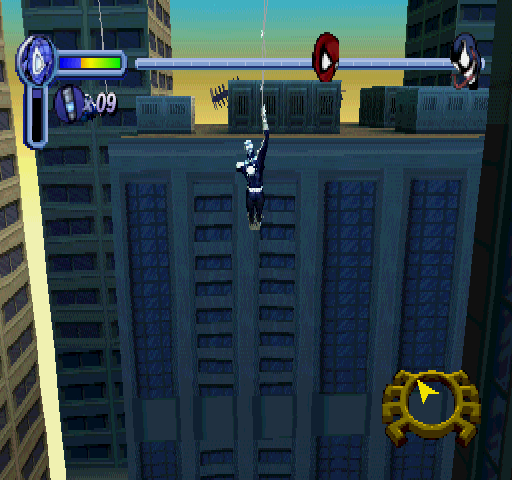
The Heads-Up Display, or HUD, for Spider-Man is fairly simple. Spider-Man's health, and that of his allies and enemies, is represented by a hybrid bar that runs across the top of the screen.
For webbing, the vertical bar registers how much web fluid is left in the web cartridge that Spider-Man is currently using. The number just to the right of this bar tells you the total number of web cartridges Spider-Man is carrying.
TRAINING
Need to fine-tune your superhero skills? The training mode offers the opportunity to test out your crime-fighting skills in a number of different training environments.
TIME ATTACK
Instant action combat for either 60 or 120 seconds. Hone your fighting skills by eliminating as many villains as you can within the selected amount of time. You will also select the villain you will fight against. Use the Directional buttons up/down to select both the time limit and type of enemy. Press the X button to confirm your selection.
SURVIVAL MODE
Survival mode is the ultimate test. No time limit, just an endless amount of foes to battle against. Once Spider-Man's health bar runs out, the fight is finished!
In Survival Mode there is also the opportunity to select the type of villain you will fight against. Use the Directional buttons up/down to highlight both the time limit and type of enemy. Press the X button to confirm your selection.
SPEED TRAINING
Web-swinging is as important to Spider-Man as walking. Speed Training mode allows you to practice your web swinging through different parts of the city. The better you become at web swinging, the lower your time will be.
TARGET PRACTICE
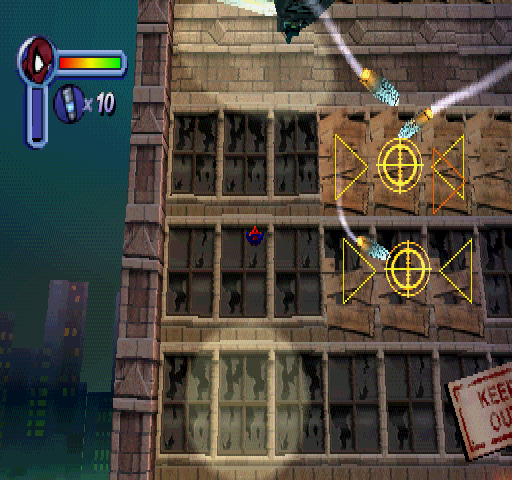
Learn to determine friend from foe while sharpening your reflexes using Spider-Man's web-attacks.
ITEM COLLECTION
Test maneuverability
.png)

.png)
.png)
.png)

.png)










_1.jpg)


 (En,Fr,De,Es,It) (No EDC).png)
 (En,Fr,De,Es,It) (v1.1).png)





_1.png)






_1.png)