Setting Up
Set up your PlayStation® according to its Instruction Manual. Insert the ANNA KOURNIKOVA'S SMASH COURT TENNIS™ disc and close the disc cover. Turn your PlayStation® ON at the POWER Button. We advise you not to insert or remove either your Controller or Memory Cards once the power is turned on. Make sure there is at least 1 free block on your Memory Card before commencing play.
•
WARNING: Insert Memory Cards into Memory Card slot 1 only.
•
PLEASE NOTE: All screenshots for this manual have been taken from the English version of this game. Some screenshots might have been taken from pre-completion screens that differ slightly from those in the finished game.
Setting Up a Multi Player Game
Up to four players can play ANNA KOURNIKOVA'S SMASH COURT TENNIS™ at the same time. A Controller is needed for each player.
For three or more players, a Multi Tap is required. Make sure that the Multi Tap is inserted into Controller port 1, and that a Controller is inserted into Controller port 1-A of the Multi Tap. Any additional Controllers should be inserted sequentially.
Options
This menu contains options for the game and for your Memory Card. Use the or buttons to choose SAVE DATA, LOAD DATA or GAME OPTIONS, then press the X button. Please be aware that the SAVE DATA option is not immediately selectable.
NOTE: Please use this mode before starting a new game as changes made cannot be saved to Memory Card once you commence a Match or Tournament.
Load Data
ANNA KOURNIKOVA'S SMASH COURT TENNIS™ uses an auto-load function. If your Memory Card already contains data from a previous game AND if it is inserted into Memory Card slot 1 on your PlayStation, the data will be automatically loaded when you switch the power on. Do not insert or remove Memory Cards once the power is turned on. Make sure you have at least one free block on your Memory Card BEFORE you begin to play.
To Load a Saved Game
Highlight YES on the LOAD DATA screen, then press the X button. Your data should automatically load. To cancel the selection without loading, choose NO.
To Save Game Data
Highlight YES on the SAVE DATA screen, then press the X button. To cancel the selection without saving, choose NO.
Game Options
In this mode you can adjust the following game settings:
Control
Each player can choose their preferred control configurations for the four basic shots: WEAK, STRONG, SUPER and LOB. The Numbers indicate each of the 4 players. Use the ← and → directional buttons to position your player number above the desired configuration.
Ball Marker
When this is set to ON, a ball marker appears during play to indicate where the ball bounced.
Sound
Choose between STEREO or MONO output for the sound effects and music for the game.
BGM
Toggle the background music on and off.
Vibration
You can switch the Analog Controller (DUAL SHOCK) Vibration Function ON or OFF here.
Adjust Screen
Hold down the △ button and use your directional buttons to adjust the screen display. Press the □ button to return the screen display to its original settings.
Game Modes - Exhibition
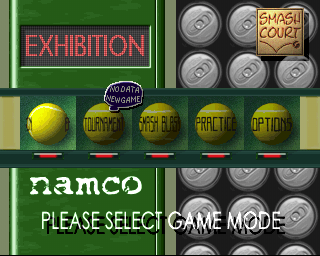
This is a mode to play a one-off game. After choosing EXHIBITION on the Main Menu, the Game Mode selection screen appears. Choose whether to play SINGLES or DOUBLES with the directional buttons, then press the X button.
Up to 4 players can play at the same time.
Starting an Exhibition Match
•
Press UP or DOWN to select the match type: P1 stands for player, COM for computer controlled player. Then press the X button.
•
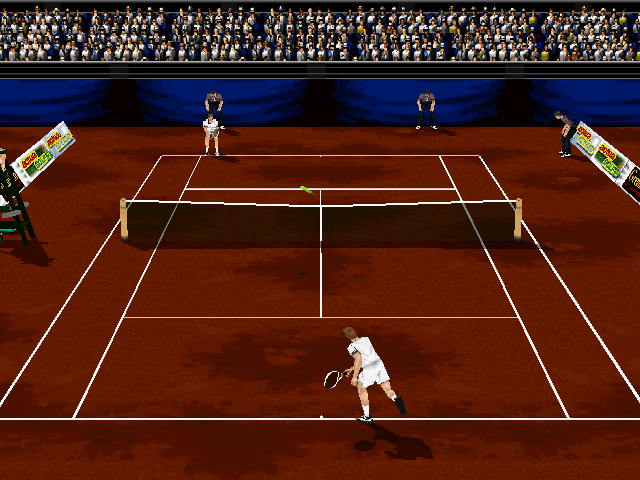
Choose your player. Use the directional buttons to highlight a player on the screen. There are 3 player types: NET PLAY (strong volley), ALL ROUND (average) and BASELINE (powerful shot).
•
Use the UP and DOWN buttons to select a court. The type of playing surface is shown in the bottom right hand corner of the screen, either LAWN, CLAY or HARD.
•
Select the match length. Choose between a 1 SET, 3 SET or a 5 SET match. The player who wins the majority of sets will be the overall winner.
Scoreboard
Press the START button during a match to bring up the Scoreboard:
Match Results Screen
•
Points acquired through your CELINE
Press the START button to leave this screen and return to the Main Menu.
Game Modes - Tournament
In this mode you can select a player and try to win prizes on the way to becoming World #1. You can choose to enter a series of Street Tournaments or a Professional series of Grand Slam Tournaments. Use the and directional buttons to select your player, then press the X button to confirm.
Street Tournament
An easy series of matches progressing in difficulty. A good way for beginners to break into the competition scene. Play here to improve your ranking, before entering the Pro-circuit.
Grand Slam
A more difficult series of matches, also progressing in difficulty. Play here if you're an expert player, or have completed the Street-series.
Records
You can keep track of your current position on the rankings screen. Once you reach a certain ranking you will become a seeded player enabling you to skip the 1st round.
Equipment
 (En,Fr,De).png)



 (En,Fr,De).png)
 (Rev 1).png)
.png)













 (En,Fr,De,Es,It).png)

.png)




.png)




.png)
.png)


_1.png)