STARTING THE GAME
PLAYSTATION GAME CONSOLE
1. Set up your PlayStation game console according to the instructions in its Instruction Manual. Make sure the power is OFF before inserting or removing a compact disc.
2. Insert the Tiger Woods PGA TOUR Golf disc and close the disc cover.
3. Insert game controllers and turn ON the PlayStation game console. 4. To bypass the introductory videos, press START or to reach the Clubhouse.
SETTING UP THE GAME
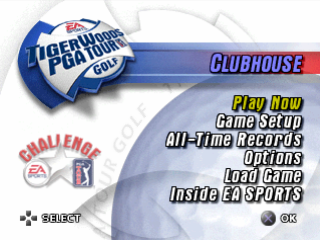
CLUBHOUSE
From the Clubhouse (Main Menu), you can access all the Tiger Woods PGA TOUR Golf game modes, including the EA SPORTS PGA TOUR Challenge. You can also set up your game, change your options, or load a previously saved game from this menu.
•
View Tiger Woods PGA TOUR GOLF's All-Time records
•
Load game (Saving and Loading on p. 15)
•
Preview other titles from EA SPORTS •
Take the EA SPORTS PGA TOUR Challenge (> EA SPORTS PGA TOUR Challenge on p. 14) •
Access the Tiger Woods PGA TOUR Golf game modes (Game Modes p. 13)
•
Change the game options (Options p. 15)
To select an option from the Clubhouse, highlight your choice and press *.
For more information about stroke play and the other Tiger Woods PGA TOUR Golf Game Modes, see p. 13.
PLAY NOW
Begin the journey toward becoming the champion of the EA SPORTS PGA TOUR Challenge (p. 14). GOLFERS SCREEN
Play any game mode and master the course as Tiger Woods or try your luck as one of the other talented PGA TOUR pro golfers.
The Golfers screen appears after you select any game mode from Game Setup or Play Now.
To select a Golfer
1. From the Golfers screen, press the D-Button until your golfer of choice is highlighted. To add other golfers to the game, press the D-Button. You can play with up to four golfers at one time (Tournament mode and EA SPORTS PGA TOUR Challenge are one player only). To customize your golfer, press (For more information, see Player Options below).
2. After you select your golfer(s), press to reach the Course Select screen. Press the D-Button to highlight the course of your choice and press again to begin play (Playing the Game on p. 8).
In some game modes, the golf course is chosen for you.
PLAYER OPTIONS
CONTROLLER
Assign a golfer to a controller. Press the D-Button to have a human player or the CPU control the golfer.
NAME
You can personalize a custom golfer with a created name. This helps identify the different golfers when playing in head-to-head games.
To name a custom golfer, press to begin editing. Press the D-Button to choose a letter or number and press the D-Button to move spaces. When your name is complete, press again to accept.
LEVEL
Select the difficulty level for your golfer. PRO is for the advanced gamer, AMATEUR is for those who have some experience, and NOVICE is for the real beginner. The courses are harder to master when the level is set at PRO.
CHARACTER
Select any PGA TOUR pro as your custom golfer.
SELECT CLUBS
Select which clubs a golfer carries in his bag. You are allowed to carry 14 clubs.
To change your clubs, press to reach the Club Select screen. Put the cursor on the club of your choice and press. The club is either added or removed from your golf bag. Press to revert back to the default settings. You can't add a club unless you are below the limit.
LOAD PLAYER
If you have a saved custom golfer, you have the option to load him from your MEMORY CARD.
SAVE PLAYER
Write custom golfers to your Memory Card.
To return to the Golfers screen, press and then press to go to the Course Select screen.
COURSE SELECT SCREEN
Tiger Woods PGA TOUR Golf features six championship golf courses including TPC at Summerlin™, TPC at The Canyons™, Badlands Golf Club™, TPC of Scottsdale™, TPC at Sawgrass™, and Poppy Hills Golf Course™.
To select a course, press the D-Button to highlight a venue and press to accept.
COURSE OPTIONS
WIND
Control the amount of wind during your round of golf. You can select wind settings of CALM, BREEZY, GUSTY, STRONG or NO wind at all.
HOLES
You have the option to play ALL 18 HOLES, THE FRONT 9, or THE BACK NINE during your round.
HOLE SELECT
In Practice mode, you have the option of choosing which hole to play. As you select holes individually, they will become grayed out. These holes will not be played.
NUMBER OF ROUNDS
In Tournament mode, you can select 1, 2, or 4 rounds.
For Course Options, press.
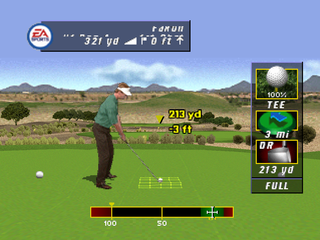
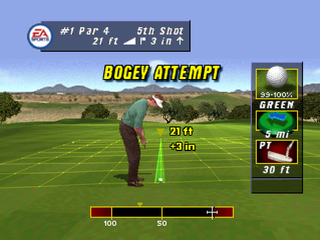
SWING MECHANICS
(analog stick) to begin the downswing. Press a third time in the hit zone to hit the ball (Analog Swing does not require a third input).
The power guide above the swing meter adjusts to changes in your aim.
How to aim
•
Press to enable the zoom camera.
-
.png)












.png)
.png)