Title Screen
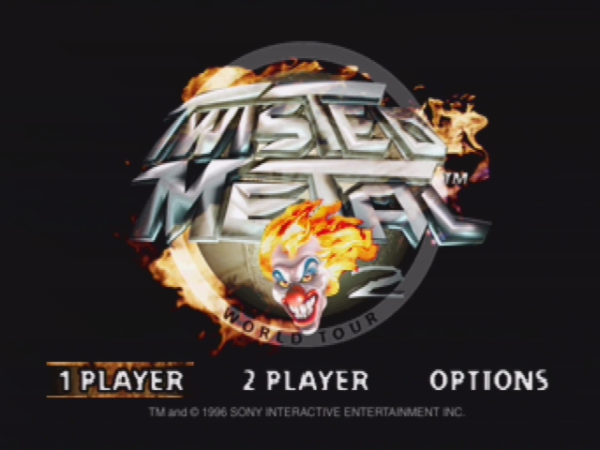
When the game loads, you will see the Title Screen. Use the Directional Buttons LEFT or RIGHT and press the Button to select from 1 PLAYER, 2 PLAYER, or OPTIONS.
If no selection is made within 30 seconds, a self-running demo will begin. Press any button to return to the Title Screen.
1 Player Game
You have three choices in a 1 Player Game: TOURNAMENT, CHALLENGE MATCH, and PASSWORD.
Tournament
A Tournament Game consists of an eight-level game. To clear a level, you must destroy all opponent vehicles.
Enemy vehicles are automatically chosen, and their numbers increase with each successfully passed level. The Tournament continues until all your lives have expired or until you have completed all levels.
After choosing a Tournament Game, you must select your vehicle. Press the Directional Buttons LEFT or RIGHT to display a vehicle and press the Button to select it.
To view details and handling information about a particular vehicle, press the Directional Button DOWN to "Car Info" and press the Button. To return to the Select Car Screen, press any button. Descriptions of all vehicles may be found in this manual beginning on pg. 14.
Players who complete all eight levels of the game will be rewarded their ultimate wish, compliments of the mighty Calypso.
Challenge Match (1 Player)
In a Challenge Match, you first select a Battleground (described on pg. 12-13), then your vehicle, and then your opponents. Depending on the level, you may select up to six enemy cars by pressing the Button.
Once you have chosen your opponent(s), press the Directional Button DOWN to "Start Match" and press the Button. Unlike a Tournament Game, you do not progress to a new battleground once you have defeated all opponents. Instead, you begin a new match on the same battleground with the same vehicles.
Password
Once a level is completed in Tournament Mode, a password is awarded at the start of the next level (you may press START to pause the screen).
To enter a password, press the Directional Button DOWN to "Password", then RIGHT to the first box, and then press the corresponding Buttons. Once all six buttons have been entered, press START.
2 Player Game
You have two choices in a 2 Player Game: CHALLENGE MATCH and CO-OP TOURNAMENT.
Challenge Match (2 Player)
In a Challenge Match, you fight head-to-head with another player. The match ends when one player successfully destroys the other vehicle, after which the match resets for another battle. There are no other enemy vehicles in a Challenge Match.
After choosing a Challenge Match, one player selects a Battleground, then both players pick out their vehicles.
Co-op Tournament
A Co-op Tournament is similar to a 1 Player Tournament except the two players may choose to help or destroy one another. However, BOTH players share a total of six lives.
When one player gets killed, both vehicles are returned to their original starting position, though the game does not start over. As in a 1 Player game, to clear a level you must destroy all enemy vehicles.
Options
There are six options available: DIFFICULTY, MAP, KEYPAD 1, KEYPAD 2, AUDIO, and HISTORY.
Difficulty
There are three levels of difficulty: EASY, MEDIUM, and HARD. In Easy Mode, only levels one through four can be played in a Tournament.
Map
Turns the spinning level select globe ON and OFF.
Keypad 1 and Keypad 2
Changes the mapping of Weapon Controls for both control pads. You may choose from STANDARD, RUN N' GUN, CONTROL FREAK, and DEADLY FORCE.
Audio
Controls the MUSIC LEVEL, SOUND EFFECTS LEVEL, and SOUNDTRACK.
History
Lets you view the continuing story of the Twisted Metal™ Tournament, as well as game credits.