STARTING THE GAME
NOTE: This CD-ROM can only be used with the PlayStation™. Do not attempt to play this CD/ROM on any other CD player - doing so may damage the headphones or speakers. •
Set up your PlayStation™ as described in the PlayStation™ instruction manual and insert a controller into controller port 1. •
Insert the VMX Racing CD, label side up, and close the disc cover. Be careful not to touch the surface. •
Press the POWER button to load the game. The game will start after the Sony Computer Entertainment and the PlayStation Logos have been shown. If nothing happens turn the system OFF and make sure that it is set up correctly. •
Once the game has loaded and the introduction screens have played, you will be at the Main Menu Screen ready to play VMX Racing. Console Top View
GETTING STARTED
Menu Selection
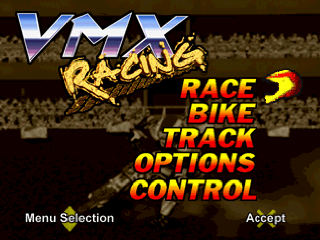
After the various logos have been displayed, the Main Menu screen appears. Use the Directional Buttons Up and Down to change the highlighted menu item and press the X Button to select.
If you press the X Button (before going into any of the sub-menus), while the cursor is on Race, the game begins with all of the default settings in place.
Your selections in the Main Menu are: RACE, BIKE, TRACK, OPTIONS AND CONTROL.
MAIN MENU SCREEN SELECTIONS
BIKE
This is where you choose which team you're riding for and which bike you'll ride. Each team/bike offers different abilities and performance ratings. Practice with each bike to determine which one best meets your style of play.
The bar graphs in the middle of the screen show the maximum output for each bike in the areas of: Max. Speed, Acceleration, Oversteer/Blast and Brake.
Max Speed is the speed rating for the bike. The longer the bar, the faster the bike will go. Oversteer/Blast is a special feature that adds an additional burst of high-speed to the bike for an extra boost. This comes in handy when coming out of a hair-pin turn or for extra launching power as you go into a jump.
•
Use Right and Left directional buttons to go from screen to screen.
•
Press the X Button to make your choice.
TRACK
Select the course or circuit you wish to compete on in this sub-menu. You can either select to race one track at a time or you can select a combination of tracks that make up the separate circuits.
Each track has its own unique variety of challenges and obstacles. It's a good idea to practice on each of the tracks before trying to challenge the circuits.
The Circuit Selections include the following choices:
•
Enduro Series - This Circuit includes: New England and Pacific Northwest.
•
National Series - This Circuit includes: Orlando and San Jose.
•
Supercross Series - This Circuit features: Anaheim and New Orleans.
•
Full Circuit - This includes all of the track selections.
OPTIONS
Select the following options for your race:
•
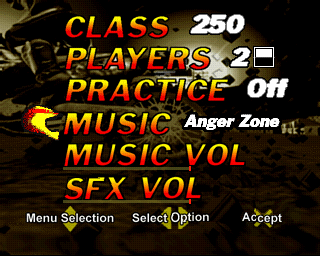
CLASS - Choose the class of bike to race, either 250cc. or 125cc. engines. The 125cc. bikes are more agile on the tracks, but they lack the power of the 250cc. class. The 250cc. bikes jump higher, but are harder to maneuver in mid-air for the really cool tricks.
•
PLAYERS - 1 or 2-Player game. Two-Player games offer side-by-side action on a split screen. Choose either a horizontal or vertical split screen for your game. Compete against a friend in 2-Player mode to see who wins the title of King of the Circuit!
•
PRACTICE - ON or OFF. This mode allows you to explore the tracks without being in a competition. Learn the dynamics and stress areas of each track without worrying about other riders being on the track. This is the best time to practice your tricks and speed maneuvers before committing to running on the circuits.
If you select OFF for practice and only one track in the Track Select screen, then you will be in the Exhibition Mode. This is a one-time race against seven other riders on the course of your selection. This is the next best way to see how you fare on the track before trying the Circuits.
•
MUSIC - Select the sound track you want to listen to as you race. Volume for Music and EFX can be controlled with the sliding scale.
NOTE: If 30 seconds goes by without any input from the controller, the game automatically displays a demo mode.
SCORING
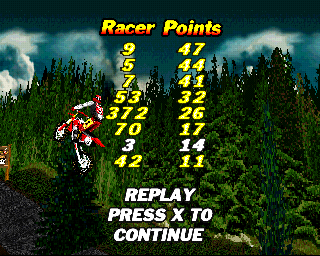
In VMX Racing you earn points in two different ways. The first is by the actual position you finish the race. First place scores more points than second place, and so on, down to last place. Even if you don't win every race on the Circuit, you still can claim the overall trophy (and the adulation of the trophy girls) by winning the most points overall. The second way to score points in the game is by pulling off some of the spectacular stunts built into the game. Plan your moves carefully — you'll have no time while you're mid-air to misjudge a difficult move! Practice the special moves on the courses before you try the Circuits to make sure you have mastered the moves so you can perform them when it really counts!
Racing points are displayed at the end of the fifth lap during the Replay Mode. Press the Δ button to remove this display and enjoy .png)



_1.png)
.png)
.png)




.png)
