Setting Up
Set up your PlayStation®2 computer entertainment system according to the instructions in its Instruction Manual. Make sure the MAIN POWER switch (located on the back of the console) is turned on.
Press the RESET button. When the power indicator lights up, press the open button and the disc tray will open. Place the BOMBASTIC™ disc on the disc tray with the label side facing up. Press the open button again and the disc tray will close.
Attach game controllers and other peripherals, as appropriate. Follow on-screen instructions and refer to this manual for information on using the software.
Starting Up
DUALSHOCK®2 ANALOG CONTROLLER
•
left analog stick (L3 button when pushed down)
•
right analog stick (R3 button when pushed down)
BOMBASTIC is a 1 to 5 player game. Connect your controllers before beginning play.
•
For 1 player, connect the DUALSHOCK®2 analog controller to controller port 1.
•
For 2 players, connect a second DUALSHOCK®2 analog controller to controller port 2.
•
For 3-5 players, connect a multitap (for PlayStation®2) (sold separately) to controller port 2, then connect additional DUALSHOCK®2 analog controllers to controller ports 2-A, 2-B, 2-C and 2-D, in that order.
When VIBRATION is set to ON in Option Mode, the DUALSHOCK®2 analog controller will vibrate in response to game events. You can turn vibration ON/OFF in Option Mode, selectable from the Main Menu.
•
multitap connector (for PlayStation®2)
Rules
Basic Play
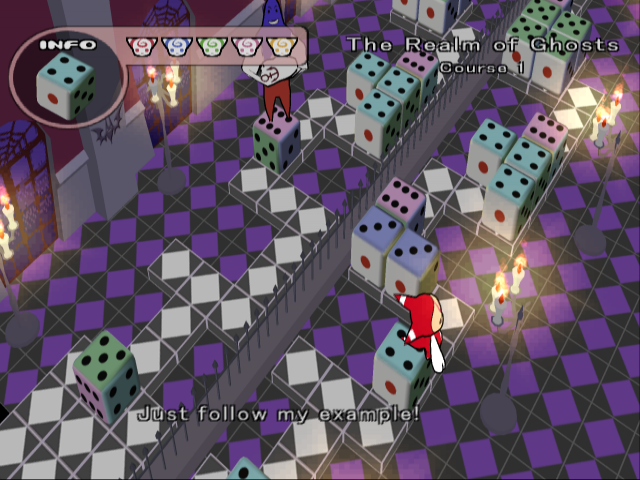
BOMBASTIC is a mystical, action-puzzle game played with lots of dice. To roll the dice, move the Aqui-Chan so they act as balancers on a ball. Explode the dice by setting them up so all the dice show the same face! The Number You Roll Shows How Many Dice to Line Up!
•
To roll a die, use the directional buttons from where Aqui-Chan is standing. If another die is next to the Aqui-Chan's die, Aqui-Chan will roll past it.
•
Look at the number showing on the die you just moved. Then roll more dice to align them either vertically or horizontally, until that same number of dice is lined up.
•
When the corresponding number of dice is lined up, they turn red and explode!
•
You collect all the exploded dice. Number 5 is an exception; you can collect more than five dice.
Hint!
Play smart and learn all the tricks! Watch the opening movie for game hints.
Explosions
Once the number of dice corresponding to the face number are lined up, they begin to pulsate and swell up. At the last moments they balloon up to a huge size and then ... explode!
•
The smaller the face number, the quicker the explosion will occur!
•
When dice explode, sometimes they trigger other dice to explode as well, in a chain reaction!
•
If the Aqui-Chan are standing on one of the explosive dice, the game is over! Watch your dice carefully to keep this from happening.
Chain Reactions
When dice explode, the blasts spread and cause surrounding dice to blow up too!
Chain Reactions affect dice with the same face value or one number less than the original dice that exploded. For example, if Face 5 explodes, all surrounding Face 5's will also explode, plus any Face 4's in the area. If Face 3 originally explodes, any Face 2's nearby also blow up.
Hint!
Be daring! You can't be a respectable devil if you shy away from explosions. Roll the surrounding dice right before the explosion to take advantage of the Chain Reaction.
Face 1 cannot cause a Chain Reaction. But when you roll face 1, it can change to any value! Once you see how this works, see how to make it work for you!
Getting Into the Game
When you see the Title screen, press the START button to display the Main Menu and its list of options.
On the Main Menu:
•
Press the directional buttons to select an option.
•
Press the X button to confirm your selection.
Main Menu Options
•
TRIAL — Play the standard game mode.
•
QUEST — Experience BOMBASTIC adventure by playing the game in different worlds.
•
MANUAL — Check up on game rules and techniques.
•
STYLE CHANGE — Change Styles as your game progresses.
•
WARS — Join a survival game for one to five players.
•
OPTION — Save game data, load saved game data, and change certain game settings.
•
To save or load, insert a memory card (8MB) (for PlayStation®2) in MEMORY CARD slot 1 before starting play.
•
To save, the memory card must have 221KB of free space available. To load, the memory card
.png)



.png)



_1.png)


_1.png)


_1.png)


.png)

.png)